
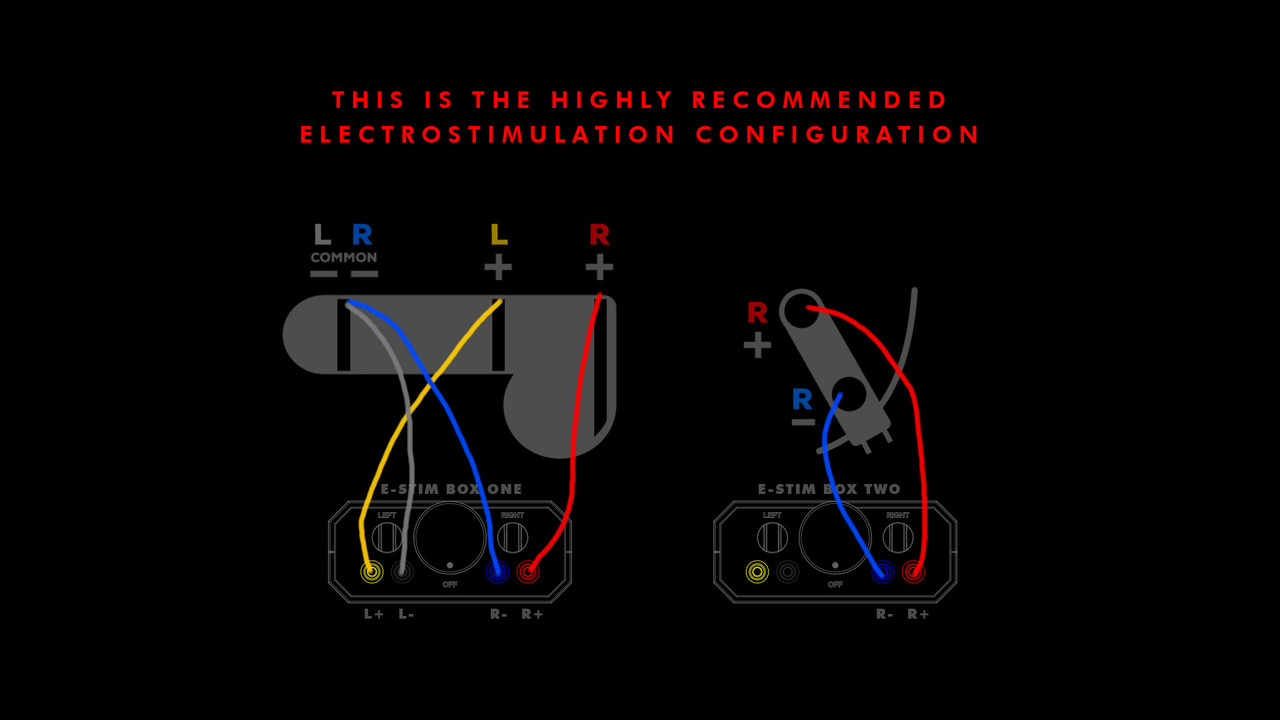
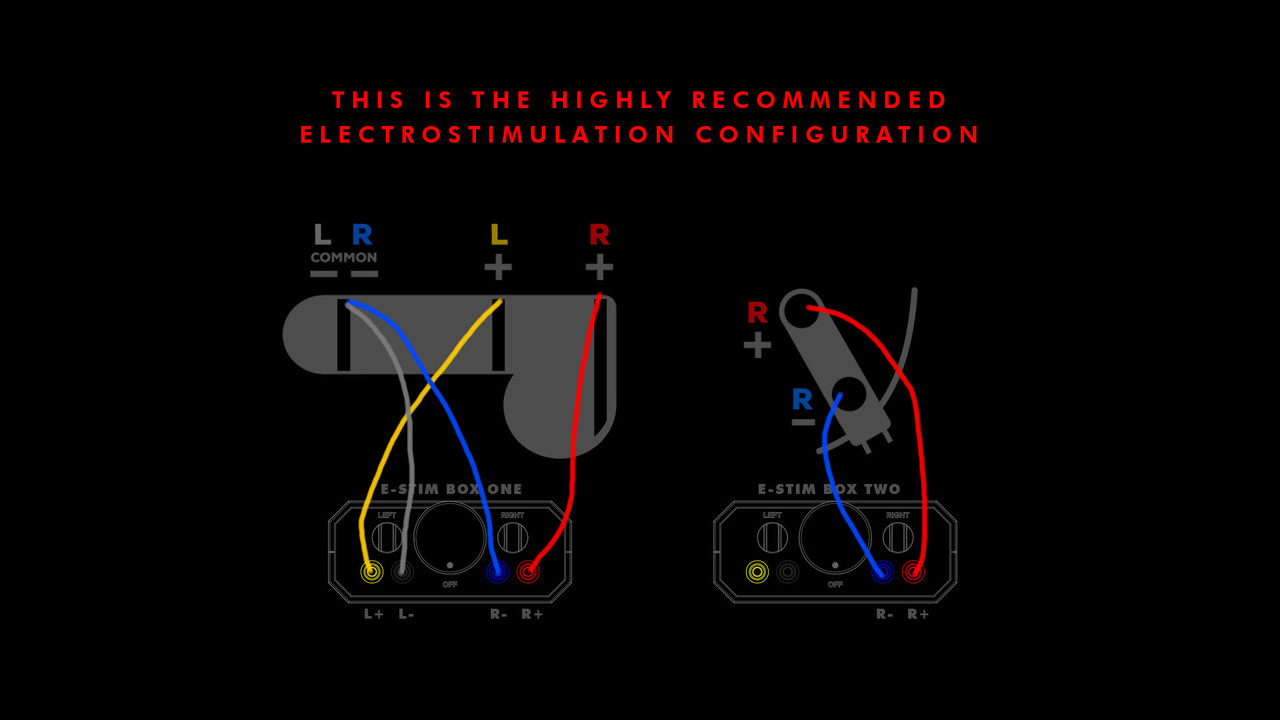
I am trying to add an inline image as a spoiler.
ref: viewtopic.php?p=388815#p388815
In that post, i tried using the following bbcode:
(Opening bracket replaced with a brace { so it'll show what I tried)
{spoiler]{url]https://i.postimg.cc/QMG1H81B/Two-Box-V ... n.jpg{/url]{/spoiler]
I have tried adding the image as an inline attachment, but the spoiler is broken and the image just appears at the bottom of the post. (in another version of the post)
I can add the image as an attachment, or reference an external image hosting site - whichever is necessary.
Thanks for your help!
Add image as a spoiler?
-
Kink135
- Explorer

- Posts: 24
- Joined: Wed Nov 19, 2025 12:42 pm
- Gender: Male
- Sexual Orientation: Open to new ideas!
- I am a: Switch
- Location: East coast, USA
Add image as a spoiler?
We are blessed to have content creators and stim software/hardware makers!
Say thank you!
Say thank you!
- Spoiler: show

Re: Add image as a spoiler?
Well, your link redirected me to such website https://postimg.cc/HrzVNCSH where I clicked on Share and it appeared Hotlink for forums where I clicked on copy button on the right and the result I paste below:Kink135 wrote: Mon Apr 13, 2026 11:46 am I am trying to add an inline image as a spoiler.
ref: viewtopic.php?p=388815#p388815
In that post, i tried using the following bbcode:
(Opening bracket replaced with a brace { so it'll show what I tried)
{spoiler]{url]https://i.postimg.cc/QMG1H81B/Two-Box-V ... n.jpg{/url]{/spoiler]
I have tried adding the image as an inline attachment, but the spoiler is broken and the image just appears at the bottom of the post. (in another version of the post)
I can add the image as an attachment, or reference an external image hosting site - whichever is necessary.
Thanks for your help!
-
Kink135
- Explorer
- Posts: 24
- Joined: Wed Nov 19, 2025 12:42 pm
- Gender: Male
- Sexual Orientation: Open to new ideas!
- I am a: Switch
- Location: East coast, USA
Re: Add image as a spoiler?
I appreciate the reply -
but what I need help with is hiding an image in a spoiler tag. click the spoiler below to see what I mean.
- Spoiler: show
We are blessed to have content creators and stim software/hardware makers!
Say thank you!
Say thank you!
- Spoiler: show
-
Augustulus

- Explorer At Heart

- Posts: 659
- Joined: Fri Dec 25, 2015 4:27 pm
- Gender: Male
- Sexual Orientation: Open to new ideas!
- I am a: Switch
Re: Add image as a spoiler?
You might just be confused with the tags, because it looks to me that you already understood the mechanics behind the bbcode formatting.
Taking your example from the first post:
Code: Select all
[spoiler][url]https://i.postimg.cc/QMG1H81B/Two-Box-Variation.jpg[/url][/spoiler]
It should look like this in the message:
Code: Select all
[spoiler][img]https://i.postimg.cc/QMG1H81B/Two-Box-Variation.jpg[/img][/spoiler]
- Spoiler: show

Re: Add image as a spoiler?
So, do it the same way as you put a message in spoiler. Just select the image code and click spoiler button, so it will work.
-
Kink135
- Explorer
- Posts: 24
- Joined: Wed Nov 19, 2025 12:42 pm
- Gender: Male
- Sexual Orientation: Open to new ideas!
- I am a: Switch
- Location: East coast, USA
Re: Add image as a spoiler?
I'd have sworn I tried the img inside spoiler...Augustulus wrote: Tue Apr 14, 2026 4:53 pmYou might just be confused with the tags, because it looks to me that you already understood the mechanics behind the bbcode formatting.
Taking your example from the first post:just replace the url-tags with img-tags. Then the link gets resolved into an image.Code: Select all
[spoiler][url]https://i.postimg.cc/QMG1H81B/Two-Box-Variation.jpg[/url][/spoiler]
It should look like this in the message:and this once it's send (or in preview):Code: Select all
[spoiler][img]https://i.postimg.cc/QMG1H81B/Two-Box-Variation.jpg[/img][/spoiler]The url-tags are for having text that will be converted into a hyperlink, while the img-tag is to show an image from an url.
- Spoiler: show
- Spoiler: show

Thanks!
Does Milo allow us to change the "spoiler" text?
We are blessed to have content creators and stim software/hardware makers!
Say thank you!
Say thank you!
- Spoiler: show
-
Augustulus
- Explorer At Heart
- Posts: 659
- Joined: Fri Dec 25, 2015 4:27 pm
- Gender: Male
- Sexual Orientation: Open to new ideas!
- I am a: Switch
Re: Add image as a spoiler?
You're welcome. Depending on what you tried, you might did not have a link ending on jpg or similar.
Because if it's not an image, the img-tag will only print out the word "Image".

You mean this "Spoiler: show/hide" stuff?
I fear not. At least I don't know of a way and the milo help-page for bbcode does also not cover this.