
Suggestion for the Audio tab since the Error "No valid clips found for cut (duration needed)" is still an issue for lenghty PMVS & MUSIC.
Suggestion: The Audio or Video tab analyzes every lenghts of your Imported Videos so it knows what Timeline cuts it needs
= NO MORE "No valid clips found for cut (duration needed)" Errors.
PMV Director - New tool to create PMVs
Moderator: andyp
-
MrLobo

- Explorer At Heart

- Posts: 225
- Joined: Fri Jul 26, 2013 5:23 pm
- Gender: Male
- Sexual Orientation: Straight
- I am a: Switch
Re: PMV Director - New tool to create PMVs
I think I've managed to fix it. Now, for long videos with lots of cuts, the video is exported in multiple batches and then concatenated into a single video at the end, so that error shouldn't happen again.kinkyhorizons wrote: Sat Jan 31, 2026 8:14 pm Edit - I made some progress with it, I only seem to get the Filename or extension is too long when I'm trying to use longer audio tracks, did several around the 5 minute length with no issues at all, both that I tried that were over 10 minutes produced that same error.
This should also be fixed.Minuit wrote: Sun Feb 01, 2026 8:03 am - regarding the setting roundoff, I now set them directly in config.toml instead of the project, but it looked like some format conversion thing. In the example below the value was set at 0.3 before saving the project, and after reloading it got
Screenshot (1).png
I have updated the links in the first post with the new versions of the binaries.
Does this only happen with old projects? I changed the Audio tab in the latest version (simplifying it), so when you reprocess the song, it should do so in the new way and the error should not prevent you from continuing.gooner689 wrote: Mon Feb 02, 2026 1:24 pm Got this Error with the new version:
[14:22:54] Error reloading song data: invalid command name ".!ctkframe.!ctktabview.!ctkframe3.!timelinetab.!ctkframe2.!ctkframe2.!ctkframe2.!ctkcanvas2"
Thank you, gooner689, for your suggestion, but I don't quite understand it. That error occurs when there are not enough processed videos in a segment of the Timeline to fill that segment. Until you try to create the timeline, you can't know if there will be enough videos. It will depend on the timeline you are trying to create. For example, if you set the Explicitness value to “Kissing” in a 1-minute segment, and if the sum of all scenes detected as ‘kissing’ in the processed videos totals 30 seconds, you will get the error “No valid clips found for cut X (duration needed)”. I don't know how you can predict that this will happen in the Videos or Audio tabs.gooner689 wrote: Mon Feb 02, 2026 1:32 pm Suggestion for the Audio tab since the Error "No valid clips found for cut (duration needed)" is still an issue for lenghty PMVS & MUSIC.
Suggestion: The Audio or Video tab analyzes every lenghts of your Imported Videos so it knows what Timeline cuts it needs
= NO MORE "No valid clips found for cut (duration needed)" Errors.
My PMVs: https://pmvhaven.com/profile/693d3dcb748c0f68ecfd3245
Experiments with PMV Director: https://www.eporner.com/profile/MrL0b0/videos/
Experiments with PMV Director: https://www.eporner.com/profile/MrL0b0/videos/
Re: PMV Director - New tool to create PMVs
this looks really awesome. The possibilities for the future with this seems really bright.
thank you for your hard work, already playing around with it.
questions: are there any limits with the procession and the created clips for a project?
I am thinking of starting to process more and more of my stuff and create a library that i can use for other projects without processing again.
I didn't try yet, but I can just copy the clip/frames stuff in a new project, right?
thank you for your hard work, already playing around with it.
questions: are there any limits with the procession and the created clips for a project?
I am thinking of starting to process more and more of my stuff and create a library that i can use for other projects without processing again.
I didn't try yet, but I can just copy the clip/frames stuff in a new project, right?
-
MrLobo
- Explorer At Heart
- Posts: 225
- Joined: Fri Jul 26, 2013 5:23 pm
- Gender: Male
- Sexual Orientation: Straight
- I am a: Switch
Re: PMV Director - New tool to create PMVs
In principle, there are no strict limits on the number of clips you can have in a single project. The information extracted from videos is stored in a ChromaDB database. If you add an enormous amount of clips, it might take longer to perform semantic searches and consume more hardware resources when creating the timeline. However, ChromaDB is designed to handle a large number of entries, so you would need to add a vast quantity of clips for any noticeable degradation in performance.clayk0 wrote: Wed Feb 04, 2026 6:15 am questions: are there any limits with the procession and the created clips for a project?
Currently, your project consists of two main components: the your_project.pmvd file and the your_project folder. You should avoid altering these files manually.clayk0 wrote: Wed Feb 04, 2026 6:15 am I am thinking of starting to process more and more of my stuff and create a library that i can use for other projects without processing again.
I didn't try yet, but I can just copy the clip/frames stuff in a new project, right?
To reutilize videos processed in previous projects, you only need to load the existing project and then, from the "Videos" tab, add another folder for processing. This will incorporate the new videos with those already processed. Afterward, you can modify the audio and timeline as needed.
If you want to maintain the original audio and timeline settings while making changes, you can use the "Save As..." option from the menu when loading a project. This creates a copy of the project with a different name, allowing you to work on the new version without affecting the original one.
In the future, I plan to decouple the library of already processed videos entirely from the concept of a project. There will be a new view dedicated solely to video processing, where you can store your processed videos in a personal library. From there, you can import this library into any project and select which videos to use. This approach should make the process more comfortable and intuitive.
But I won't have this implemented in the short term; I need to change quite a few things for this. However, once the library with video information is decoupled, it will give me the opportunity to use it for a new function that I am planning. It's an AI mistress that generates tease videos using your videos, exploiting your fetishes and making reference to what happens in the videos. I already have some proof of concept, and the truth is that it generates quite interesting videos

My PMVs: https://pmvhaven.com/profile/693d3dcb748c0f68ecfd3245
Experiments with PMV Director: https://www.eporner.com/profile/MrL0b0/videos/
Experiments with PMV Director: https://www.eporner.com/profile/MrL0b0/videos/
-
neo76
- Explorer

- Posts: 58
- Joined: Thu Feb 11, 2016 5:15 pm
- Gender: Male
- Sexual Orientation: Open to new ideas!
- I am a: None of the above
Re: PMV Director - New tool to create PMVs
Hello,
So I am trying it with only one video.
I did a little prompt and it divided the clip in 6 clips.
Whe I try to generate the timeline I got this error :
No frames found with acceptable semantic similarity
[17:56:46] Total segments: 6
[17:56:46] Segment 1: 43 cuts
[17:56:46] Segment 2: 25 cuts
[17:56:46] Segment 3: 23 cuts
[17:56:46] Segment 4: 14 cuts
[17:56:46] Segment 5: 14 cuts
[17:56:46] Segment 6: 8 cuts
[17:56:46]
[17:56:46] Processing segment 1: woman teases
[17:56:46] [WARNING] No frames found with acceptable semantic similarity. Using fallback frame (best distance: 0.630, threshold: 0.55)
[17:56:46] Cut 1/43: Distance: 0.630 File: 18OnlyGirls.12.07.08.Klara.Searing.Anal.mp4 - 00:40:907 (duration: 2.7s)
[17:56:46] Error generating timeline: No clips available for segment 1
Suggestions:
- Increase Explicitness or Nudity tolerance
- Enable 'Ignore filters when no valid clips'
So I am trying it with only one video.
I did a little prompt and it divided the clip in 6 clips.
Whe I try to generate the timeline I got this error :
No frames found with acceptable semantic similarity
[17:56:46] Total segments: 6
[17:56:46] Segment 1: 43 cuts
[17:56:46] Segment 2: 25 cuts
[17:56:46] Segment 3: 23 cuts
[17:56:46] Segment 4: 14 cuts
[17:56:46] Segment 5: 14 cuts
[17:56:46] Segment 6: 8 cuts
[17:56:46]
[17:56:46] Processing segment 1: woman teases
[17:56:46] [WARNING] No frames found with acceptable semantic similarity. Using fallback frame (best distance: 0.630, threshold: 0.55)
[17:56:46] Cut 1/43: Distance: 0.630 File: 18OnlyGirls.12.07.08.Klara.Searing.Anal.mp4 - 00:40:907 (duration: 2.7s)
[17:56:46] Error generating timeline: No clips available for segment 1
Suggestions:
- Increase Explicitness or Nudity tolerance
- Enable 'Ignore filters when no valid clips'
-
MrLobo
- Explorer At Heart
- Posts: 225
- Joined: Fri Jul 26, 2013 5:23 pm
- Gender: Male
- Sexual Orientation: Straight
- I am a: Switch
Re: PMV Director - New tool to create PMVs
Hi neo76,
you need to process more than one video because using only a single video will always result in an error message. When generating the timeline, the algorithm aims for variety by never placing two consecutive clips from the same video. This means that if you process just one video, all the clips come from it, causing issues when trying to create cuts beyond the first one since there are no additional source videos to draw clips from.
My PMVs: https://pmvhaven.com/profile/693d3dcb748c0f68ecfd3245
Experiments with PMV Director: https://www.eporner.com/profile/MrL0b0/videos/
Experiments with PMV Director: https://www.eporner.com/profile/MrL0b0/videos/
-
neo76
- Explorer
- Posts: 58
- Joined: Thu Feb 11, 2016 5:15 pm
- Gender: Male
- Sexual Orientation: Open to new ideas!
- I am a: None of the above
Re: PMV Director - New tool to create PMVs
Thanks,
I am doing it with 7 clips and it works.
But, it doesn't really get what I want in the clip.
I mean, first scene is bj, to I put "oral sex" 1 woman but I still get hardcore in it.
Does the description in each clip count as prompt ?
Also, I don't seems to get as many frame as you, in a 22min video I got 19 frame with movement treshold @ 0.2, same with 0.50.
Even with max interval at 240sec it extract a 536sec frame somehow

I am doing it with 7 clips and it works.
But, it doesn't really get what I want in the clip.
I mean, first scene is bj, to I put "oral sex" 1 woman but I still get hardcore in it.
Does the description in each clip count as prompt ?
Also, I don't seems to get as many frame as you, in a 22min video I got 19 frame with movement treshold @ 0.2, same with 0.50.
Even with max interval at 240sec it extract a 536sec frame somehow
-
MrLobo
- Explorer At Heart
- Posts: 225
- Joined: Fri Jul 26, 2013 5:23 pm
- Gender: Male
- Sexual Orientation: Straight
- I am a: Switch
Re: PMV Director - New tool to create PMVs
I'll explain how video processing works so you can understand the screenshot log. It's quite detailed, but I don't know how to explain it more briefly.neo76 wrote: Thu Feb 05, 2026 7:45 pm Also, I don't seems to get as many frame as you, in a 22min video I got 19 frame with movement treshold @ 0.2, same with 0.50.
Even with max interval at 240sec it extract a 536sec frame somehow
Boring technical stuff about the tool:
- Spoiler: show
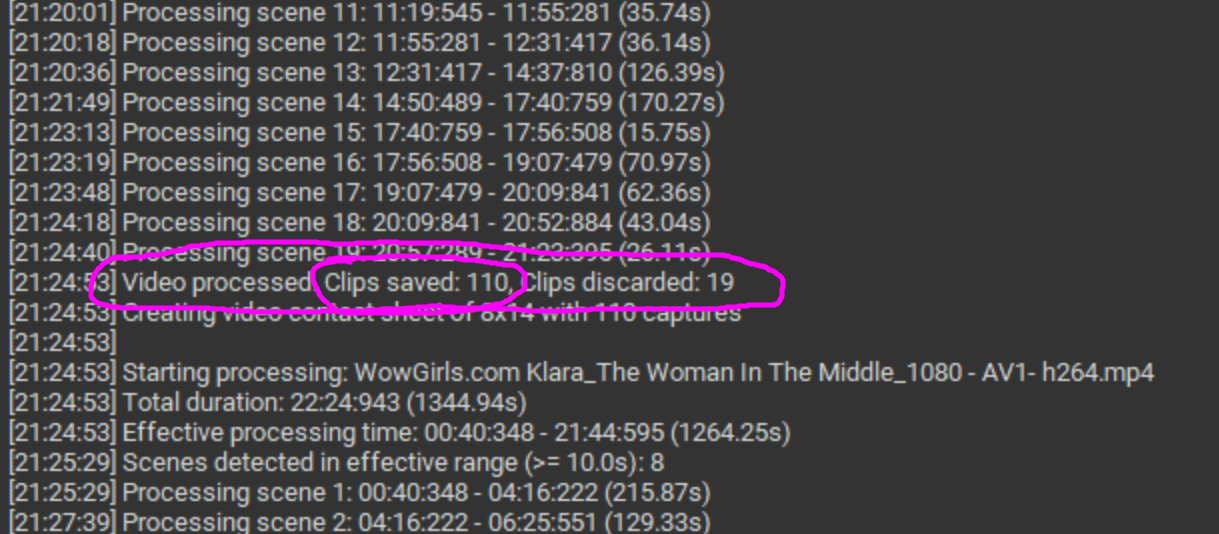

Even with proper tolerances defined, you might notice some clips that don't match the segment requirements. This is due to the AI model miscategorizing frames. I've tested many models, and in the guide, I recommend the one that gave me the best results. However, I have not found any public models specifically trained for adult content, so they sometimes have difficulty understanding what is happening in a frame.
I hope this clarifies things rather than making them more complicated.

My PMVs: https://pmvhaven.com/profile/693d3dcb748c0f68ecfd3245
Experiments with PMV Director: https://www.eporner.com/profile/MrL0b0/videos/
Experiments with PMV Director: https://www.eporner.com/profile/MrL0b0/videos/
-
neo76
- Explorer
- Posts: 58
- Joined: Thu Feb 11, 2016 5:15 pm
- Gender: Male
- Sexual Orientation: Open to new ideas!
- I am a: None of the above
Re: PMV Director - New tool to create PMVs
I was using it all wrong !MrLobo wrote: Thu Feb 05, 2026 10:51 pmI'll explain how video processing works so you can understand the screenshot log. It's quite detailed, but I don't know how to explain it more briefly.neo76 wrote: Thu Feb 05, 2026 7:45 pm Also, I don't seems to get as many frame as you, in a 22min video I got 19 frame with movement treshold @ 0.2, same with 0.50.
Even with max interval at 240sec it extract a 536sec frame somehow
Boring technical stuff about the tool:In summary, to ensure a section contains only Oral Sex, configure the 'People' field correctly and set Explicitness Tolerance to 0. And make sure that “Ignore filter invalid clips” is unchecked.
- Spoiler: show
Even with proper tolerances defined, you might notice some clips that don't match the segment requirements. This is due to the AI model miscategorizing frames. I've tested many models, and in the guide, I recommend the one that gave me the best results. However, I have not found any public models specifically trained for adult content, so they sometimes have difficulty understanding what is happening in a frame.
I hope this clarifies things rather than making them more complicated.
Makes much more sense.
Thanks for taking the time to do such a good explanation.
I this possible to make a tolerance bar for each segment instead of the whole pmv ?
I got a teasing and then a bj segment
so I set the teasing one as 1-Suggestive pose and 1-Revealing clothes with 1 tolerance for both and it works nicely.
But then in the bj segment , since I put "oral sex" with 1 tolerance I have touching and sex in it too.
-
kinkyhorizons
- Explorer
- Posts: 50
- Joined: Sat Jul 01, 2017 12:10 pm
- Gender: Male
- Sexual Orientation: Bisexual/Bi-Curious
- I am a: Switch
Re: PMV Director - New tool to create PMVs
Great, I've just downloaded the new version, will update to it and give it a try.MrLobo wrote: Tue Feb 03, 2026 6:48 amI think I've managed to fix it. Now, for long videos with lots of cuts, the video is exported in multiple batches and then concatenated into a single video at the end, so that error shouldn't happen again.kinkyhorizons wrote: Sat Jan 31, 2026 8:14 pm Edit - I made some progress with it, I only seem to get the Filename or extension is too long when I'm trying to use longer audio tracks, did several around the 5 minute length with no issues at all, both that I tried that were over 10 minutes produced that same error.
Again, fabulous work with this, it works really well and little niggles like this or the others people have come across aways to be expected once you release anything to a wider audience that might be using it in different way. None of them detract from cool a program you've pulled together.
-
neo76
- Explorer
- Posts: 58
- Joined: Thu Feb 11, 2016 5:15 pm
- Gender: Male
- Sexual Orientation: Open to new ideas!
- I am a: None of the above
Re: PMV Director - New tool to create PMVs
So, I have been playing with it for some time, pretty awesome app.
I have a couple of suggestions if you can add it :
- tolerance and nudity flexibility for each segment instead of the whole clip
- An option where you can see how much cut you have for each keyword (ie: 76 cut - blowjobs, 150 cuts - non nudes, 206 cuts - sex man on woman, etc)
I have a couple of suggestions if you can add it :
- tolerance and nudity flexibility for each segment instead of the whole clip
- An option where you can see how much cut you have for each keyword (ie: 76 cut - blowjobs, 150 cuts - non nudes, 206 cuts - sex man on woman, etc)
-
MrLobo
- Explorer At Heart
- Posts: 225
- Joined: Fri Jul 26, 2013 5:23 pm
- Gender: Male
- Sexual Orientation: Straight
- I am a: Switch
Re: PMV Director - New tool to create PMVs
The tolerance design isn’t well thought out, it was a quick fix to allow video generation when there weren’t enough clips for certain segments, especially when Explicitness levels varied greatly across categories. I think it’s best to remove these tolerance sliders entirely and turn the Explicitness, People, and Nudity selectors into multi‑select options so you can pick multiple categories per segment. This will increase the number of videos that meet each condition and make the concept of tolerances unnecessary.neo76 wrote: Sun Feb 08, 2026 10:56 am - tolerance and nudity flexibility for each segment instead of the whole clip
I hope to release a new version this week with this change and another feature that I am finishing testing.
This is not something I am considering at the moment; perhaps in the future. The next thing I will work on is completely breaking down the concept of video library and project. This way, there will be a new view where videos are processed (there will be greater control over already processed videos and it will be possible to view/modify analyzed clips), and the videos tab will simply import this library and select which ones you want for that project.neo76 wrote: Sun Feb 08, 2026 10:56 am - An option where you can see how much cut you have for each keyword (ie: 76 cut - blowjobs, 150 cuts - non nudes, 206 cuts - sex man on woman, etc)
I believe this will allow more flexibility, as this library with video information and scenes can be used for other purposes and could even be shared (along with the analyzed videos) so that another user can use them without having to reprocess the scenes, which is the most tedious process and the only one that really requires a powerful GPU.
My PMVs: https://pmvhaven.com/profile/693d3dcb748c0f68ecfd3245
Experiments with PMV Director: https://www.eporner.com/profile/MrL0b0/videos/
Experiments with PMV Director: https://www.eporner.com/profile/MrL0b0/videos/
-
neo76
- Explorer
- Posts: 58
- Joined: Thu Feb 11, 2016 5:15 pm
- Gender: Male
- Sexual Orientation: Open to new ideas!
- I am a: None of the above
Re: PMV Director - New tool to create PMVs
This will help a lot, I am still struggling with the semantic search, can't get it to work properly, so I rely much more on categories.MrLobo wrote: Mon Feb 09, 2026 5:57 amThe tolerance design isn’t well thought out, it was a quick fix to allow video generation when there weren’t enough clips for certain segments, especially when Explicitness levels varied greatly across categories. I think it’s best to remove these tolerance sliders entirely and turn the Explicitness, People, and Nudity selectors into multi‑select options so you can pick multiple categories per segment. This will increase the number of videos that meet each condition and make the concept of tolerances unnecessary.neo76 wrote: Sun Feb 08, 2026 10:56 am - tolerance and nudity flexibility for each segment instead of the whole clip
I hope to release a new version this week with this change and another feature that I am finishing testing.
Thanks for all you are doing, excited to see where this is going.This is not something I am considering at the moment; perhaps in the future. The next thing I will work on is completely breaking down the concept of video library and project. This way, there will be a new view where videos are processed (there will be greater control over already processed videos and it will be possible to view/modify analyzed clips), and the videos tab will simply import this library and select which ones you want for that project.
I believe this will allow more flexibility, as this library with video information and scenes can be used for other purposes and could even be shared (along with the analyzed videos) so that another user can use them without having to reprocess the scenes, which is the most tedious process and the only one that really requires a powerful GPU..
-
MrLobo
- Explorer At Heart
- Posts: 225
- Joined: Fri Jul 26, 2013 5:23 pm
- Gender: Male
- Sexual Orientation: Straight
- I am a: Switch
Re: PMV Director - New tool to create PMVs
Hi 
I have uploaded a new version of PMV Director with two changes:
1- I removed the tolerances from the Timeline tab and, instead, it is now possible to select various categories of explicitness, nudity, and people composition per segment.

2- I added a new feature that allows for a 3-column layout with different vertical videos. To do this, there is a new option in the segments of the Timeline tab that lets you select the orientation of the videos to use:
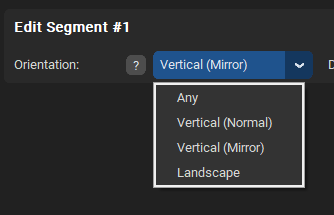
- Any: Use videos of any orientation
- Vertical (Normal): 3-column layout with different videos
- Vertical (Mirror): 3-column layout, same video on left/right (mirrored)
- Landscape: Only use landscape videos
There is a new configuration variable in config.toml, under the timeline section, called vertical_cut_threshold_seconds. This decides how changes for these vertical videos will be made. If the cut is less than vertical_cut_threshold_seconds, only one of the 3 vertical videos will change; if it is greater, all three will change at once.
Here are two demo videos where I have used this new feature.
I have uploaded a new version of PMV Director with two changes:
1- I removed the tolerances from the Timeline tab and, instead, it is now possible to select various categories of explicitness, nudity, and people composition per segment.
2- I added a new feature that allows for a 3-column layout with different vertical videos. To do this, there is a new option in the segments of the Timeline tab that lets you select the orientation of the videos to use:
- Any: Use videos of any orientation
- Vertical (Normal): 3-column layout with different videos
- Vertical (Mirror): 3-column layout, same video on left/right (mirrored)
- Landscape: Only use landscape videos
There is a new configuration variable in config.toml, under the timeline section, called vertical_cut_threshold_seconds. This decides how changes for these vertical videos will be made. If the cut is less than vertical_cut_threshold_seconds, only one of the 3 vertical videos will change; if it is greater, all three will change at once.
Here are two demo videos where I have used this new feature.
- Lina Belfiore compilation: https://www.eporner.com/video-dkg52NS07 ... mpilation/
Backup: https://streamtape.com/v/K4Gkkbdz3bC0R9 ... o_Lina.mp4
- Ellie Leen compilation: https://www.eporner.com/video-UrSuzF3Z6 ... mpilation/
Backup: https://streamtape.com/v/YDxLrQMrQ3C3YD ... _Ellie.mp4
My PMVs: https://pmvhaven.com/profile/693d3dcb748c0f68ecfd3245
Experiments with PMV Director: https://www.eporner.com/profile/MrL0b0/videos/
Experiments with PMV Director: https://www.eporner.com/profile/MrL0b0/videos/
-
MrLobo
- Explorer At Heart
- Posts: 225
- Joined: Fri Jul 26, 2013 5:23 pm
- Gender: Male
- Sexual Orientation: Straight
- I am a: Switch
Re: PMV Director - New tool to create PMVs
Hi again
I am pleased to announce a new version of PMVDirector!!!
And this brings a major change: Projects and video libraries are now separate. A library holds your analyzed video data and can be shared across multiple projects. A project simply references a library instead of embedding the data.
Now, on one hand, we have the libraries, which are .vlib files containing the info about the videos we’ve already analyzed. And on the other hand, we have the projects, .pmvd files, which use the videos from the libraries to create a PMV.
These libraries can be used as many times as you like, and you can view and edit the videos they contain. The idea is to have a library containing information about your videos, and then, whenever you want to create a PMV, select which videos from your library you want to use.
From the new “Manage Videos” view, you can manage the videos in a library and even rearrange their paths if the videos have been moved to another folder.
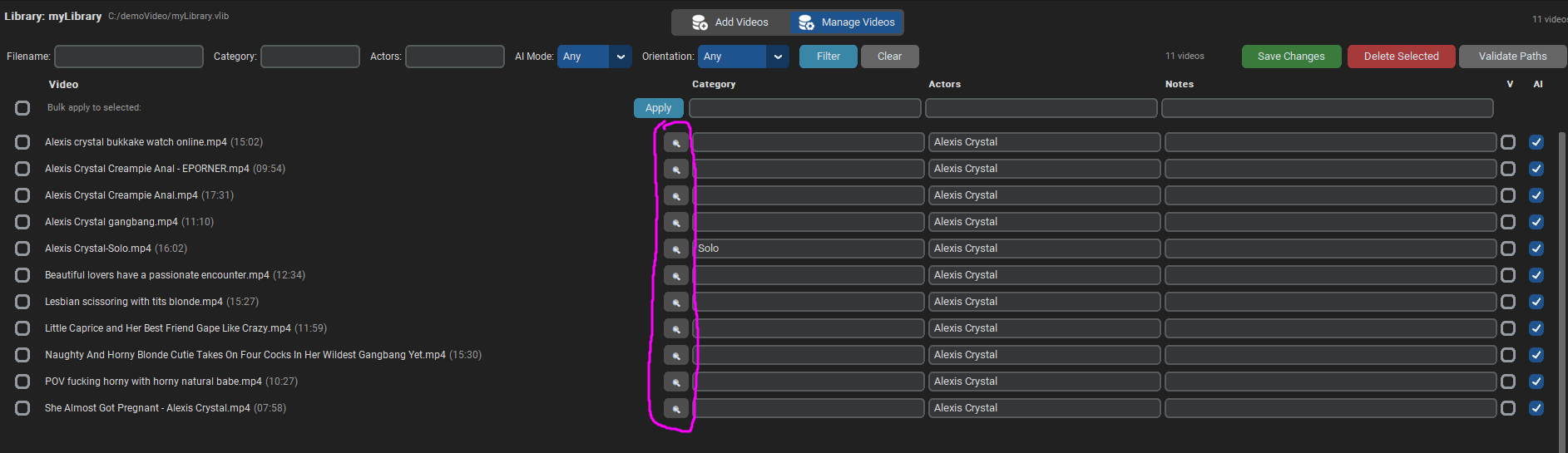
By clicking the magnifying glass icon, you can view the processed scenes, including the description and categorization generated by the AI (which now allows you to test other AI models and easily see how well or poorly they perform). And from that view, you can also make manual adjustments, in case the AI made a mistake and you want to correct it.
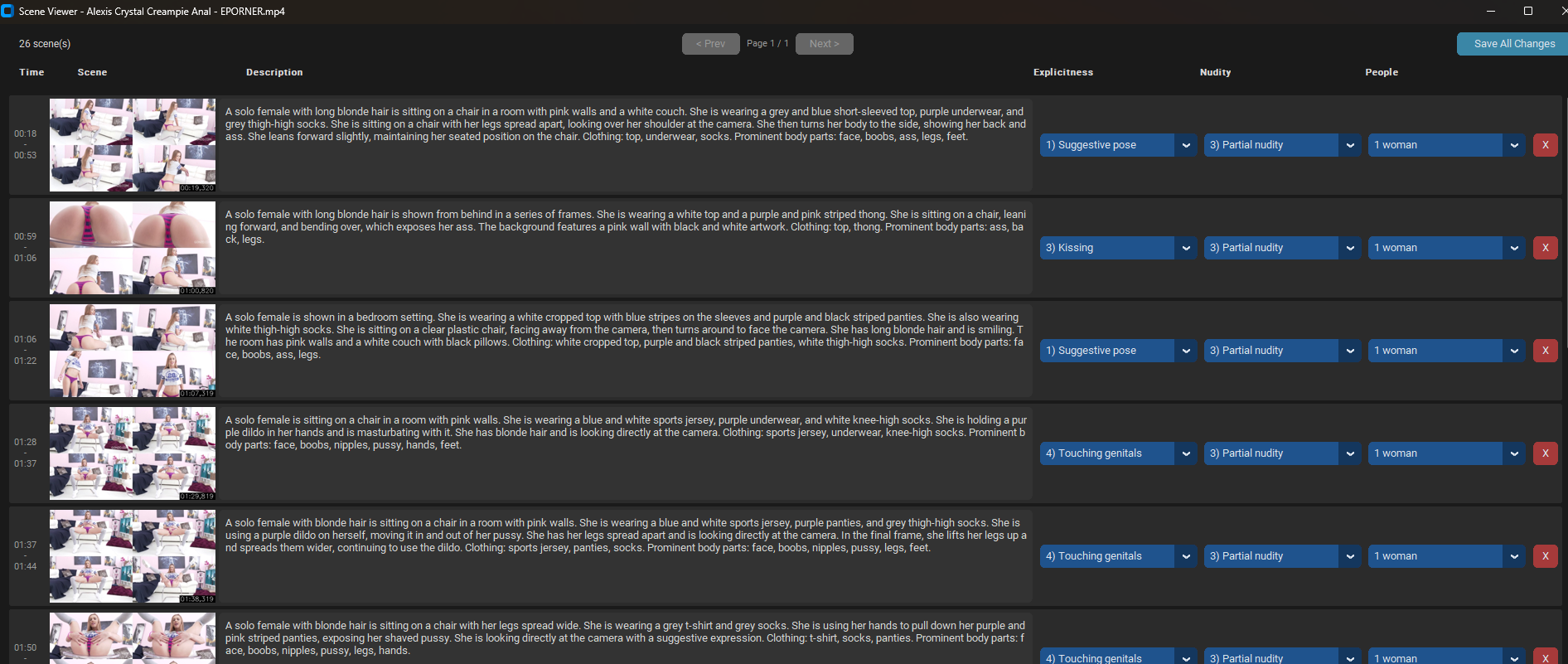
Now, when we create a new project, instead of processing the videos, we simply select a library (vlib file) and choose which videos we want to use.
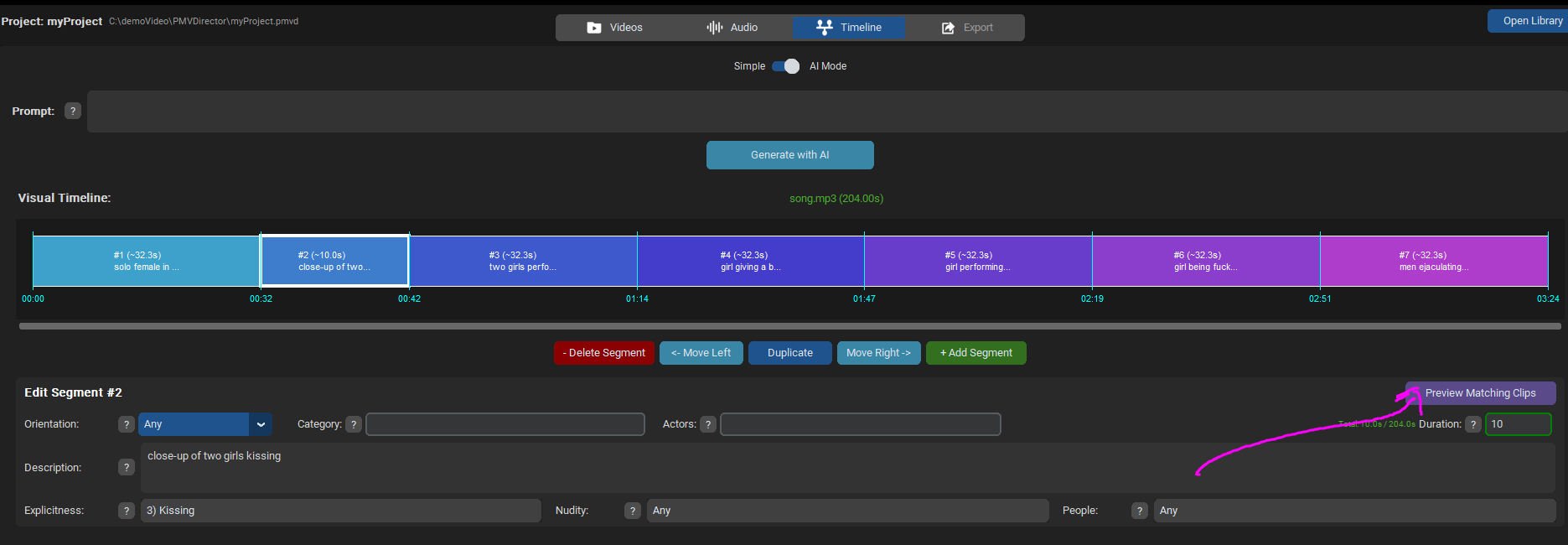
I've also added a button called “Preview Matching Clips” in the Timeline tab, within the segment settings.
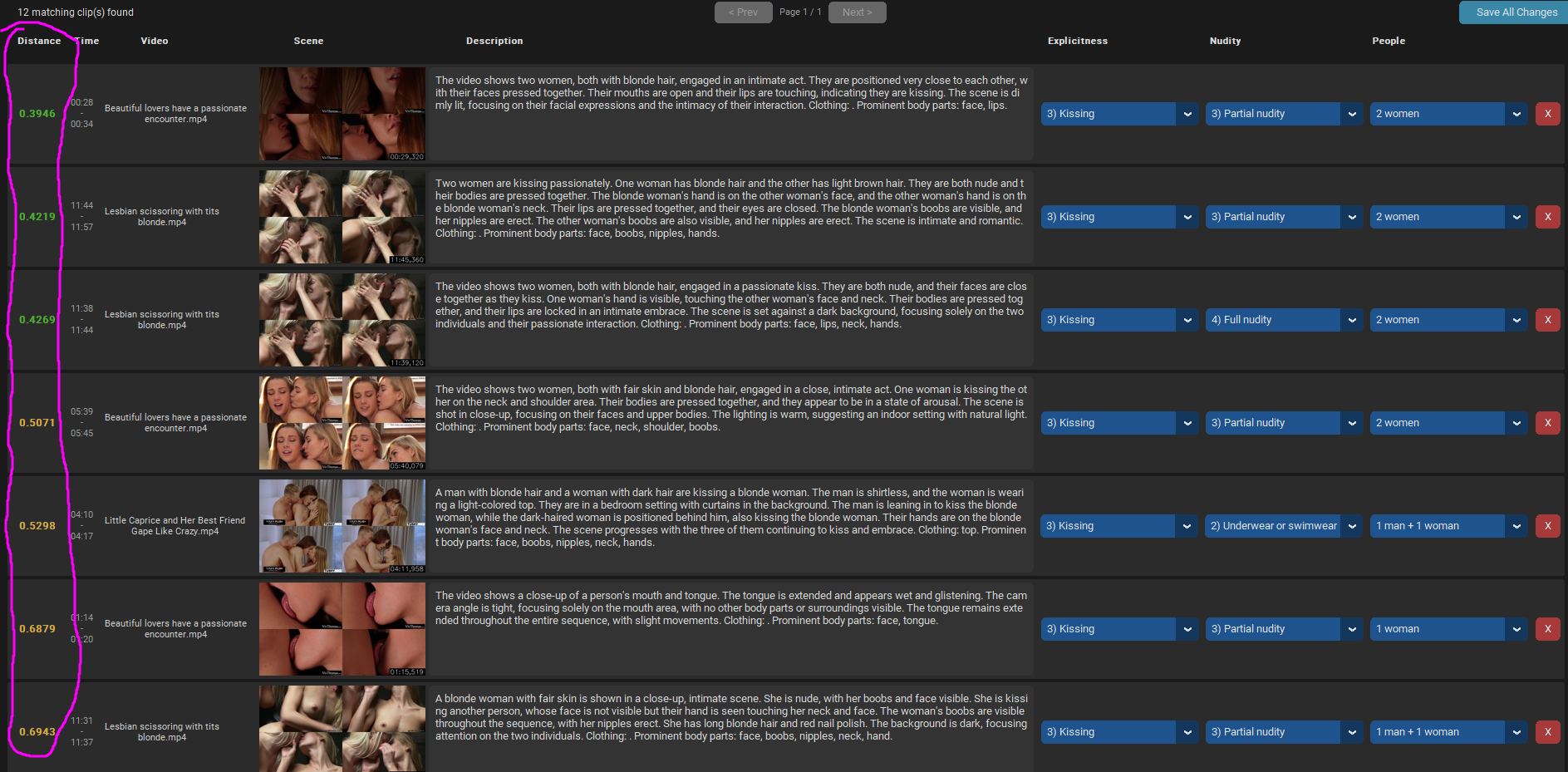
This allows you to see which clips meet your segment's criteria. They're sorted in descending order, starting with the ones that best match your description.
I’ve updated the demo video with these changes: https://streamtape.com/v/rrPAjvY8erhx8J/demoV2.mp4
The video doesn’t explain all the options; when I have time, I want to create a more detailed tutorial that I’ll post in the first post.
I’ve updated the PMVDirector download links in the first post with this latest version. Keep in mind that older projects (.pmvd files) aren’t compatible with this new version.
Now that we have this library with the videos already analyzed, I plan to implement new modes to use it beyond just doing PMVs. I’m working on a “mistress” mode that uses this information from your videos to tease you.
Any suggestions are welcome
I am pleased to announce a new version of PMVDirector!!!
And this brings a major change: Projects and video libraries are now separate. A library holds your analyzed video data and can be shared across multiple projects. A project simply references a library instead of embedding the data.
Now, on one hand, we have the libraries, which are .vlib files containing the info about the videos we’ve already analyzed. And on the other hand, we have the projects, .pmvd files, which use the videos from the libraries to create a PMV.
These libraries can be used as many times as you like, and you can view and edit the videos they contain. The idea is to have a library containing information about your videos, and then, whenever you want to create a PMV, select which videos from your library you want to use.
From the new “Manage Videos” view, you can manage the videos in a library and even rearrange their paths if the videos have been moved to another folder.
By clicking the magnifying glass icon, you can view the processed scenes, including the description and categorization generated by the AI (which now allows you to test other AI models and easily see how well or poorly they perform). And from that view, you can also make manual adjustments, in case the AI made a mistake and you want to correct it.
Now, when we create a new project, instead of processing the videos, we simply select a library (vlib file) and choose which videos we want to use.
I've also added a button called “Preview Matching Clips” in the Timeline tab, within the segment settings.
This allows you to see which clips meet your segment's criteria. They're sorted in descending order, starting with the ones that best match your description.
I’ve updated the demo video with these changes: https://streamtape.com/v/rrPAjvY8erhx8J/demoV2.mp4
The video doesn’t explain all the options; when I have time, I want to create a more detailed tutorial that I’ll post in the first post.
I’ve updated the PMVDirector download links in the first post with this latest version. Keep in mind that older projects (.pmvd files) aren’t compatible with this new version.
Now that we have this library with the videos already analyzed, I plan to implement new modes to use it beyond just doing PMVs. I’m working on a “mistress” mode that uses this information from your videos to tease you.
Any suggestions are welcome
My PMVs: https://pmvhaven.com/profile/693d3dcb748c0f68ecfd3245
Experiments with PMV Director: https://www.eporner.com/profile/MrL0b0/videos/
Experiments with PMV Director: https://www.eporner.com/profile/MrL0b0/videos/