
Thank you for the help and explanation!
At exporting im getting this Error:
[02:23:42] [ERROR] Export error: Video creation error: [WinError 206] The filename or extension is too long
Im using the name "Test2.mp4"
Im exporting it to "K:\ZZZZ\Z_PMVDIRECTOR v0.2 by MrLobo\EXPORT"
I already modified my Registry key and set LongPathsEnabled to 1
PMV Director - New tool to create PMVs
Moderator: andyp
-
MrLobo

- Explorer At Heart

- Posts: 225
- Joined: Fri Jul 26, 2013 5:23 pm
- Gender: Male
- Sexual Orientation: Straight
- I am a: Switch
Re: PMV Director - New tool to create PMVs
Yes, it is a bug. I think that if you move the PMVDirector folder to a shorter path, such as C:\PMVDirector, you won't have this problem. Otherwise, you can first export it as otio and use Davinci Resolve to finish generating the MP4, as suzyjamestv said:gooner689 wrote: Tue Jan 20, 2026 1:29 am Thank you for the help and explanation!
At exporting im getting this Error:
[02:23:42] [ERROR] Export error: Video creation error: [WinError 206] The filename or extension is too long
Im using the name "Test2.mp4"
Im exporting it to "K:\ZZZZ\Z_PMVDIRECTOR v0.2 by MrLobo\EXPORT"
I already modified my Registry key and set LongPathsEnabled to 1
suzyjamestv wrote: Tue Dec 23, 2025 11:58 am Thanks for the info,
If you could work on the windows error when you have time I/we would be most grateful. Workaround I am currently using, export as OTIO, import into DaVinci, edit and the export as MP4. Works ok, you just need a lot of disk space.
I will soon release a new version that fixes this bug and adds some interesting features

My PMVs: https://pmvhaven.com/profile/693d3dcb748c0f68ecfd3245
Experiments with PMV Director: https://www.eporner.com/profile/MrL0b0/videos/
Experiments with PMV Director: https://www.eporner.com/profile/MrL0b0/videos/
-
gooner689
- Explorer

- Posts: 8
- Joined: Fri Jan 16, 2026 1:52 pm
- Gender: Gender-fluid
- Sexual Orientation: Bisexual/Bi-Curious
- I am a: Switch
Re: PMV Director - New tool to create PMVs
Awesome! Cant wait thx Alot!!
-
kinkyhorizons
- Explorer
- Posts: 50
- Joined: Sat Jul 01, 2017 12:10 pm
- Gender: Male
- Sexual Orientation: Bisexual/Bi-Curious
- I am a: Switch
Re: PMV Director - New tool to create PMVs
Is there an updated download link? The ones in the original post for both Windows and Linux seem to be dead.
-
MrLobo
- Explorer At Heart
- Posts: 225
- Joined: Fri Jul 26, 2013 5:23 pm
- Gender: Male
- Sexual Orientation: Straight
- I am a: Switch
Re: PMV Director - New tool to create PMVs
Hey everyone! 
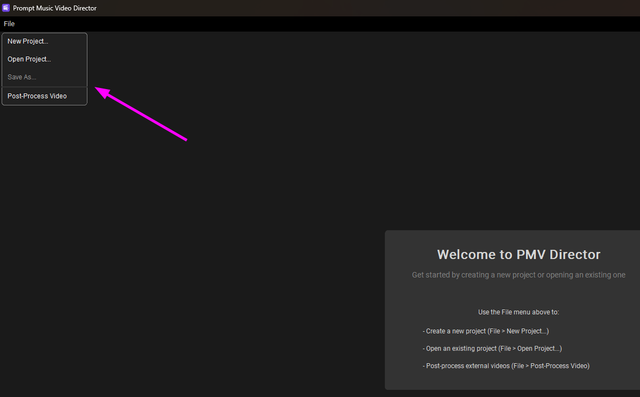
I'm excited to announce the new version of PMV Director! I've made some UI improvements by simplifying the Audio tab and adding a top menu for creating or opening projects directly from within the app (no need to quit and reopen). You can now save projects with different names (the app already autosaves projects, but this way you can have multiple versions of the same project).
I've also fixed several bugs.
As for new features, I've added two:
First, I integrated NudeNet, a model for detecting nudity. Now, when you export your PMV to mp4, you can apply censorship as a new Post-Processing option, for beta style PMV.
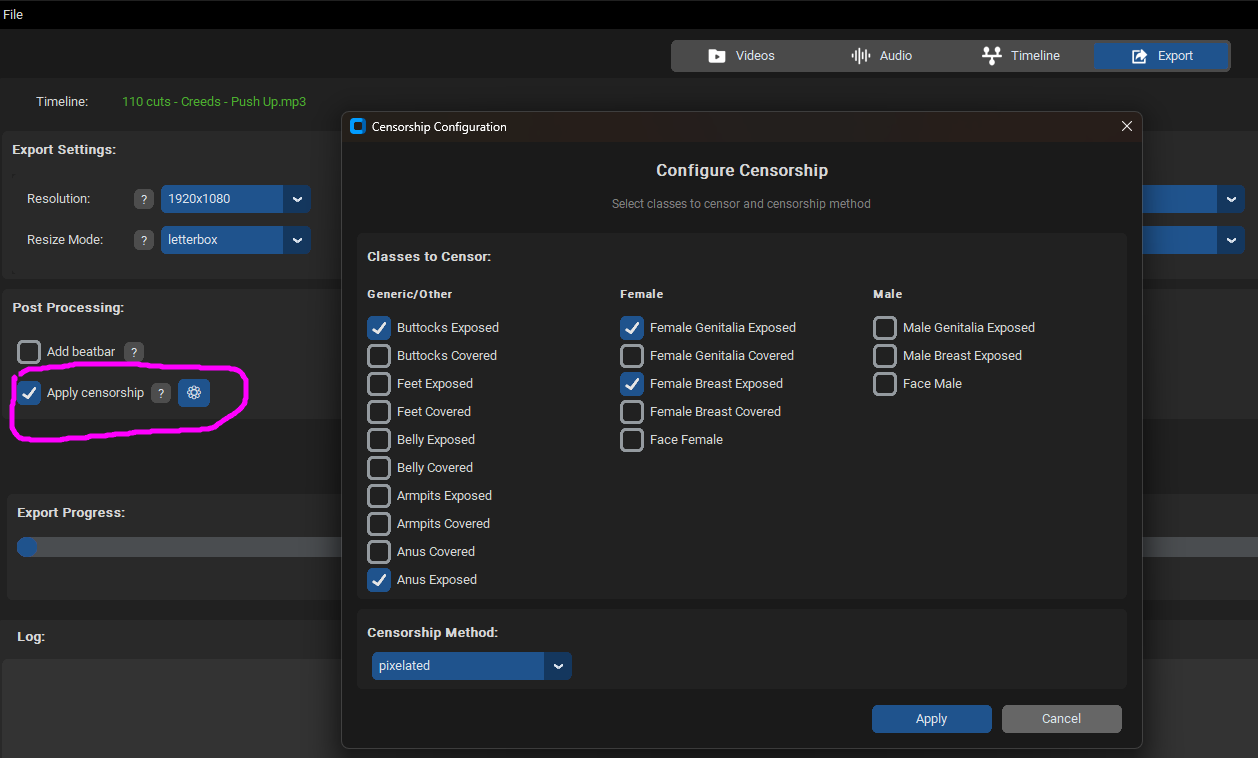
NudeNet doesn't detect nudity 100% of the time, so the generated video won't be perfectly censored. However, it's a great base if you plan to do some manual editing afterward.
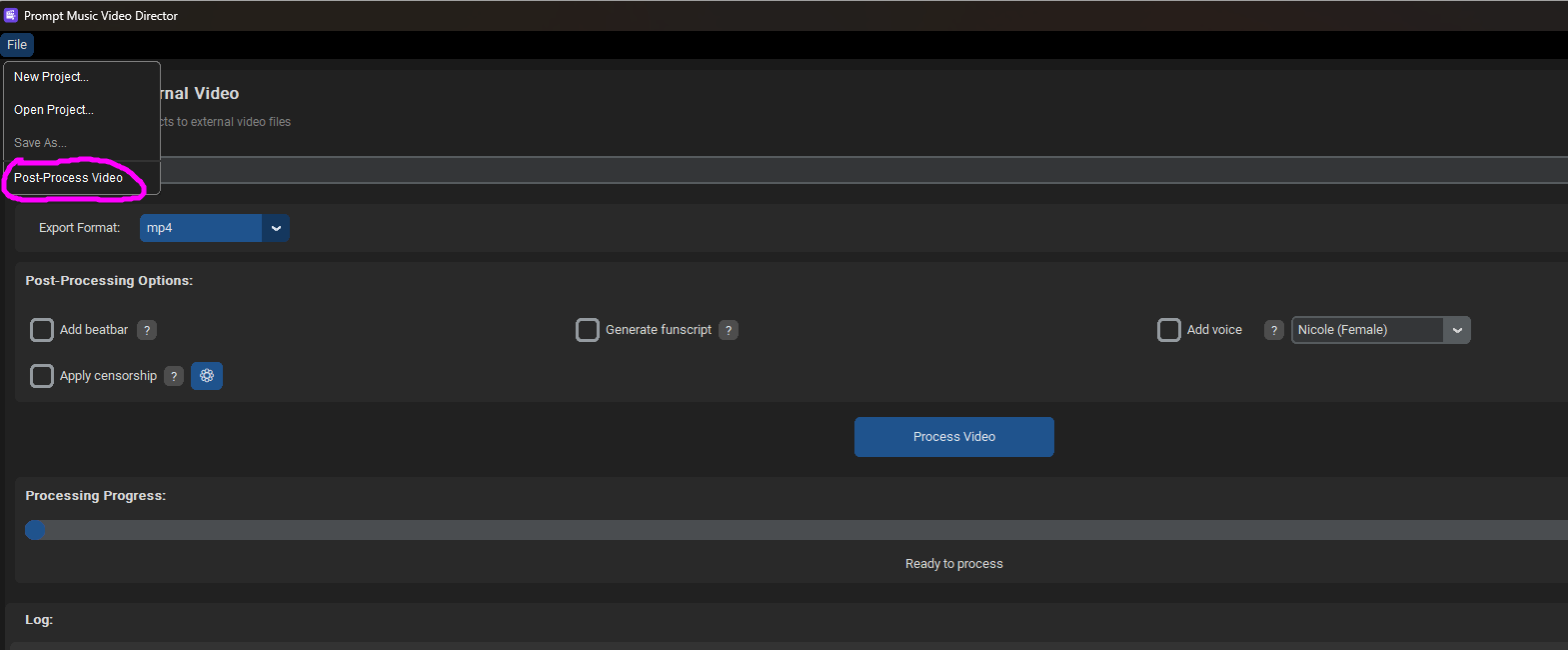
Second, you can now add different Post-Processing effects not only to PMVs generated from the application but to any video. There's a new menu option called "Post-Process Video" that lets you select any video and apply any Post-Processing effect (Beatbar, generate funscript, add voice, or the new censorship option).
As a demo, I processed Caius' amazing PMV "PMV Fusion" and added the beatbar and censorship.
Original PMV Fusion: https://spankbang.com/553yp/video/fusio ... ius+prepus
Edited (beatbar + censorship): https://streamtape.com/v/wDvB17varrFJ8Z ... edited.mp4
I also processed BiasPMV's "Perfect Pussy" PMV and added the beatbar and voice narration.
Original Perfect Pussy PMV: https://pmvhaven.com/video/perfect-puss ... f8474d5953
Edited (beatbar + voice narration): https://streamtape.com/v/rkyodl8RwwCbmg ... edited.mp4
I have updated the links in the first post with the ZIP files for the new version.
I hope there aren't any more issues, but I'm sure there are still some things to improve.
Let me know what you think if you try it out! Feedback is always appreciated
I'm excited to announce the new version of PMV Director! I've made some UI improvements by simplifying the Audio tab and adding a top menu for creating or opening projects directly from within the app (no need to quit and reopen). You can now save projects with different names (the app already autosaves projects, but this way you can have multiple versions of the same project).
I've also fixed several bugs.
As for new features, I've added two:
First, I integrated NudeNet, a model for detecting nudity. Now, when you export your PMV to mp4, you can apply censorship as a new Post-Processing option, for beta style PMV.
NudeNet doesn't detect nudity 100% of the time, so the generated video won't be perfectly censored. However, it's a great base if you plan to do some manual editing afterward.
Second, you can now add different Post-Processing effects not only to PMVs generated from the application but to any video. There's a new menu option called "Post-Process Video" that lets you select any video and apply any Post-Processing effect (Beatbar, generate funscript, add voice, or the new censorship option).
As a demo, I processed Caius' amazing PMV "PMV Fusion" and added the beatbar and censorship.
Original PMV Fusion: https://spankbang.com/553yp/video/fusio ... ius+prepus
Edited (beatbar + censorship): https://streamtape.com/v/wDvB17varrFJ8Z ... edited.mp4
I also processed BiasPMV's "Perfect Pussy" PMV and added the beatbar and voice narration.
Original Perfect Pussy PMV: https://pmvhaven.com/video/perfect-puss ... f8474d5953
Edited (beatbar + voice narration): https://streamtape.com/v/rkyodl8RwwCbmg ... edited.mp4
Oh, and I fixed the bug "The filename or extension is too long"
I have updated the links in the first post with the ZIP files for the new version.
I hope there aren't any more issues, but I'm sure there are still some things to improve.
Let me know what you think if you try it out! Feedback is always appreciated
My PMVs: https://pmvhaven.com/profile/693d3dcb748c0f68ecfd3245
Experiments with PMV Director: https://www.eporner.com/profile/MrL0b0/videos/
Experiments with PMV Director: https://www.eporner.com/profile/MrL0b0/videos/
-
MrLobo
- Explorer At Heart
- Posts: 225
- Joined: Fri Jul 26, 2013 5:23 pm
- Gender: Male
- Sexual Orientation: Straight
- I am a: Switch
Re: PMV Director - New tool to create PMVs
LOL, I was just updating them with the new versionkinkyhorizons wrote: Sat Jan 24, 2026 8:19 pm Is there an updated download link? The ones in the original post for both Windows and Linux seem to be dead.
They should be working now.
My PMVs: https://pmvhaven.com/profile/693d3dcb748c0f68ecfd3245
Experiments with PMV Director: https://www.eporner.com/profile/MrL0b0/videos/
Experiments with PMV Director: https://www.eporner.com/profile/MrL0b0/videos/
-
kinkyhorizons
- Explorer
- Posts: 50
- Joined: Sat Jul 01, 2017 12:10 pm
- Gender: Male
- Sexual Orientation: Bisexual/Bi-Curious
- I am a: Switch
Re: PMV Director - New tool to create PMVs
Thanks, I've got it downloaded and all set up. Just starting to have a play with it, it looks very good so far!MrLobo wrote: Sat Jan 24, 2026 8:26 pmLOL, I was just updating them with the new versionkinkyhorizons wrote: Sat Jan 24, 2026 8:19 pm Is there an updated download link? The ones in the original post for both Windows and Linux seem to be dead.
They should be working now.
Re: PMV Director - New tool to create PMVs
Any chance of creating a mac version of this?
-
MrLobo
- Explorer At Heart
- Posts: 225
- Joined: Fri Jul 26, 2013 5:23 pm
- Gender: Male
- Sexual Orientation: Straight
- I am a: Switch
Re: PMV Director - New tool to create PMVs
In principle, no, I don't have a Mac to build the binary.
My PMVs: https://pmvhaven.com/profile/693d3dcb748c0f68ecfd3245
Experiments with PMV Director: https://www.eporner.com/profile/MrL0b0/videos/
Experiments with PMV Director: https://www.eporner.com/profile/MrL0b0/videos/

Re: PMV Director - New tool to create PMVs
Hi,
This is a quite intriguing tool, thanks for sharing it !
Just started to try it, a few remarks:
- as already mentioned, vulkan llama seems to always give errors
- cuda12 loads fine but seems to default to CPU (I have a quite old card anyway, GTX 1060 3GB :D)
- when I load an existing project, I see a weird roundoff in the threshold value, and the source folder is missing
- the Nymph models have been updated, Q4 is no longer available, only Q2 and Q3. I tried to download the Q2 one and update the config.toml, but the app still tries to load the Q4 one, even after restarting ?
Speaking of which, after a few tries, I get through the video and audio processing pass, but then I get an error at the timeline generation:
This is a quite intriguing tool, thanks for sharing it !
Just started to try it, a few remarks:
- as already mentioned, vulkan llama seems to always give errors
- cuda12 loads fine but seems to default to CPU (I have a quite old card anyway, GTX 1060 3GB :D)
- when I load an existing project, I see a weird roundoff in the threshold value, and the source folder is missing
- the Nymph models have been updated, Q4 is no longer available, only Q2 and Q3. I tried to download the Q2 one and update the config.toml, but the app still tries to load the Q4 one, even after restarting ?
Speaking of which, after a few tries, I get through the video and audio processing pass, but then I get an error at the timeline generation:
Code: Select all
14:15:01 - INFO     - Starting llama.cpp text server...
14:15:01 - INFO     - Waiting for text server to load model...
14:15:01 - INFO     - [llama.cpp] load_backend: loaded RPC backend from C:\Program Files\llama-cpu\ggml-rpc.dll
14:15:01 - INFO     - [llama.cpp] load_backend: loaded CPU backend from C:\Program Files\llama-cpu\ggml-cpu-haswell.dll
14:15:01 - INFO     - [llama.cpp] main: n_parallel is set to auto, using n_parallel = 4 and kv_unified = true
14:15:01 - INFO     - [llama.cpp] build: 7870 (eed25bc6b) with Clang 19.1.5 for Windows x86_64
14:15:01 - INFO     - [llama.cpp] system info: n_threads = 6, n_threads_batch = 6, total_threads = 12
14:15:01 - INFO     - [llama.cpp] system_info: n_threads = 6 (n_threads_batch = 6) / 12 | CPU : SSE3 = 1 | SSSE3 = 1 | AVX = 1 | AVX2 = 1 | F16C = 1 | FMA = 1 | BMI2 = 1 | LLAMAFILE = 1 | OPENMP = 1 | REPACK = 1 |
14:15:01 - INFO     - [llama.cpp] Running without SSL
14:15:01 - INFO     - [llama.cpp] init: using 11 threads for HTTP server
14:15:01 - INFO     - [llama.cpp] Web UI is disabled
14:15:01 - INFO     - [llama.cpp] start: binding port with default address family
14:15:01 - INFO     - [llama.cpp] main: loading model
14:15:01 - INFO     - [llama.cpp] srv    load_model: loading model 'C:\Program Files\PMVDirector\AImodels\Nymph_8B-Q4_K_M.gguf'
14:15:01 - INFO     - [llama.cpp] common_init_result: fitting params to device memory, for bugs during this step try to reproduce them with -fit off, or provide --verbose logs if the bug only occurs with -fit on
14:15:01 - INFO     - [llama.cpp] gguf_init_from_file_impl: invalid magic characters: 'Entr', expected 'GGUF'
14:15:01 - INFO - [llama.cpp] llama_model_load: error loading model: llama_model_loader: failed to load model from C:\Program Files\PMVDirector\AImodels\Nymph_8B-Q4_K_M.gguf-
MrLobo
- Explorer At Heart
- Posts: 225
- Joined: Fri Jul 26, 2013 5:23 pm
- Gender: Male
- Sexual Orientation: Straight
- I am a: Switch
Re: PMV Director - New tool to create PMVs
Hi Minuit,
I'm using an NVIDIA graphics card with CUDA, but Vulkan should work too (even if it's slower). Perhaps the documentation for llama.cpp says something about the errors you are getting.
3GB of VRAM is not enough to handle these models efficiently. Part of the model will end up on the CPU and run pretty slow. You can use PMV Director in random mode with AI disabled under the Videos tab, but then you lose the ability to create custom timelines.
Regarding the Nymph_8B-Q4_K_M.gguf model, you're right; they removed Q4, but Q3 should work fine. If you still want Q4, you can download it from this link: https://huggingface.co/mradermacher/Nymph_8B-GGUF
If it says that the model Q4 is still loading, it's because you didn't modify the text_model variable in config.toml correctly. All variables in config.toml are predefined in the code and will override their default values if found in config.toml. When you change something in config.toml, you have to restart the application for the change to take effect, but since you are already doing that, if it continues to use the value Nymph_8B-Q4_K_M.gguf, it is because the text_model variable is not defined correctly in config.toml, check it carefully.
To test if llama.cpp works with your text model, run this command:
Change the paths "C:\PMVDirector\AImodels\your_model.gguf" and put where you have the downloaded models; then if you open http://localhost:1234/ in your browser, you'll see the web interface for llama.cpp. Write something in the chatbot and check if it processes it. PMVDirector runs llama.cpp that way, so if that works, it should work in PMVDirector.
Regarding what you mentioned about "I see a weird roundoff in the threshold value" I'm not sure what you mean. Could you provide more details or a screenshot? As for the "source folder" value being lost when opening a project, it's because it isn't saved. The idea is that you can import another folder (or even the same one if there are new videos) into an existing project, and it will process the new videos, adding them to those already processed so you can use them all in the timeline.
I hope this helps! If you have any other questions or issues, let me know and I'll do my best to help you.
I'm using an NVIDIA graphics card with CUDA, but Vulkan should work too (even if it's slower). Perhaps the documentation for llama.cpp says something about the errors you are getting.
3GB of VRAM is not enough to handle these models efficiently. Part of the model will end up on the CPU and run pretty slow. You can use PMV Director in random mode with AI disabled under the Videos tab, but then you lose the ability to create custom timelines.
Regarding the Nymph_8B-Q4_K_M.gguf model, you're right; they removed Q4, but Q3 should work fine. If you still want Q4, you can download it from this link: https://huggingface.co/mradermacher/Nymph_8B-GGUF
If it says that the model Q4 is still loading, it's because you didn't modify the text_model variable in config.toml correctly. All variables in config.toml are predefined in the code and will override their default values if found in config.toml. When you change something in config.toml, you have to restart the application for the change to take effect, but since you are already doing that, if it continues to use the value Nymph_8B-Q4_K_M.gguf, it is because the text_model variable is not defined correctly in config.toml, check it carefully.
To test if llama.cpp works with your text model, run this command:
Code: Select all
.\llama-server.exe -m C:\PMVDirector\AImodels\your_model.gguf --jinja -c 6096 --port 1234 --host 0.0.0.0Regarding what you mentioned about "I see a weird roundoff in the threshold value" I'm not sure what you mean. Could you provide more details or a screenshot? As for the "source folder" value being lost when opening a project, it's because it isn't saved. The idea is that you can import another folder (or even the same one if there are new videos) into an existing project, and it will process the new videos, adding them to those already processed so you can use them all in the timeline.
I hope this helps! If you have any other questions or issues, let me know and I'll do my best to help you.
My PMVs: https://pmvhaven.com/profile/693d3dcb748c0f68ecfd3245
Experiments with PMV Director: https://www.eporner.com/profile/MrL0b0/videos/
Experiments with PMV Director: https://www.eporner.com/profile/MrL0b0/videos/
-
kinkyhorizons
- Explorer
- Posts: 50
- Joined: Sat Jul 01, 2017 12:10 pm
- Gender: Male
- Sexual Orientation: Bisexual/Bi-Curious
- I am a: Switch
Re: PMV Director - New tool to create PMVs
I'm still getting this problem and I only downloaded it after you'd already posted the updated version.MrLobo wrote: Sat Jan 24, 2026 8:23 pm
Oh, and I fixed the bug "The filename or extension is too long"
At first I did have it much deeper in the file system, so I moved it and it was still the same, but I thought maybe it could have been because the videos were also pretty deep within the system, so I moved them too and rescanned everything in a folder on the root of C, but I'm still getting the same error.
[20:05:35] Starting MP4 export...
[20:05:35] Output file: C:/PMVDirector/Test.mp4
[20:05:35] [OK] Timeline data loaded: 992 cuts
[20:05:35] Resolution: 1920x1080
[20:05:35] Quality: high
[20:05:35] Resize mode: letterbox
[20:05:35] FPS: 24
[20:05:35] Audio: C:\PMVDirector\Audio\Latex Lover.mp3, Duration: 699.958s
[20:05:35] Processing 992 cuts...
[20:05:35] [INFO] 14/37 videos need scaling to 1920x1080
[20:05:35] Writing final video to: \\?\C:\PMVDirector\Test.mp4
[20:05:35] This may take several minutes depending on video length and quality...
[20:05:35] ERROR during video creation: [WinError 206] The filename or extension is too long
[20:05:35] [ERROR] Error during export: ERROR during video creation: [WinError 206] The filename or extension is too long
Anything else you can think I should check?
Edit - I made some progress with it, I only seem to get the Filename or extension is too long when I'm trying to use longer audio tracks, did several around the 5 minute length with no issues at all, both that I tried that were over 10 minutes produced that same error.
Last edited by kinkyhorizons on Sun Feb 01, 2026 4:25 pm, edited 1 time in total.
Re: PMV Director - New tool to create PMVs
Hi MrLobo,
Thanks a lot, I finally got my first video out. This looks incredibly fun :D
Some feedback
- the text model error went away after I redownloaded it from your link and renamed it to fit the hardcoded value. I'll try to do some more testing regarding the path format in config.toml. I'm on windows 10, and moving the app from C: to another partition seemed to remove some access rights problems (e.g. log file).
- I understand now the source folder acts like a 'Add new sources to existing project', which is quite handy. I first thought it was the folder for the current sources of the project. Maybe you could edit a bit the lable/tooltip ? For big projects it could be handy to display somewhere in the GUI the current list of sources, maybe open a file explorer showing frames/ ?
- minor related question: the path to the actual video files is recorded somewhere in the project database, so the files should not be moved after thay have been processed ?
- running the CPU version of llama does appear to work, although slowly. The text model is reasonnable, a few minutes for a very simple prompt like 'go from clothed to naked'. I'll see how this scales up for more elaborate prompts. The longest part is the sources processing, but I don't mind adding them one folder at a time and letting it run overnight. So yay :D
- to speed up the process I'm using low settings, such as 320 resolution for video analysis, 1fps etc. Do you know how one could assess how this affects the end results ? For instance, is there a way to check the description given to a specific clip ? The user could then use a test video source to tune the settings.
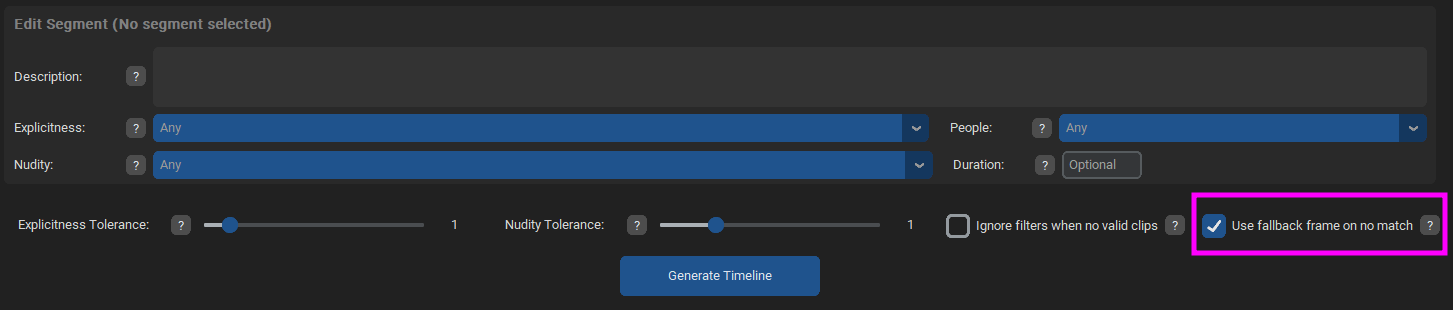
- I regularly got the missing clips error and finally checked the 'use nearest clip' option. Maybe this could be the default, with a warning logged (similar to the error message: can not find clip for segment etc, nearest was ... > 0.55).
- unless I missed something, there is currently a single audio file. It would be great to have a playlist with several songs, but maybe this would complicate the timeline part ? I guess you can generate a video for each song then concatenate them later manually. By the way, a new (second) window pops up after video export, is this intentional ?
- minor quirk: the GUI does not seem to be resizable smaller than 1080 ?
- regarding the setting roundoff, I now set them directly in config.toml instead of the project, but it looked like some format conversion thing. In the example below the value was set at 0.3 before saving the project, and after reloading it got
That's it for now  Thanks again for sharing the app !
Thanks a lot, I finally got my first video out. This looks incredibly fun :D
Some feedback
- the text model error went away after I redownloaded it from your link and renamed it to fit the hardcoded value. I'll try to do some more testing regarding the path format in config.toml. I'm on windows 10, and moving the app from C: to another partition seemed to remove some access rights problems (e.g. log file).
- I understand now the source folder acts like a 'Add new sources to existing project', which is quite handy. I first thought it was the folder for the current sources of the project. Maybe you could edit a bit the lable/tooltip ? For big projects it could be handy to display somewhere in the GUI the current list of sources, maybe open a file explorer showing frames/ ?
- minor related question: the path to the actual video files is recorded somewhere in the project database, so the files should not be moved after thay have been processed ?
- running the CPU version of llama does appear to work, although slowly. The text model is reasonnable, a few minutes for a very simple prompt like 'go from clothed to naked'. I'll see how this scales up for more elaborate prompts. The longest part is the sources processing, but I don't mind adding them one folder at a time and letting it run overnight. So yay :D
- to speed up the process I'm using low settings, such as 320 resolution for video analysis, 1fps etc. Do you know how one could assess how this affects the end results ? For instance, is there a way to check the description given to a specific clip ? The user could then use a test video source to tune the settings.
- I regularly got the missing clips error and finally checked the 'use nearest clip' option. Maybe this could be the default, with a warning logged (similar to the error message: can not find clip for segment etc, nearest was ... > 0.55).
- unless I missed something, there is currently a single audio file. It would be great to have a playlist with several songs, but maybe this would complicate the timeline part ? I guess you can generate a video for each song then concatenate them later manually. By the way, a new (second) window pops up after video export, is this intentional ?
- minor quirk: the GUI does not seem to be resizable smaller than 1080 ?
- regarding the setting roundoff, I now set them directly in config.toml instead of the project, but it looked like some format conversion thing. In the example below the value was set at 0.3 before saving the project, and after reloading it got
- Screenshot (1).png (41.04 KiB) Viewed 7245 times
Thanks again for sharing the app !-
MrLobo
- Explorer At Heart
- Posts: 225
- Joined: Fri Jul 26, 2013 5:23 pm
- Gender: Male
- Sexual Orientation: Straight
- I am a: Switch
Re: PMV Director - New tool to create PMVs
I've been checking what it could be, and I've finally managed to reproduce this error. It's not actually that you're saving the videos in very long paths (this is what I fixed), but rather it has to do with how PMV Director builds the ffmpeg command to create the final video. For each cut, instructions are added to the command, and with 992 cuts, it ends up being a huge command, and Windows only allows a 32.767 character command line limit, which is why the error occurs. I don't normally go over 200 cuts, which is why I hadn't encountered this error before.
The fix is not trivial because I have to change the way I run ffmpeg. I hope to upload a fix this week. In the meantime, you can extract the video to another file and use a video editor such as Davinci Resolve to import it and generate the video from there, or reduce the number of cuts in the Audio tab.
Hi Minuit,
Thank you for your detailed feedback. I will break down the points to answer you.
- Spoiler: show
As I always use the application in a certain way (I always export videos as OTIO so that I can finish adjusting the scenes manually), it is interesting to see how many errors appear when others try it out

My PMVs: https://pmvhaven.com/profile/693d3dcb748c0f68ecfd3245
Experiments with PMV Director: https://www.eporner.com/profile/MrL0b0/videos/
Experiments with PMV Director: https://www.eporner.com/profile/MrL0b0/videos/
-
gooner689
- Explorer
- Posts: 8
- Joined: Fri Jan 16, 2026 1:52 pm
- Gender: Gender-fluid
- Sexual Orientation: Bisexual/Bi-Curious
- I am a: Switch
Re: PMV Director - New tool to create PMVs
Got this Error with the new version:
[14:22:54] Error reloading song data: invalid command name ".!ctkframe.!ctktabview.!ctkframe3.!timelinetab.!ctkframe2.!ctkframe2.!ctkframe2.!ctkcanvas2"
[14:22:54] Error reloading song data: invalid command name ".!ctkframe.!ctktabview.!ctkframe3.!timelinetab.!ctkframe2.!ctkframe2.!ctkframe2.!ctkcanvas2"