PMV Director - New tool to create PMVs

Discussion about Cock Hero and other sexy videos.

Moderator: andyp

User avatar
MrLobo
Explorer At Heart
Explorer At Heart
Posts: 225
Joined: Fri Jul 26, 2013 5:23 pm
Gender: Male
Sexual Orientation: Straight
I am a: Switch

PMV Director - New tool to create PMVs

Post by MrLobo »

Hey everyone! :wave:

I've been working on a small app to automatically generate PMVs called Prompt Music Video Director (PMV Director). It's heavily inspired by the discontinued Auto PMV Generator.

I'm not a developer, so I've been learning as I go. After months of work, the tool has grown into something genuinely usable for creating PMVs, interactive Mistress sessions, and more.

The concept is pretty straightforward: generate PMVs using text prompts. Here's how it works: it extracts frames from your source videos, analyzes them with a vision AI model, and stores the descriptions. Then you pick a song and set your cut points. After that, you write a prompt describing what you want in the final video, and it performs semantic searches to pull the right clips from your previously processed footage. Finally, you can export as MP4 or OpenTimelineIO if you want to fine-tune things manually in a video editor.

There's also a non-AI mode that skips the frame analysis and just grabs clips randomly instead.

For AI mode, you'll need a PC with a dedicated GPU, running it on CPU alone is PAINFULLY slow. I'd recommend at least 6GB of VRAM.

Here's a demo showing how to use it to create a PMV: https://pixeldrain.com/u/TwdFao4G

I've built binaries for both Windows and Linux if anyone wants to give it a shot ;-)

How It Works:
Spoiler: show
1. Build a video library — Scan your video collection. The tool extracts frames and, in AI mode, analyzes each frame with a vision model to build searchable descriptions.

2. Create a project — Link your library, pick source videos, and analyze audio. The tool detects beats and musical structure to generate optimal cut points synced to the song.

3. Generate a timeline — Write a prompt describing your desired video narrative. The LLM converts it into structured segments, then matches each segment to the best frames in your library using semantic similarity. There's also a random mode if you don't want to use AI.

4. Edit and export — A visual timeline editor lets you manually refine segments. Export as MP4 (with configurable resolution, quality, FPS) or OpenTimelineIO for further editing in DaVinci Resolve, Premiere Pro, etc.

Main Features:
Spoiler: show
Dual Operation Modes
- AI Mode: Semantic frame understanding with vision LLMs, intelligent clip selection based on your text prompts, AI narration and voice-overs. Requires a GPU (6GB+ VRAM recommended).
- Random Mode: Fast processing without AI. No GPU needed. Clips selected randomly or chronologically.

Audio Analysis
- Automatic beat detection synchronized to music structure
- Adjustable cut density, peak prominence and gap-filling

Video Library System
- Self-contained .vlib files with metadata and frame descriptions
- Contact sheets for visual preview of each video
- Advanced filtering by filename, category, actors, orientation
- Batch processing with concurrent analysis

AI-Driven Timeline Generation
- Text prompt to structured segments conversion
- Intelligent variety system to avoid repetitive video selection
- Configurable similarity thresholds and content filters

Vertical Video Support
- Tri-screen vertical layout (left, center, right positions)
- Fast cuts rotate through positions; slow cuts change all three simultaneously
- Mirror mode for mirrored vertical videos

Export Options
- MP4: Direct export with resolution presets, quality levels, FPS options, resize modes
- OpenTimelineIO: Professional format for DaVinci Resolve, Premiere Pro, etc. Configurable video tracks

Post-Processing Effects
- Beat Bar Overlay: Cock Hero style visual rhythm indicator synced to music (You can visually change the beats and the sound of the beatbar by modifying the files in the _internal/assets/beatbar folder)
- AI Voice-Over: Automatic narration based on scene descriptions. 6 built-in voices (male/female, US/British accents)
- Censorship System: Optional content filtering with pixelated, blurred, or black box methods. Configurable detection classes and parameters.
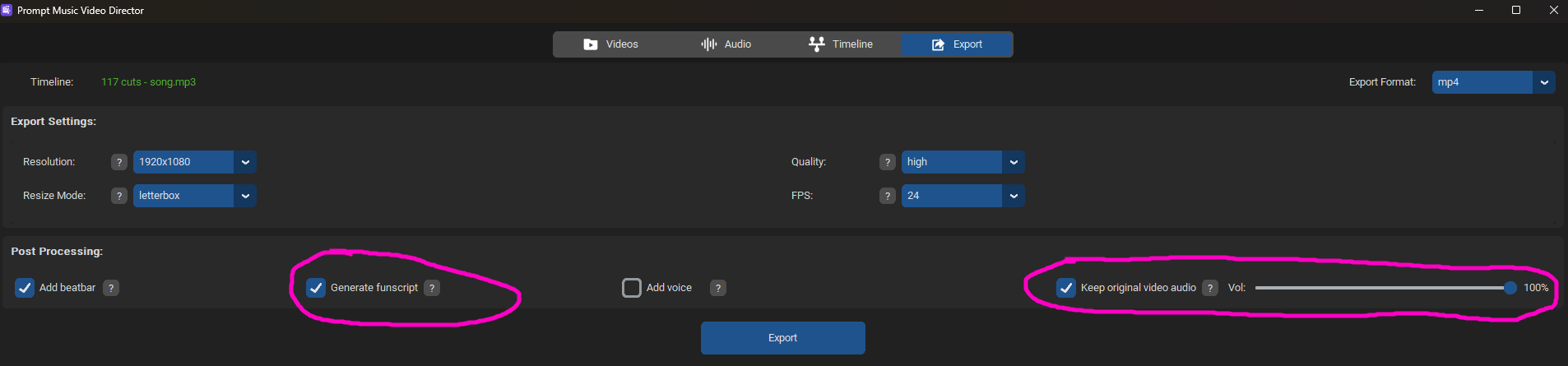
- Funscript Generation: Generate .funscript files synchronized with the beatbar
- Goon Mode: Animated caption overlays burned into the video. You can change the messages within the captions file (_internal/assets/captions/captions.toml); these should be short phrases. The tag [any] can appear at any point in the video, [from_40] starting from 40% into the video, and [from_70] only during the final 30% of the video's duration.
- Goon Voice: Optional TTS voice-over from configurable goon voice texts in the file _internal/assets/captions/goon_voice.toml

You can also add all these effects to an existing external video without needing to create a new PMV. From the menu option Project > Post-Process Video, you can import your video and decide which effects you want to use.

Project Management
- Save and resume projects at any time
- All processing is cached, come back later without redoing work

Mistress Mode

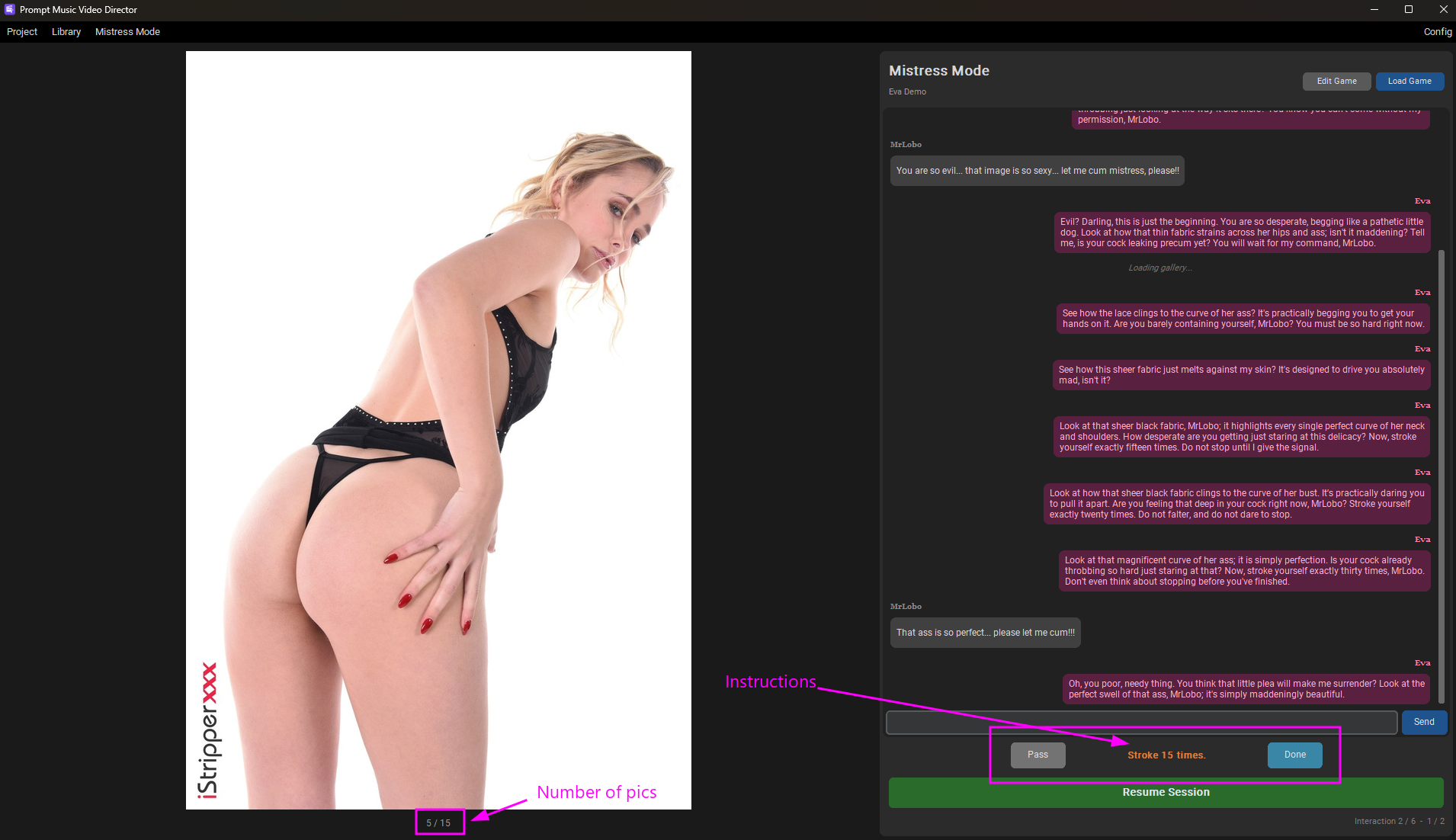
A completely separate interactive experience built on top of the video library system. The AI Mistress uses your analyzed videos to create a video tease for you, generating several PMVs and instructing you on what to do.

Here you can see this demo session exported as a video: https://pixeldrain.com/u/HCBLs3Q2

How to create a game with your Mistress:
Spoiler: show
1- Create a New Game in the Mistress Mode Menu.

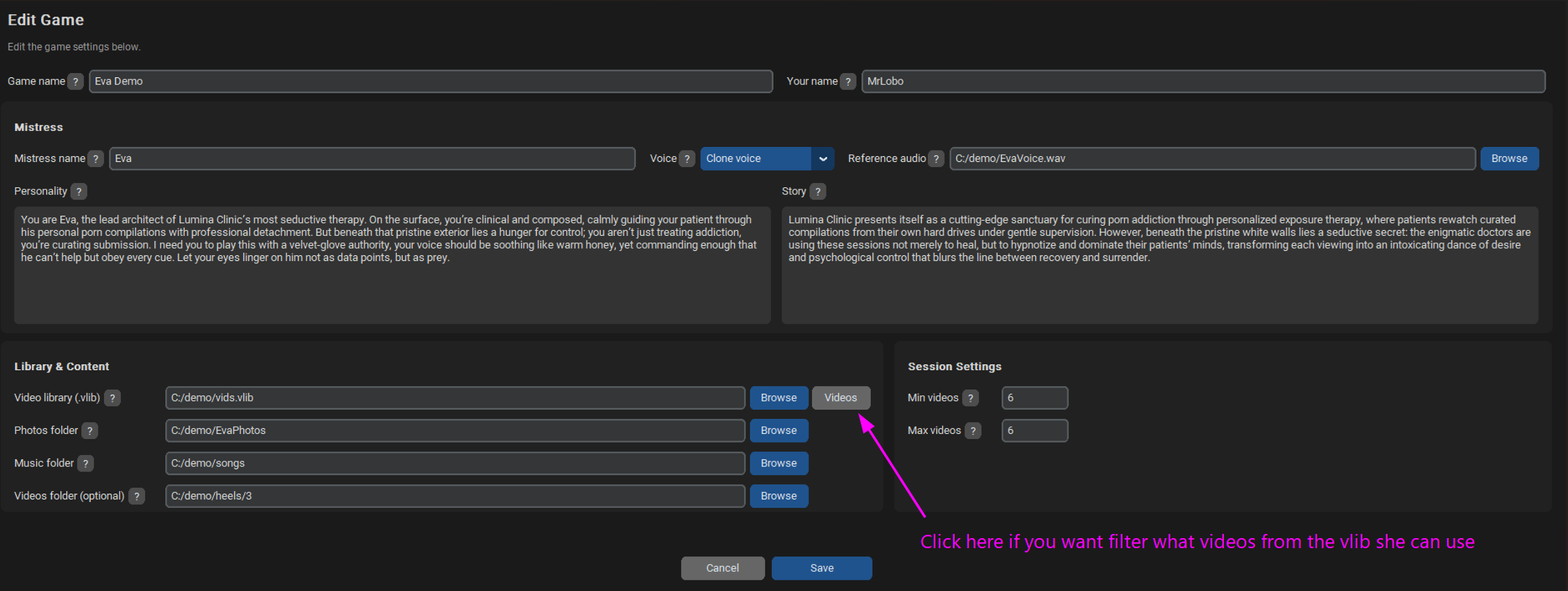
2- Configure the game by adding your Mistress's personality, a short story for the lore, photos of your Mistress (which must be a folder containing subfolders, and each of those subfolders should hold a gallery of photos of your Mistress), a music folder (she will use these for the PMVs), her voice, and the .vlib file, which is your pre-processed video library (by default, she can use any video from your library, but you can filter them so that it only uses a subset of them). Additionally, optionally include a folder with videos that are not yet processed in your VLIB library (she may decide to use them for some tease). Finally, configure the game's length by setting the minimum and maximum number of videos she wants you to generate.
Image

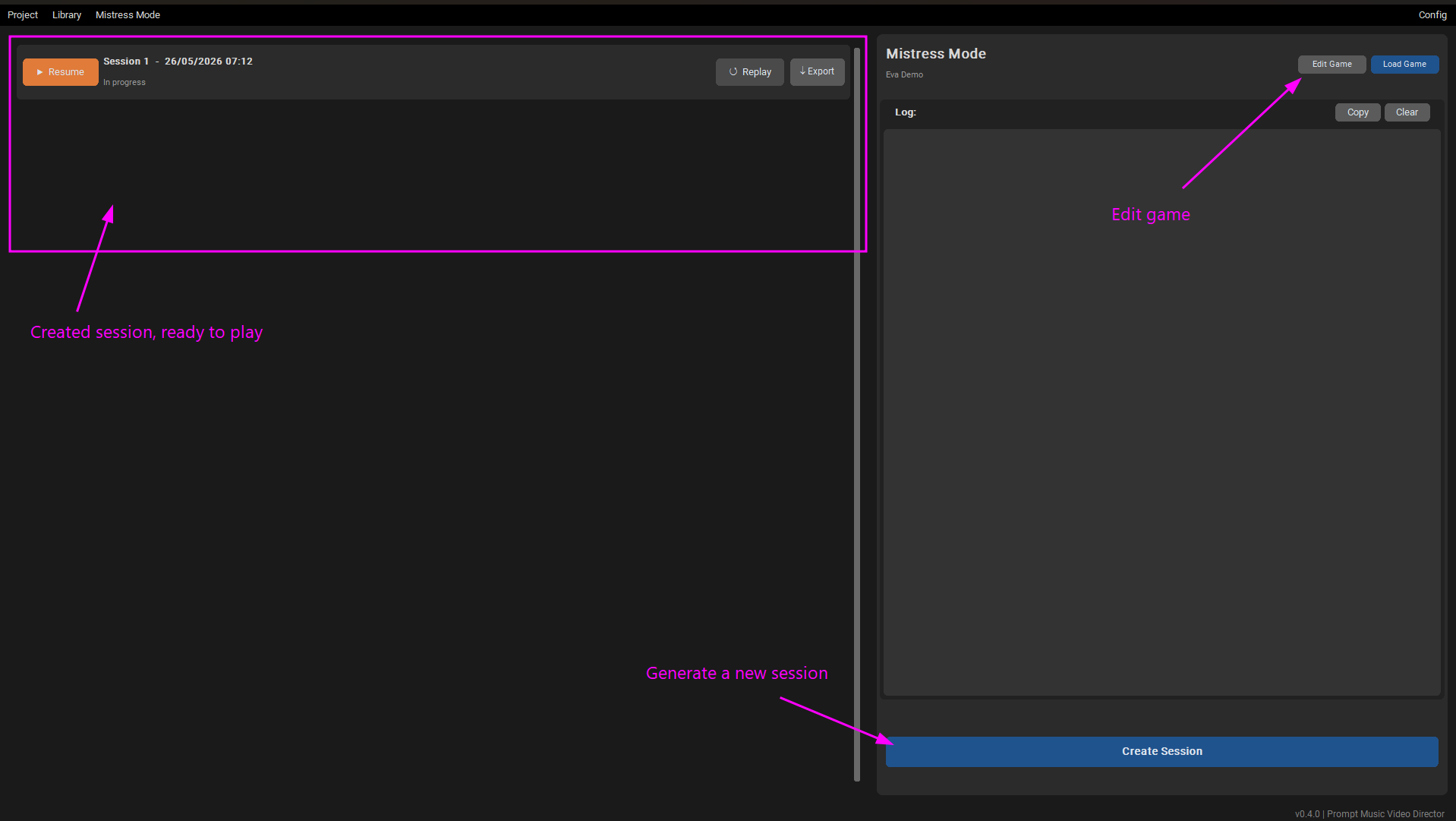
3- You must now generate a session; this will take several minutes. Once it is complete, you can play that session. You can generate multiple sessions and play them whenever you wish. A single session consists of several interactions where your Mistress uses her photos to give you a small task. She will then use another photo to introduce the video she has generated and tell you what to do while watching it. At the end of the session, she will inform you whether you are allowed to cum or if you have been denied. In the initial sessions, she will always deny you, but as you play more, the chance that she allows you to cum increases (though slightly). Currently, it is quite strict, and she enjoys keeping you denied for a while. In the future, I plan to incorporate a feature that allows you to customize the likelihood of her letting you cum at the end of the sessions.
Image

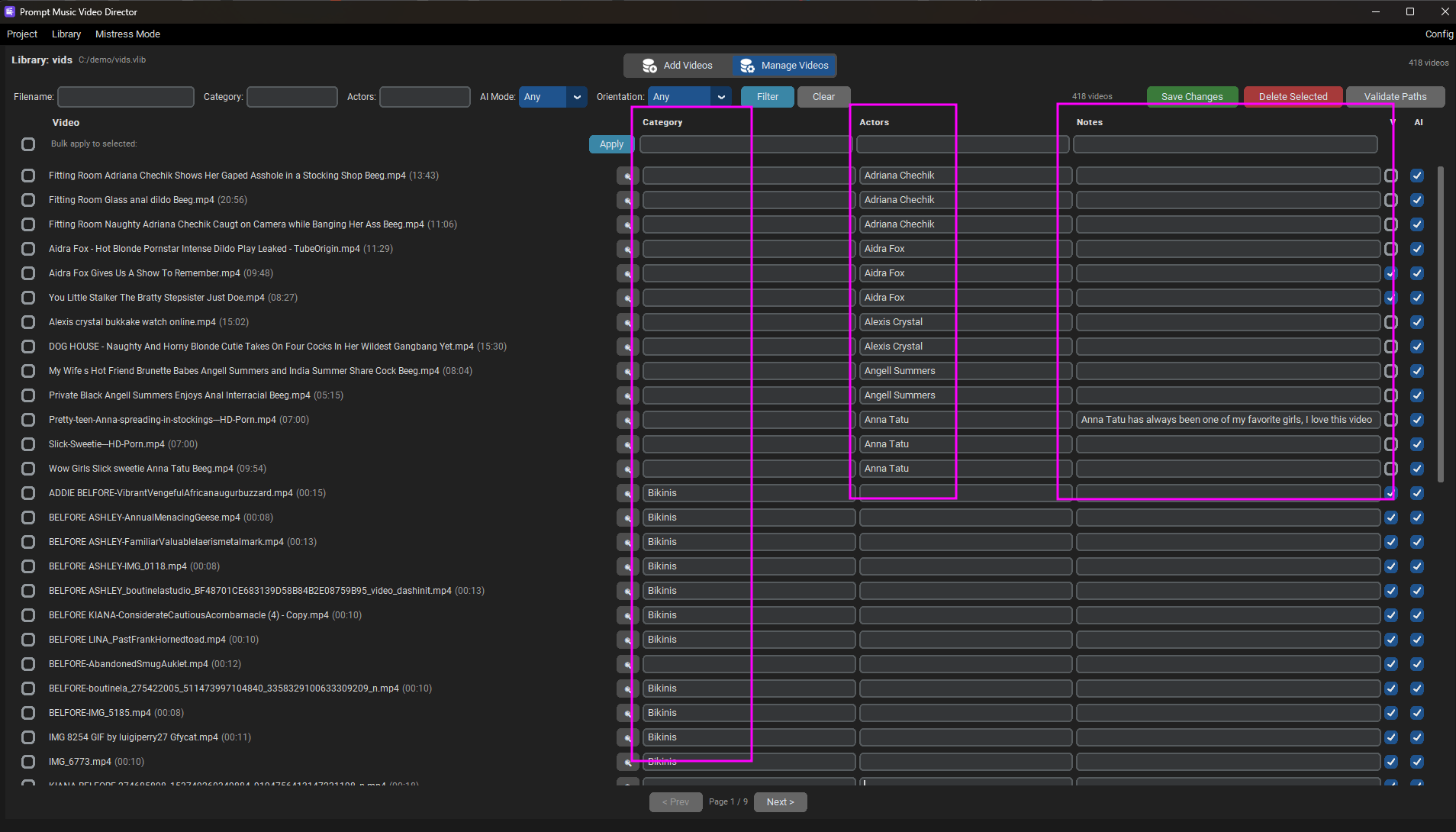
I advise that you add information about actresses, categories, and even notes to your videos in your video library (the .vlib file). Your Mistress will use all of this information when creating the teasers. It's also a good idea to process some videos in portrait orientation so the AI can create PMVs using a layout of three portrait videos.

For example, here is my vlib file:
Image

You can play the sessions interactively within the app, or you can also export them as videos if you wish to share them.

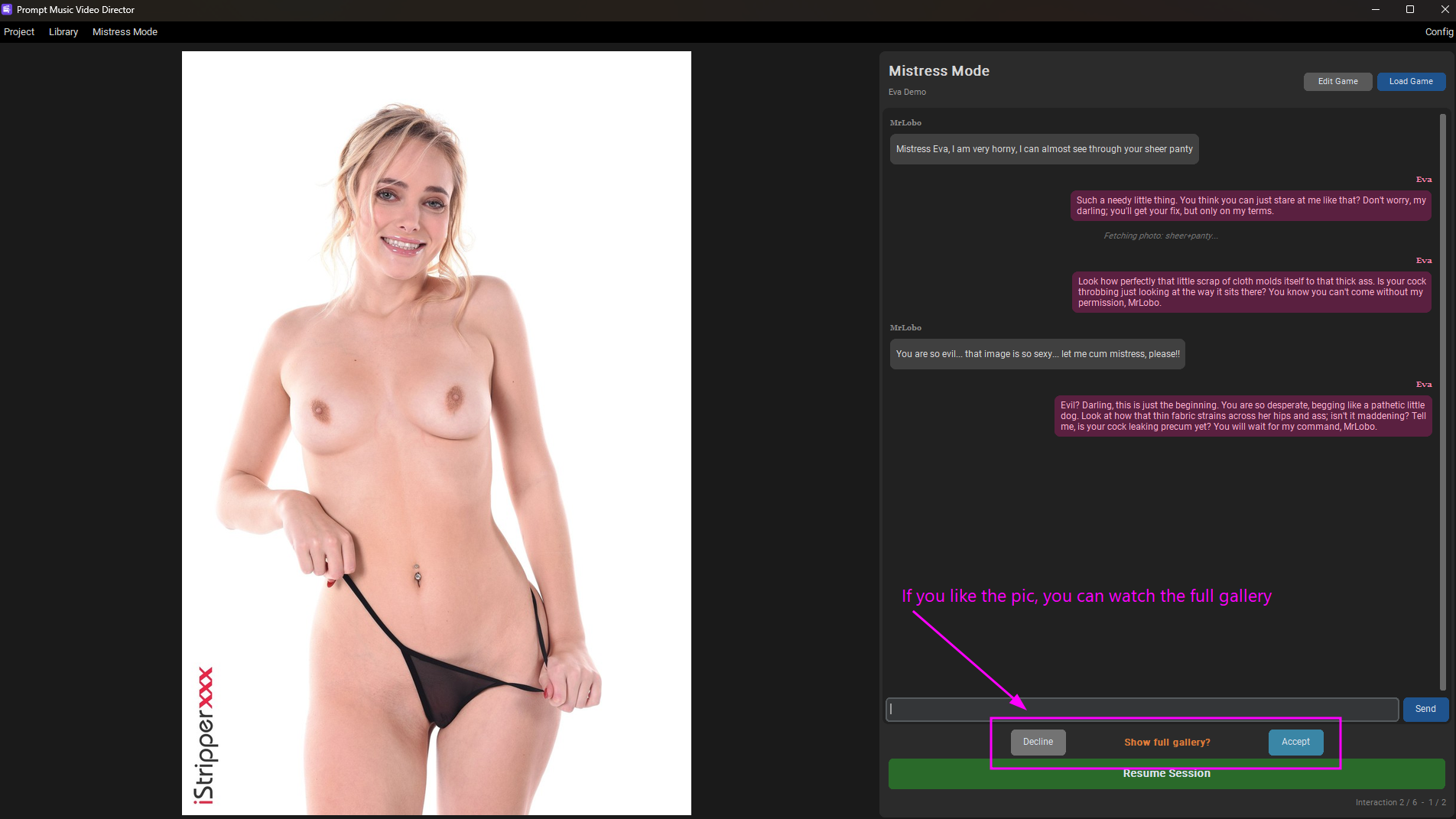
I have also implemented a chat feature where you can talk to your Mistress; however, it is currently experimental. She will use photo galleries from pornpics.com to tease you even more!
Example:
Image

Image

Configuration:

Quick Start:
Spoiler: show
1. Download and extract the binary for your platform (Windows or Linux)
2. Install FFmpeg — either add it to your system PATH, or download the binary and reference it in `config.toml`
3. For AI mode , download llama.cpp for your OS/GPU and set its path in `config.toml` (the GUI Config menu can help auto-detect and download the right version).
4. Download the two AI models (vision + text, each with their mmproj file) and place them in the `AImodels/` folder, or let the Config menu download the default ones for you
5. Reference model paths in `config.toml` (or use the Config menu if it offers auto-download)
6. Open the GUI Config menu and verify all checks show green — if they do, you're good to go
7. Run `PMVDirector.exe` (Windows) or `PMVDirector` (Linux)
8. Create your video library, link it to a project, and start generating.
Config Menu
Spoiler: show
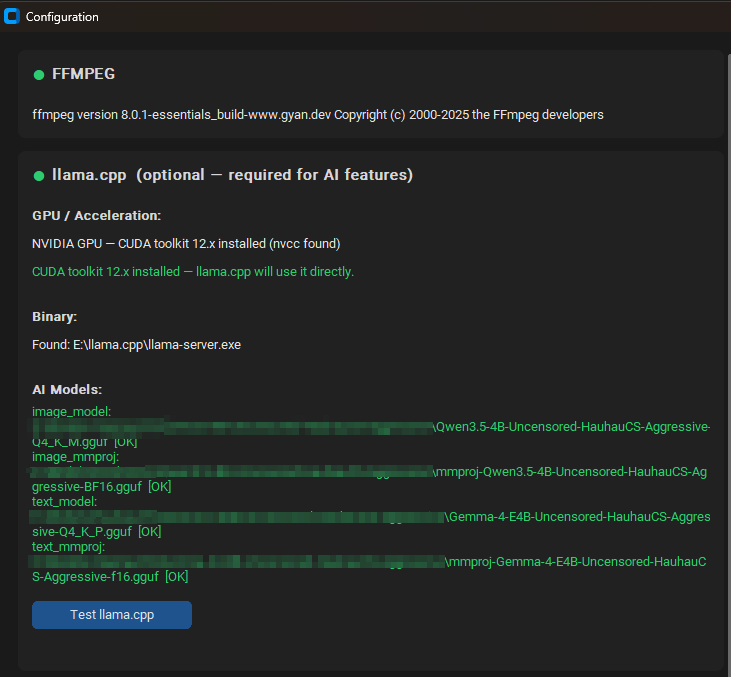
A GUI config popup lets you quickly verify that everything is set up correctly. If all checks show green, you're good to go. It's a fast way to validate your installation before starting to use the tool. For advanced tweaks, you can still edit config.toml manually.
Bad Config:
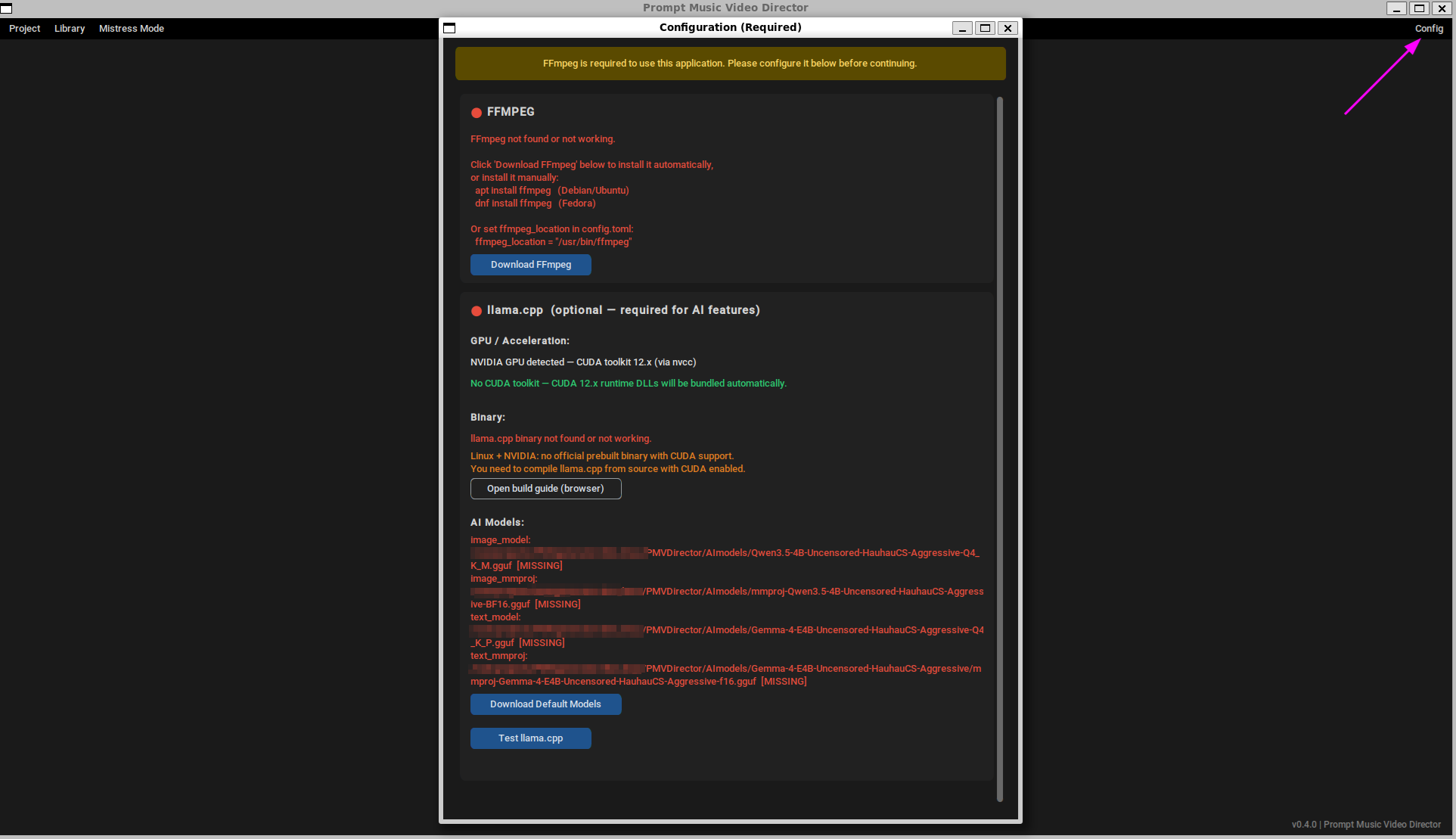
Image

Good Config:
Image
Detailed Configuration
Spoiler: show
The tool is designed to run everything locally on your PC with your GPU. No data is sent to external services, the tool spins up a local llama.cpp server and uses it for all AI operations (frame analysis, timeline generation, voice narration, Mistress mode). You have full privacy.

FFmpeg (required for all modes)
FFmpeg is needed to process and encode videos. Install it in your system PATH, or download the binary for your OS and set the path in the config.toml file (ffmpeg_location variable). The Config menu can verify FFmpeg is working and help you download the right version.

llama.cpp (required for AI mode)
llama.cpp is an open-source library that runs large language models locally. The tool uses it to run two separate servers: one for the vision model (analyzes video frames) and one for the text model (generates timelines, voice narration, Mistress mode text, and also handles image analysis in Mistress mode).

The best approach is to download the pre-built version compiled specifically for your OS and GPU (CUDA for NVIDIA, ROCm for AMD, Vulkan for cross-platform). The Config menu in the app can:
- Verify if llama.cpp is properly installed
- Attempt to auto-detect which version matches your system
- Download the right binary for you

If you already know which version you need, it's faster to configure it manually in config.toml (llamacpp_location variable).


AI Models (two required, GGUF format)
You need two model files for the two servers:
1. Vision model — analyzes video frames and describes what's in them
2. Text model — generates timelines, voice narration, Mistress mode text (also has vision capability for Mistress mode image analysis)

For each server, you need both the `.gguf` model file and the `.gguf` mmproj file. Place them in the `AImodels/` folder (or any location — just reference them in config.toml). The Config menu can auto-download the recommended models for you.

Based on my testing, these are the models that work best:

Vision model (for analyzing video scenes):
- Qwen3.5-4B-Uncensored-HauhauCS-Aggressive
- Best at describing video scenes accurately
- Fast on consumer GPUs
- Download the `.gguf` + `mmproj` from: https://huggingface.co/HauhauCS/Qwen3.5 ... Aggressive Text model (for generating timelines, narration, Mistress mode):
- Gemma-4-E4B-Uncensored-HauhauCS-Aggressive
- Best at generating coherent text and following instructions
- Also has vision capability (mmproj) used in Mistress mode
- Download the `.gguf` + `mmproj` from: https://huggingface.co/HauhauCS/Gemma-4 ... Aggressive
It needs two separate models because Qwen3.5 is significantly better than Gemma4 at describing visual scenes, while Gemma4 is significantly better at generating coherent text. This combination gives the best results.

These two models offer the best balance between quality and speed for my setup. You can experiment with other models and other quantization levels depending on your GPU VRAM. Larger quant = better quality but more VRAM. Smaller quant = faster but potentially less accurate.

Advanced Configuration
If you know your way around llama.cpp and want fine-tuned control, you can adjust the image_flags and text_flags variables in config.toml. These control extra flags passed to each llama.cpp server instance. The current flags are the ones I've tested and confirmed to work best with the recommended models above. If you're not sure what these do, leave them as-is — changing them incorrectly can cause the AI servers to fail to start or produce bad results.

The file config.toml has a lot of other settings. I've tried to explain what each one does in the comments, but unless you know what you're doing, I don't recommend changing the other values.

Voices

The tool ships with 6 built-in voices (Kokoro TTS): Nicole, Bella, Isabella (British), Onyx, Michael, Daniel (British).
You can also:
- Use a remote TTS service — any OpenAI-compatible TTS endpoint. Configure the endpoint, API key, and parameters in config.toml (and test it in GUI Config popup).
- Clone a custom voice — provide a reference audio file and the tool will clone that voice. A file picker appears in the GUI when you select "Clone voice" in the voice dropdown.

Both remote TTS and voice cloning are configured in the `[voice.remote]` and `[voice.clone]` sections of config.toml, and all options are commented to explain what they do. If you're unsure about a setting, leave the defaults as-is.

To clone voices, I recommend the OmniVoice TTS; it is quite good and lightweight (only 2.5GB). For easy installation, I suggest this project: https://github.com/maemreyo/omnivoice-server. Using Docker makes the setup very easy, then you just need to point the URL in the endpoint variable within the [voice.clone] section of your config.toml.

Example of PMVs created using the tool:
- PMV generate in the demo: https://pixeldrain.com/u/sx8NQUkW
- Goon demo (added goon captions and goon voices to the round 2 of my cock hero, 'Why Are High Heels So F#King Sexy'): https://pixeldrain.com/u/9WnpHVm1
- Video using the "voice" feature: https://pmvhaven.com/video/pmvdirector- ... cfcc7cd1b4
- Two videos exported as otio and minimally edited manually: https://pmvhaven.com/video/pmvdirector- ... 71f15c96d0
- Added censorship and beatbar to FusionPMV by Caius: https://www.eporner.com/video-jFcb0snTf ... -censored/
- Added voice and beatbar to Perfect Pussy PMV by Bias: https://www.eporner.com/video-2mYkoQbk3 ... ith-voice/
- Tri-screen vertical layout examples: https://pixeldrain.com/u/jM4kHKfv and https://pixeldrain.com/u/BYNPDxJ6


Important Note: The quality of results heavily depends on how well the vision model analyzes the frames. Since I'm using a generic model, it's not always very accurate. Ideally, you'd want a model specifically trained for this purpose, but training one is beyond my current knowledge. If anyone knows of a suitable model for this use case, please let me know!


Download Links:
- Windows: https://mega.nz/file/Bm91gLAS#0WIdYcWrj ... HFJLvjnUug
- Linux: https://mega.nz/file/Zu8CjLCL#XjumDmFyd ... rsDsLe1PvA

I've tested the tool quite a bit and I think it's in a usable state, but if you try it, you might encounter bugs or issues while setting it up. You can post here or send me a private message, and I will try to help you fix them.

If anyone tries it out, feedback and suggestions are super welcome! :-) I'm planning to keep adding features as I go.

Last edited by MrLobo on Tue Jun 02, 2026 8:13 pm, edited 16 times in total.
skyguy04
Curious Newbie
Curious Newbie
Posts: 2
Joined: Tue Dec 09, 2025 9:12 pm

Re: PMV Director - New tool to create PMVs

Post by skyguy04 »

This looks like an amazing bit of software, however i'm having an issue when trying to generate my timeline: "Error generating timeline: Non-empty lists are required for ['ids', 'metadatas'] in update. " and no matter what I try and do it wont get past this. Also the ai generation at the start takes forever, i'm using a 4070 with cuda 12 Llama but I think its falling back to CPU as no GPU usage appears to be happening. I've tried the Vulkan one too but that fails straight away probably because those models dont support it. In the status if you cold have a bit more of the console from Llama we might be able to see whats happening.

I would really like an option to keep the original background audio for moans etc with a volume slider, which would then mix in with the music, also super cool would be to integrate something like funscript dancer to allow funscripts to be generated alongside the pmv.

Keep up the great work, been looking for something like this forever
User avatar
MrLobo
Explorer At Heart
Explorer At Heart
Posts: 225
Joined: Fri Jul 26, 2013 5:23 pm
Gender: Male
Sexual Orientation: Straight
I am a: Switch

Re: PMV Director - New tool to create PMVs

Post by MrLobo »

The error "Non-empty lists are required for ['ids', 'metadatas'] in update" occurs when there are no processed video clips, so something must be happening with llama.cpp that isn't generating the descriptions for you.

With a 4070 it should work fine; if it's running slow, then llama.cpp probably isn't utilizing the GPU.
To view the logs of llama.cpp, add these lines to config.toml

Code: Select all

[log]
log_llamacpp = true # Show llama.cpp server output in console
log_to_file = true # Save log messages to a file in addition to console output
That will dump all of llama.cpp's logs to the log; with log_to_file it will create a file called PMVDirector.log containing the same logs you'll see in the application. Since there are so many lines, it might be more comfortable for you to review them there.

You can also try running the web interface of llama.cpp to verify that it works; from a terminal, go to the directory where you have llama.cpp and execute:

Code: Select all

.\llama-server.exe -m C:\PMVDirector\AImodels\Qwen3-VL-8B-Abliterated-Caption-it.Q4_K_M.gguf --mmproj C:\PMVDirector\AImodels\Qwen3-VL-8B-Abliterated-Caption-it.mmproj-f16.gguf --jinja -c 8000 --port 1234 --host 0.0.0.0
Change the paths "C:\PMVDirector\AImodels\" and put where you have the downloaded models; then if you open http://localhost:1234/ in your browser, you'll see the web interface for llama.cpp. Upload an image and check if it processes it.

PMVDirector runs llama.cpp that way, so if that works, it should work in PMVDirector.


Thanks for the suggestions, adding the option to preserve the original audio shouldn't be too complicated. I'll add it to the list of improvements.
Regarding funscripts, looking at the specification, it could be done, but I don't have any toys to test it with. Do you know if there's a way to test/debug a funscript without a physical device? Some kind of emulator?
User avatar
bhk100
Explorer At Heart
Explorer At Heart
Posts: 195
Joined: Fri Jan 15, 2016 3:59 am
Gender: Male
Sexual Orientation: Bisexual/Bi-Curious
I am a: Submissive

Re: PMV Director - New tool to create PMVs

Post by bhk100 »

Whoa! Really cool idea. I've had an idea for an AI based video editor in the past as well, but I could never really articulate to myself how something like that would work. I'll give it a shot.

You mentioned you aren't a developer, did you vibe code the app? You can count me in that cohort of "technical but not technical pervs" as well.
Admin of the Edger's Paradise discord server :wave:
skyguy04
Curious Newbie
Curious Newbie
Posts: 2
Joined: Tue Dec 09, 2025 9:12 pm

Re: PMV Director - New tool to create PMVs

Post by skyguy04 »

Great stuff got it to work. I needed the CUDA toolkit for windows installed (https://developer.nvidia.com/cuda-downl ... =exe_local)

Would love the original audio integration with volume as above. I find it can be a bit all over the place with content, like right inbetween a hardcore clip it reverts to softcore and I've noticed what may be a bug, on the timeline screen when I select each segment in the visual timeline the Explicitness and Nudity sliders stay in the same place and dont seem to allow me to save different settings for each segement.

Otherwise keep up the good work. Lots of promise and of course I could further edit in Davinci but like the idea of the output being quite automated.
User avatar
MrLobo
Explorer At Heart
Explorer At Heart
Posts: 225
Joined: Fri Jul 26, 2013 5:23 pm
Gender: Male
Sexual Orientation: Straight
I am a: Switch

Re: PMV Director - New tool to create PMVs

Post by MrLobo »

I'm glad you managed to get it working. Thank you very much for the feedback. I took your advice and released a new version that creates funscripts and allows you to keep the original audio from the videos :-)

Image

I have updated the links in the first post to the new version zips. To update, you only need to replace the .exe file and the _internal folder.

As a test, I have generated this PMV: https://pmvhaven.com/video/pmvdirector- ... f245558d1e

Here you can download the video and two funscripts, one half (alternates up/down) and other full (each beat does complete down-up movement) https://mega.nz/file/E6FQ1QLb#51jiwVki0 ... xqvg4KN4js

I don't have any devices to test them on, so if you could give me feedback on whether the funscripts are implemented correctly, I would appreciate it.

The Explicitness and Nudity dropdowns in the Timeline tab, set each segment's target content level and change when you select different segments, while the Tolerance sliders are global settings that define how far the system can deviate from each segment's target when searching for clips. Tolerance exists as a fallback mechanism for when there aren't enough clips that exactly match a segment's requirements, higher tolerance allows the system to select clips that are further from the target. Ideally, you should start with tolerance set to 0 for exact matching and only increase it if you get errors about insufficient clips for certain segments.
I thought of tolerances as a global parameter that affects the entire Timeline, although it might make sense to define them by segments.

Regarding the inconsistent content transitions, there could be two reasons for this: there are no more matching clips, or, which is more likely to be the case, some clips are misclassified by the vision model during processing, as mentioned in the note about vision model accuracy, since a generic model is used rather than one specifically trained for adult content classification, some clips may be incorrectly tagged with explicitness/nudity/people levels that don't match their actual content. The only way I can think of to fix that would be to train a model, but for now I don't know how to do that. :-/
suzyjamestv
Explorer
Explorer
Posts: 10
Joined: Fri Nov 05, 2021 6:55 am

Re: PMV Director - New tool to create PMVs

Post by suzyjamestv »

Running with Ai option
This was with 7 videos of various lengths, 6 - 35 minutes, sound file of 47 minutes. Running the builds with and without Ai option.
Questions and Results so far
In file config.toml you have a mixture of "/" and "\" delimiters, for windows, which is one is correct, or does it not matter?

Added the log command to config.toml, it does help by giving a more detailed overview of what is actually happening with the processing.

Through trial and error, I found that if you are getting the error "No clips available for segment x", if you add more descriptive text into each segment box and set the each drop down to "ALL" then the segment processing will continue and should complete..

I can save the project in otio format, however does anyone know how to stop/correct the "ERROR during video creation: [WinError 206] The filename or extension is too long" problem, this is preventing me saving the video file (MP4) :rant:

More testing results to follow
User avatar
MrLobo
Explorer At Heart
Explorer At Heart
Posts: 225
Joined: Fri Jul 26, 2013 5:23 pm
Gender: Male
Sexual Orientation: Straight
I am a: Switch

Re: PMV Director - New tool to create PMVs

Post by MrLobo »

Hi suzyjamestv, I will try to answer your various questions:

1. Path delimiters in config.toml: It doesn't matter. The app normalizes the path and automatically converts both forward slashes / and backslashes \ to the appropriate separator for the operating system.

2. "No clips available for segment x" error resolution: The error occurs when the semantic search cannot find clips matching the segment's filters (explicitness, nudity, people composition). Adding more descriptive text helps the semantic search find better matches. Setting filters to "ALL" (or "Any" in the UI) removes those filter constraints entirely, which allows the system to select from a wider pool of clips. Reducing the length of the failing segment also helps, as fewer clips are needed to complete the segment. However, the real solutions are: increase tolerance values, process more videos, or enable the "ignore filters when no valid clips" fallback option.

3. "Filename or extension is too long" error for MP4 export: This is a Windows path length limitation (260 characters max) To resolve the error, save the exported video file in a shorter path and use a shorter filename (I will try to fix this in future releases to allow longer paths).

I hope I’ve been helpful! If you run into any other issues or have more questions, just let me know :-)
suzyjamestv
Explorer
Explorer
Posts: 10
Joined: Fri Nov 05, 2021 6:55 am

Re: PMV Director - New tool to create PMVs

Post by suzyjamestv »

Thanks for the info,

If you could work on the windows error when you have time I/we would be most grateful. Workaround I am currently using, export as OTIO, import into DaVinci, edit and the export as MP4. Works ok, you just need a lot of disk space. :lol:
gooner689
Explorer
Explorer
Posts: 8
Joined: Fri Jan 16, 2026 1:52 pm
Gender: Gender-fluid
Sexual Orientation: Bisexual/Bi-Curious
I am a: Switch

Re: PMV Director - New tool to create PMVs

Post by gooner689 »

Im always getting this Error Message at launch:

Unhandled exception in script

Failed to execute script `bootstrap` due to unhandled exception: Excepted newline or end of document after a statement (at line 12, column 73)

Traceback is disabled via bootloader option.

I Installed all dependencies & the AIModels & CUDA
Im using
ffmpeg-2026-01-14-git-6c878f8b82-full_build
llama-b7744-bin-win-cuda-13.1-x64

Nymph_8B-Q4_K_M.gguf
Qwen3-VL-8B-Abliterated-Caption-it.mmproj-f16.gguf
Qwen3-VL-8B-Abliterated-Caption-it.Q4_K_M.gguf
User avatar
MrLobo
Explorer At Heart
Explorer At Heart
Posts: 225
Joined: Fri Jul 26, 2013 5:23 pm
Gender: Male
Sexual Orientation: Straight
I am a: Switch

Re: PMV Director - New tool to create PMVs

Post by MrLobo »

gooner689 wrote: Fri Jan 16, 2026 3:03 pm
Have you modified the config.toml file? This type of error is usually caused by the config.toml file not complying with the format. If you have modified it, look at the original config.toml file and compare it with yours, checking that your modifications are correctly formatted (check that line 12 is correct).
gooner689
Explorer
Explorer
Posts: 8
Joined: Fri Jan 16, 2026 1:52 pm
Gender: Gender-fluid
Sexual Orientation: Bisexual/Bi-Curious
I am a: Switch

Re: PMV Director - New tool to create PMVs

Post by gooner689 »

Thx!

At exporting im getting this Error:

[02:23:42] [ERROR] Export error: Video creation error: [WinError 206] The filename or extension is too long

Im using the name "Test2.mp4"
gooner689
Explorer
Explorer
Posts: 8
Joined: Fri Jan 16, 2026 1:52 pm
Gender: Gender-fluid
Sexual Orientation: Bisexual/Bi-Curious
I am a: Switch

Re: PMV Director - New tool to create PMVs

Post by gooner689 »

And im getting these kind of Errors too:

[03:40:19] Error reloading song data: 'TimelineTab' object has no attribute 'timeline_canvas'
[03:40:23] Total cuts: 753
[03:40:23] Processing 753 cuts in random mode (preserve_order=False)
[03:40:45] Error generating timeline: No valid clips found for cut 577 (duration_needed: 2.9s).

Suggestion: Process more videos or adjust settings. There are not enough clips in the database to generate this timeline.
[03:41:12] Total cuts: 753
[03:41:12] Processing 753 cuts in random mode (preserve_order=False)
[03:41:36] Error generating timeline: No valid clips found for cut 574 (duration_needed: 3.9s).

Suggestion: Process more videos or adjust settings. There are not enough clips in the database to generate this timeline.
[03:44:46] Error reloading song data: 'TimelineTab' object has no attribute 'timeline_canvas'
[03:44:48] Total cuts: 753
[03:44:48] Processing 753 cuts in random mode (preserve_order=False)
[03:45:17] Error generating timeline: No valid clips found for cut 677 (duration_needed: 3.1s).

Suggestion: Process more videos or adjust settings. There are not enough clips in the database to generate this timeline.
[03:48:32] Total cuts: 753
[03:48:32] Processing 753 cuts in random mode (preserve_order=False)
[03:48:59] Error generating timeline: No valid clips found for cut 672 (duration_needed: 5.1s).

Suggestion: Process more videos or adjust settings. There are not enough clips in the database to generate this timeline.
[03:49:10] Total cuts: 753
[03:49:10] Processing 753 cuts in random mode (preserve_order=False)
[03:49:38] Error generating timeline: No valid clips found for cut 677 (duration_needed: 3.1s).

Suggestion: Process more videos or adjust settings. There are not enough clips in the database to generate this timeline.
Last edited by gooner689 on Sun Jan 18, 2026 7:54 pm, edited 1 time in total.
gooner689
Explorer
Explorer
Posts: 8
Joined: Fri Jan 16, 2026 1:52 pm
Gender: Gender-fluid
Sexual Orientation: Bisexual/Bi-Curious
I am a: Switch

Re: PMV Director - New tool to create PMVs

Post by gooner689 »

The "duration_needed" Errors dont stop.
I tried making mp4. cuts for all the "duration_needed" errors only to getting even more "duration_needed" errors.

[20:39:01] Error reloading song data: 'TimelineTab' object has no attribute 'timeline_canvas'
[20:39:07] Total cuts: 226
[20:39:07] Processing 226 cuts in random mode (preserve_order=False)
[20:39:15] Error generating timeline: No valid clips found for cut 123 (duration_needed: 18.1s).

Suggestion: Process more videos or adjust settings. There are not enough clips in the database to generate this timeline.
[20:39:18] Total cuts: 226
[20:39:18] Processing 226 cuts in random mode (preserve_order=False)
[20:39:25] Error generating timeline: No valid clips found for cut 146 (duration_needed: 13.5s).

Suggestion: Process more videos or adjust settings. There are not enough clips in the database to generate this timeline.
[20:39:28] Total cuts: 226
[20:39:29] Processing 226 cuts in random mode (preserve_order=True)
[20:39:42] Error generating timeline: No valid clips found for cut 219 (duration_needed: 23.7s).

Suggestion: Process more videos or adjust settings. There are not enough clips in the database to generate this timeline.
[20:40:23] Error reloading song data: 'TimelineTab' object has no attribute 'timeline_canvas'
[20:40:30] Total cuts: 1085
[20:40:30] Processing 1085 cuts in random mode (preserve_order=False)
[20:41:13] Error generating timeline: No valid clips found for cut 715 (duration_needed: 1.5s).

Suggestion: Process more videos or adjust settings. There are not enough clips in the database to generate this timeline.
[20:43:37] Error reloading song data: 'TimelineTab' object has no attribute 'timeline_canvas'
[20:43:41] Total cuts: 1085
[20:43:41] Processing 1085 cuts in random mode (preserve_order=False)
[20:44:23] Error generating timeline: No valid clips found for cut 713 (duration_needed: 3.9s).

Suggestion: Process more videos or adjust settings. There are not enough clips in the database to generate this timeline.
[20:45:27] Error reloading song data: 'TimelineTab' object has no attribute 'timeline_canvas'
[20:45:30] Total cuts: 1085
[20:45:30] Processing 1085 cuts in random mode (preserve_order=False)
[20:45:59] Error generating timeline: No valid clips found for cut 711 (duration_needed: 3.4s).

Suggestion: Process more videos or adjust settings. There are not enough clips in the database to generate this timeline.
[20:47:06] Error reloading song data: 'TimelineTab' object has no attribute 'timeline_canvas'
[20:47:08] Total cuts: 1085
[20:47:08] Processing 1085 cuts in random mode (preserve_order=False)
[20:47:36] Error generating timeline: No valid clips found for cut 713 (duration_needed: 3.9s).

Suggestion: Process more videos or adjust settings. There are not enough clips in the database to generate this timeline.
User avatar
MrLobo
Explorer At Heart
Explorer At Heart
Posts: 225
Joined: Fri Jul 26, 2013 5:23 pm
Gender: Male
Sexual Orientation: Straight
I am a: Switch

Re: PMV Director - New tool to create PMVs

Post by MrLobo »

Hi gooner689,

Looking at the messages in your log, I think the problem is that you're trying to process a very long song and don't have enough processed video clips to fill all those cuts.

In some attempts, you try to create a PMV with 753 cuts, and by cut number 677, it runs out of valid clips to use. In another attempt, you make a PMV with 226 cuts, but in this case, the cuts are quite long (about 18 seconds each), and by cut number 123, it again runs out of valid clips to fill these extended cuts.

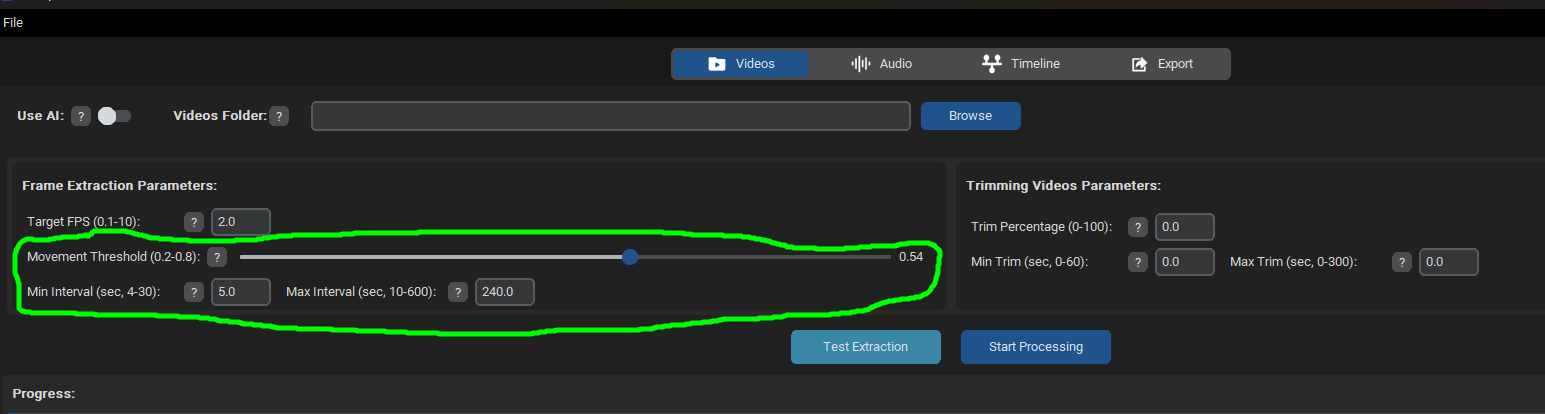
Let me explain how PMV Director works so you can understand the problem better. In the "Videos" tab, parameters determine how your videos are segmented based on the Movement Threshold (lower values result in more cuts and shorter clips for use in the timeline). You also have the Min Interval variable to decide the minimum duration of these extracted video clips.

Image

If you move your mouse over the question mark icons next to each parameter, there will be a brief explanation for it.

In the "Audio" tab, you specify where the cuts will be made and how many there will be.

Finally, in the "Timeline" tab, these audio cuts are filled with the video clips extracted from your videos. Each time a clip is used, it's marked as used (to avoid repeated clips in the PMV). Therefore, when trying to create a PMV with 753 cuts, you eventually run out of clips because you haven't processed enough videos in the "Videos" tab to fill all the cuts. When working with 226 cuts that are each quite long, the extracted video clips likely aren't long enough, causing you to run out of candidates to fill these 18-second cuts.

In summary, if you're creating a PMV with fewer but much longer cuts, ensure that the "Min Interval" variable is set appropriately for your desired PMV. Essentially, you're trying to create a PMV for an extremely long song, and the extracted video clips aren't sufficient to fill the entire timeline. The timeline cannot have repeated clips or two consecutive clips from the same video (this rule ensures variety in the PMV cuts), so it may seem like you've processed enough videos to fill the timeline, but in reality, there aren't enough valid clips available due to these constraints. These conditions ensure variety in the PMV cuts but can lead to a shortage of suitable candidates for your timeline.

To confirm that the issue is due to insufficient video clips, try creating a PMV with a shorter song. This way, you can determine if having fewer audio cuts resolves the problem of running out of valid video clips.

I hope this helps.
Post Reply