TAIPEJ - an IDE for TeaseAI v1.3.0

Webteases are great, but what if you're in the mood for a slightly more immersive experience? Chat about Tease AI and other offline tease software.

Moderator: 1885

N3R0
Explorer
Explorer
Posts: 51
Joined: Tue Jun 02, 2015 1:28 pm
Gender: Male
Sexual Orientation: Straight
I am a: Switch
Location: Germany

TAIPEJ - an IDE for TeaseAI v1.3.0

Post by N3R0 »

Hi everyone :wave:

I've been a frequent reader in this forum and have played webteases for years and even registered 7 years ago, but never posted anything.
So let's change that.
Please apologize if the formatting of this post turns out in a way that is... uhm... "not very pleasent to read". Despite being almost 30 years old now and being a tech-savvy person, this is my second forum post OF ALL TIME. (and yes, that involves other forums, cause Milovana is the first forum I ever registered to, LOL) :blush:

So I've been using TeaseAI for a while and eventually got bored of how repetitive most personalities become over time. So I eventually decided to program my own. But after a few vocab files, some small scripts and a long "first time" start script I got tired of how slow things went, because all I had was faulty syntax highlighting and insufficient auto-completion in Notepad++ and TeaseAI's built-in command guide, which is incomplete and in a few places even wrong. And there was absolutely no help for debugging.
Somewhere on Milovana there is/was a program called "Personality Creator". But first it was hard to find a compiled version (instead of just the source code) and then I wasn't satisfied with what it could do.

So some time ago I put the personality on hold and starting programming:

TAIPEJ -- TeaseAI Personality Editor in Java

Despite the name, TAIPEJ is not just a smart text editor like Geany, Gedit, Notepad++ (sort of) or Sublime Text. It is a complete IDE designed specifically for TeaseAI personality development!

(If anyone cares: I chose the name "editor" to avoid confusion with the "Personality Creator" and I added the "Java" to the name, because googling for "Taipe" [without the J] will just get you tons of false matches [there is a city called Taipei, in case you aren't aware], whereas searching "Taipej" will get you the right result - at least after you told Google that it's not a typo ;-) )

At first I thought about creating a plugin for Eclipse, but since I have never done that before and most TeaseAI script writers probably don't have it installed already and because TeaseAI scripts differ a LOT from normal source code, I wrote the whole thing from scratch, only utilizing a library or two.

Features
Spoiler: show
So here's a summary of what it can do:
  • correct Syntax highlighting (i.e. only valid commands will show up as commands,while

    Code: Select all

    @Nonsense
    will not)
  • auto completion [in a later version] of: Flags, Variables, Goto-points, Commands, Filters, Keywords (both, user and system), Media categories and (maybe) more
  • provides a bunch of useful keyboard shortcuts to speed up your editing
  • find out what's wrong with your scripts: lists all problems found in your scripts and devides them into "errors", "warnings" and "info" (as of writing this, 35 different types of problems can be detected - and I'm just getting started)
  • color-coded file names and line numbers depending on the file type (extension) and whether any errors or warnings were found in it (if it's a script).
  • the bits of your script that are faulty will be underlined, deprecated stuff will be strikethrough and hovering over anything that is deprecated or has known issues shows a tooltip that explains what's wrong or what you should use instead
  • the point above and the syntax highlighting are customizable via CSS, so if you don't like the strikethrough or the colors i chose: just change them
  • a complete list of all the commands, filters, system keywords and their parameters, if any
  • designed for small updates: when a new TeaseAI version comes around, you only have to update one tiny file and it works; if a bug in TAIPEJ itself needs to be fixed or if there is a new feature in it, you only need to replace another small file. No need to re-download everything!
  • compatible with left-handed mouse settings (I don't know about other programming languages, but in Java you need to explicitly provide support for that as a developer, even though it is a system setting)
  • of course there will also be a search-and-replace feature, including "search in all files" and support for regular expressions.
  • TAIPEJ is (almost) completely portable
Cool, right? 8-)
I will probably make the keyboard shortcuts adjustable (including a possibility to create your own).
MAYBE I will also add a spell check. But if so, only for English, because
  • most personalities are written in English
  • I would like to be able to confirm that it works correctly, so I need to be able to speak the language
  • the only other language I speak is German. And writing a spell check for that is nearly impossible thanks to our so-called "compound nouns" :-/

In order to not repeat myself too much, I will attach a copy of TAIPEJ's built-in manual. (check out the "keyboard shortcuts" and "known issues" sections before you start using TAIPEJ)

I hope you like my idea. Some people may have moved on to TeaseAI-Java and other successors of TeaseAI, but TeaseAI still seems to be easier to write scripts for (at least for people with little to no experience in programming) than TAI-J. And even for professional software devs like me some things are just a lot simpler / quicker to do in the original TeaseAI.
And even if nobody uses it to create a new personality (I really hope someone does, though) you can at least use it to debug existing ones.

Almost forgot to add a
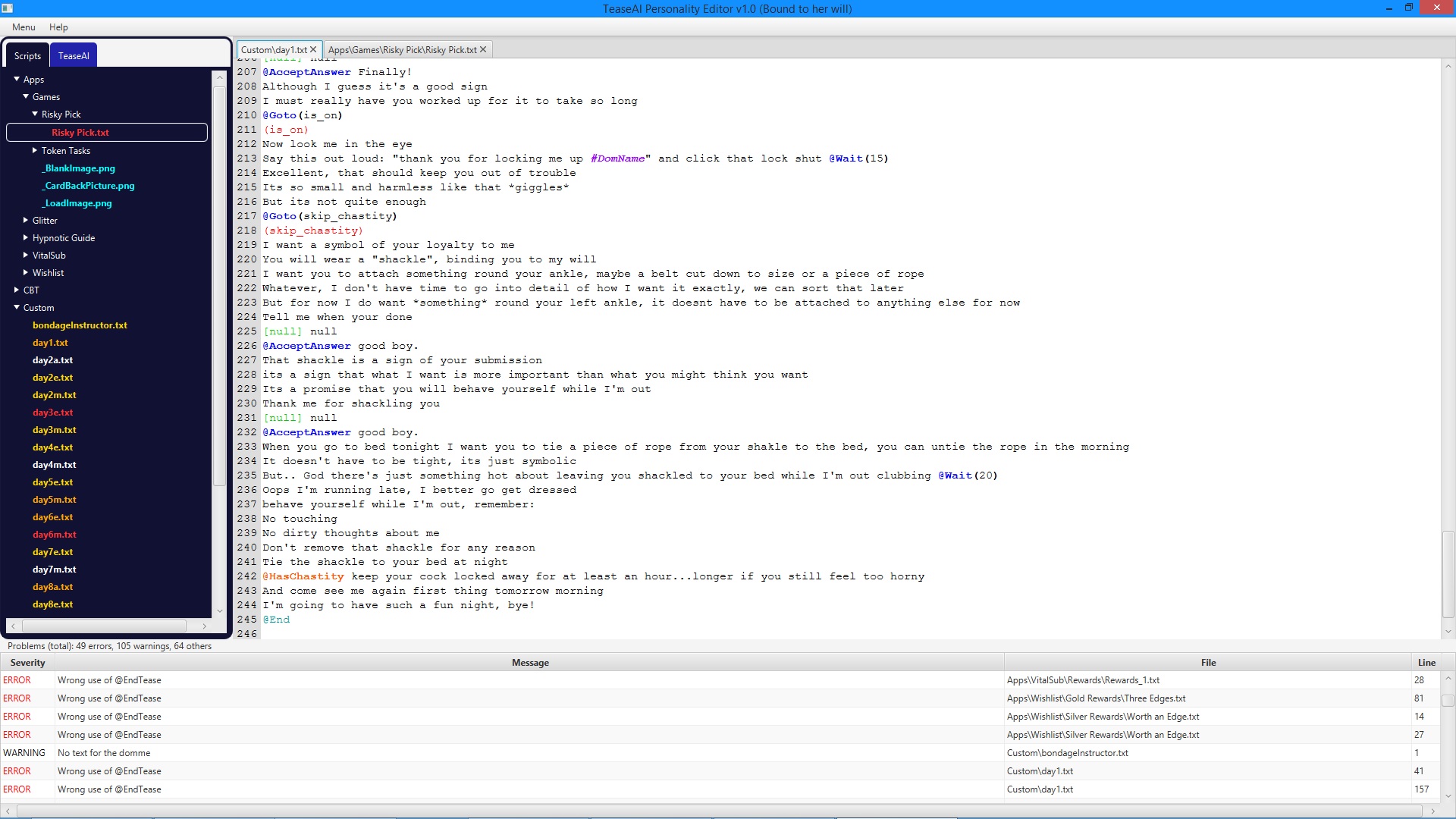
Screenshot

(taken from the "bound to her will" personality)
screenshot.jpg
screenshot.jpg (432.77 KiB) Viewed 79790 times

Previous updates
Spoiler: show
Update April 11th, 2022

Great news: the first beta release is here!


Update May 1st, 2022
Spoiler: show
Good news: thanks to user theredreaper, I was able to fix a couple of bugs (all the ones he reported and a few more, which I found myself in the process).
I also added a built-in changelog, which you can check out for a more detailed list of what I fixed.

I updated the download links below to point to the latest version (which is now 1.1.0).
If you have already downloaded TAIPEJ at some point, you only need to
  1. download the attached file "TAIPEJ 1.1.0.dot"
  2. rename it to "TAIPEJ.rjf" (note the different extension, milovana wouldn't let me upload it with its original one)
  3. close all running instance of TAIPEJ, if any
  4. and replace the existing file with this one.
Update October 15th, 2025

I finally found the time to upload a new version. Sorry for the long wait :look:

These are the changes:
Changelog version 1.2.0
Spoiler: show
New features
  • Added a new main layout component / area: the developer tools (or "dev tools" for short). Its visibility can be toggled by pressing F12 or via the menu bar.
    Note: Because this layout component has its own visibility toggle, it won't automatically disappear when you activate "maximized code" mode.
  • Added a color-coded command guide (alphabetically sorted, of course) to the developer tools. It uses the same colors as the code area. If you use custom CSS for the syntax highlighting, the command guide will use your custom colors automatically.
    If you double-click on an entry, it will be inserted into the current script at the current caret position.
    Right-clicking it will show additional information.
  • Added a filter to the command guide. (thanks to markus for the suggestion)
    Click on "filter" at the top of the guide to expand or collaps the filter settings. The changes are applied automatically, so there is no "apply" button.
  • Added a new tab to the dev tools: "Outline". This allows you to jump to certain parts of your current script. Check the manual for details.
  • Added auto-completion for the code area (step 1, 2 & 3 out of 8). Press CTRL + space to complete a command, filter or keyword. More details can be found in the manual.
  • TAIPEJ now checks for updates for itself every time you launch it.
  • Added a new option to the settings menu, which allows you to configure how often you would like to be notified about new TAIPEJ versions.
  • Added a new keyword shortcut: CTRL + ENTER (only works for Linear scripts). Check the manual to see what it does.
  • In the debug settings (where you select the personality you wish to edit) you can now tell TAIPEJ to remember the last used "target TeaseAI version".
  • TAIPEJ can now recognize user keywords in the first line of a regular response file. (this syntax was introduced in TeaseAI 55.0)
    This allows TAIPEJ to raise errors / warnings if the keyword file doesn't exist or if you used this syntax even though your selected TeaseAI version doesn't support it.
  • TAIPEJ can now recognize both types of keywords in multiple-choice answers. (this syntax was introduced in TeaseAI 55.0)
    This allows TAIPEJ to raise errors / warnings if the keyword file doesn't exist or if you used this syntax even though your selected TeaseAI version doesn't support it.
  • TAIPEJ now supports TeaseAI version 55.3 (Unofficial Patch) as "target version".
  • TAIPEJ now supports TeaseAI version 55.5 (Unofficial Patch) as "target version".
  • You can now left-click on your code while holding down CTRL to interact with it. What happens, depends on what you click on:
    Command / System Keyword / Filter: opens the info popup, which also appears when right-clicking on an entry in the command guide
    User Keyword: opens the file (if it exists) / jumps to the tab (if already open)
Changes / improvements
  • The changelog window can now also be closed by pressing the ESC key.
  • Added a few more dividers to the menus of the menu bar for a better visual structure.
  • Improved the descriptions of the Java libraries, which show up when you press the corresponding "?" button in the resource manager.
  • If there are multiple instances of the same TAIPEJ installation open at the same time, the settings will now be synchronized.
  • Improved the readability of the built-in changelog by adding some space between the individual list items.
  • TAIPEJ can now detect 4 new types of problems regarding response files.
  • TAIPEJ will now ask you to accept the EULA again, whenever the EULA has changed.
  • The "maybe" branch of the code block, which gets inserted when pressing CTRL + 3 now also includes "might be, might have, could be, may have".
  • Updated the EULA. TAIPEJ is now licensed under the 2nd version of the Closed Source Freeware License, instead of the 1st.
    (the new version fixes a typo and adds the missing word "copy" to the second line of the 5th paragraph)
  • In both file trees the folders will now be displayed above the files.
    This way you don't have to scroll past all your vocab files to get to the response files.
  • Improved the portability of TAIPEJ. You can now have more than one independent TAIPEJ installation on a single PC. (thanks to theredreaper for the inspiration)
    If you already have more than one: update them all, launch the one you use most often first, then the others.
    You will have to either copy the config file to the other installations by hand or manually adjust the settings of the other installations, because the formerly shared settings will now only apply to whichever installation you launched first after the update.

    Because of this independence, you can now use different TAIPEJ installations to debug different TeaseAI installations, e.g. one TAIPEJ for the official edition and one TAIPEJ for Sweet Patch.
  • Updated the bundled TCD file for TeaseAI 54.9 to version 2.
    Version 1.0 (which you can now safely delete via "View" > "show resources") was missing some data, which would have caused TAIPEJ to crash, if you tried to filter the command guide entries by a version number.
  • The parser is now a little bit faster when processing lines with multiple-choice answers in them.
Fixes
  • Added the missing title to the resource manager window.
  • Fixed bug that allowed you to delete the currently loaded TCD file via the resource manager.
  • In some rare cases TAIPEJ would claim, that it's running as an Admin on Windows, even though it wasn't, due to a bug in Windows or Java itself. This has been fixed by using a different detection method.
  • Fixed a "known issue": Doing "undo" or "re-do" no longer positions the caret at a weird location. It now ends up where you expect it to be, even though TAIPEJ still uses the version of RichTextFX, which has this bug.
  • Fixed a usability issue: When switching to a different tab (script), the text area is now automatically focused.
    So after clicking on a different tab or using the keyword shortcut CTRL + [+ SHIFT] + TAB, you can now directly continue typing, without having to click into the text area first.
  • Fixed the bug that the content of the file trees sometimes wasn't alphabetically sorted.
  • Fixed crash: When switching from personality A to B and back to A without closing TAIPEJ in between, TAIPEJ would crash.
  • Fixed a bug: Under certain conditions TAIPEJ would show an error message and fail to parse a script, if an opening HTML tag in a script had a typo in it, so that it no longer identified as an HTML tag. Now this works as intended.
  • TAIPEJ no longer shows an error message and fails to parse a script, if a command / filter / keyword / Response key has more than 127 arguments.
  • Fixed crash: If an error occurrs while re-parsing a script when you open it, the script is now displayed without syntax highlighting instead of causing a crash.
Removed features
  • The problem type "Empty multiple-choice selector" has been removed. If your selector is (completely) empty, it will now show up as "Invalid multiple-choice selector", just like partially empty ones did and still do.

Update October 19th, 2025

There's already a new version available: 1.2.1

Changelog
Spoiler: show
New features
  • You can now use CTRL + L to jump to a specific line (number).
  • The command guide and the auto-complete feature now both show no longer just show the type for each argument, but also their names (unless their purpose is super obvious), to give you a better idea of what the command (or rather its argument) does.
  • When using auto-complete, it will now insert the only possible value for each argument, that only has 1 possible value, instead of its type and name.
  • Under "Tools" > "Command Guide Legend" you can now find a pop-up window with some more info about how to read the command guide. This should make things easier for those, who are new to TeaseAI scripting.
  • Added support for another script type: Playlists.
Changes / improvements
  • The details-popup of the command guide now also shows the relative paths for all arguments requiring scripts / media files / etc.
  • Added @ControlFlag() to the list of commands, which can be inserted via CTRL + ALT + F.
  • When inserting a command / filter / system keyword via auto-complete, there will now be some extra spaces for better readability.
  • Improved problem detection regarding the @DecideOrgasm version without any arguments.
  • TAIPEJ now comes with a *.reg file, which Windows users can execute during un-installation to remove the registry entries from their system.
Fixes
  • Fixed false negatives in the problem detection regarding @GotoDommeOrgasm, @GotoDommeRuin and @GotoSlideshow.
  • Fixed a crash that was caused by filtering the command guide by version number, when the target TAI version was set to something more recent than 54.9.
  • Fixed a bug: When using "search in all files" unsaved changes were being ignored.

Update November 2nd 2025

There's a new version with all sorts of changes:
Spoiler: show
New features
  • Added support for another script type: System Response files.
  • Added a dark mode.
  • Added support for the Sweet Patch
  • TAIPEJ can now detect wrong response markers and incorrectly nested response markers.
  • TAIPEJ can now detect a new problem regarding @PlayVideo(): the JOI-and-CH bug.
  • Added a new shortcut: CTRL + ALT + I. This will let you insert a command or keyword related to images.
Changes / improvements
  • The details-popup of the command guide now also shows the possible values for all ENUM arguments.
  • The details-popup of the command guide now also shows the type of a System Keyword's return value or tells you that it requires a corresponding vocabulary file.
  • Adjusted the styling of the "Table of problems" to match the command guide.
  • When a command / filter / etc. has arguments, the commas used to separate them (if any) and the brackets are now highlighted in the same color as the command.
  • The Error Log no longer shows messages for people with a German keyboard layout, who try to type @ or €.
  • The list of commands, filters and keywords, which is displayed when using a CTRL + ALT + ? shortcut, is now alphabetically sorted.
  • When inserting commands, filters or keywords, which have no arguments, by using a CTRL + ALT + ? shortcut, a space is now automatically appended.
  • When using CTRL + click on a command / filter / etc., for which TAIPEJ has detected a problem, it will now display the same message that will show up, if you right click on the entry in the List of Problems, instead of just telling you to fix the problem.
  • You can now use CTRL + click on any type of token which raised an error / a warning to show the problem details message.
  • Updated the bundled version of RichTextFX from 0.9.0 to 0.9.3
  • Made some internal changes to the Line number handling in preparation for a future update of RichTextFX to version 0.10+
Fixes
  • Added missing system keywords #VTLength and atsymbol (lowercase).
  • Fixed bug that HTML tags weren't recognized, if they contained uppercase letters.
  • Fixed bug that the comparison of opening and closing HTML tags was case-sensitive.
  • Fixed bug: After you closed the auto-completion pop-up either by pasting copied text from the 1. clipboard or by entering a character which is not allowed in commands, filters & keywords, you could no longer use it anywhere else, unless you pressed ESC or navigated back to where you opened it.
  • Fixed bug: After you closed the auto-completion pop-up either by pasting copied text from the 1. clipboard or by entering a character which is not allowed in commands, filters & keywords, you could no longer move the caret up or down via the arrow keys.
  • Fixed bug: After you closed the auto-completion pop-up either by pasting copied text from the 1. clipboard or by entering a character which is not allowed in commands, filters & keywords, TAIPEJ would crash the next time you pressed ENTER.
  • Fixed bug: When using CTRL + space to open the auto-completion pop-up, a message about an invalid caret position would show up, if the # or @ was the last character on that line.
  • Fixed bug that the auto-completion pop-up remained visible when you clicked somewhere on the code area.
  • Fixed bug: The command guide and the auto-completion pop-up showed the 3 dots for varargs not just for the last argument, but for all of them.
  • Fixed crash: When using CTRL + click on a command / etc. which has varargs and the vararg was present more than once, TAIPEJ crashed.
  • Fixed crash: When the auto-completion pop-up was open and you moved the caret to the left of the character in front of the # or the @ via the arrow keys or backspace, TAIPEJ crashed.
  • Fixed bug that pressing a (valid) number after using a CTRL + ALT + ? shortcut would display a message "invalid key" instead of inserting the corresponding text into the script.
  • Fixed crash: When using CTRL + click on one of the following commands (only, if they were called without any arguments), TAIPEJ crashed: @AddStrokeTime, @AddTeaseTime, @PlayAvoidTheEdge, @PlayCensorshipSucks, @PlayRedLightGreenLight
  • Fixed bug that an incorrectly placed @Info did not show up in the list of problems.
  • Fixed bug that the list of problems wasn't updated correctly, if you switched to a different target version mid-session.
Removed features
  • You can no longer switch to a different target version mid-session, if there are still scripts open in TAIPEJ.
Download

complete package 1.3.0 74 MB
update to version 1.2.1.zip
(510.1 KiB) Downloaded 184 times
update to version 1.3.0 1,2 MB


Installation (clean new install)
  1. Download the "complete package" above
  2. extract the content into an empty folder
  3. run start.bat and follow the on-screen instructions
Installation (update)
If you already have a working TAIPEJ installation:
Note: version 1.3.0 comes with an updated version (0.9.3) of the RichTextFX library! If you have manually replaced this library in your TAIPEJ installation with something more recent (and somehow manged to get it working), don't overwrite your library with the one in the zip file!
  1. download the update(s) and extract the content into your TAIPEJ folder (one update after the other, in case you have an older version)
  2. Launch TAIPEJ, open the Resource Manager (under Tools) and delete everything that is marked as "unsupported".

Please note
This is a beta version. So there will be bugs, even though I did my best to prevent them. "Beta" also means, YOU are testers. Please pay special attention to the following things while testing:
  • that there are no false positives in the "table of problems"
  • that there are no false negatives missing from the "table of problems" (as far as TAIPEJ is currently capable of detecting problems, of course)
  • that the syntax highlighting is correct, where operators, booleans, comparisons or assignments are used (for example:

    Code: Select all

    ...]And[...    ...]+[...   ...]==[...
    and so on)
  • that the Quick Fixes work correctly

Bug Reports
Before you write a bug report about false positive "Unknown command" errors, make sure you've read the text, that pops up when you klick on "How does the selected version influence what TAIPEJ does?" in the debug settings.

When writing bug reports, please format them like so:
Spoiler: show
BUG REPORT

version <TAIPEJ version number>
<whether you use the JDK or JRE>

<what you did>

<what happened; including any error message(s), you might have gotten>

<what you expected to happen, if that isn't 100% obvious>

<the content of the box that shows up when you click on "show internal errors" in the menu, after the bug occurred>
THANK YOU!


I hope you like it and find it useful. Happy scripting, everybody!

Attachments
Manual (HTML) 1.2.1.zip
(16.86 KiB) Downloaded 181 times
Last edited by N3R0 on Tue Nov 04, 2025 6:48 pm, edited 9 times in total.
wqslave
Explorer
Explorer
Posts: 24
Joined: Sat Jan 22, 2011 3:32 am

Re: TAIPEJ - an IDE for TeaseAI

Post by wqslave »

Well, crud. This looks incredible and makes me a lot more interested on working on TeaseAI stuff in the future if I had a tool like this!

For those who may not know exactly what an IDE is, in addition to the features OP outlines, what they *really* can do is let just about anyone code, if you're willing and able to learn and look over existing documentation. It tells you what you're doing wrong with syntax as you code--it's sort of like spelling and grammar check for code. They're pretty essential for all professional coding, and IMO I find it especially helpful as someone that likes to work and play with many different coding languages, helping to remind me of syntax for a language if I haven't touched it in a while.

An IDE for TeaseAI will make creating new content, and editing existing content, significantly easier for newbies and veterans alike.

Excited for the beta release when that comes :-)
User avatar
markus
Explorer At Heart
Explorer At Heart
Posts: 863
Joined: Tue Nov 18, 2008 11:09 pm

Re: TAIPEJ - an IDE for TeaseAI

Post by markus »

N3R0 wrote: Fri Feb 25, 2022 2:47 pm Hi everyone :wave:
Hi and welcome to the forum (as an active user ;-) )! :wave:
Please apologize if the formatting [...]
Don't worry, everything is fine. :-)
So some time ago I put the personality on hold
Do you plan to get back to it some time?
and TeaseAI's built-in command guide, which is incomplete and in a few places even wrong.
Mhhh, ... so you do have (made) an up-to-date guide (with everything from the Fury-Patch included)?
If so,... well, that maybe could spare me some work on a command guide for Awakening, I mean, there is no hurry for such, ... do release this software when you are ready for it, ... but don't be surprised if you may get a PM from me one day. :whistle: ;-)
Cool, right? 8-)
You've got me interested.
I have once done something very simple to help me script a bit faster, ... maybe you wanna take a look and see if any of it can inspire you for your project - Webtease to TAI:
viewtopic.php?t=22511

(What I still sometimes use from that are pre-setted blocks of script-code, the 'Done'-button is which I used most, ... so maybe it would be good to have a user-defined button panel with script-code-blocks associated by the user??? ... Maybe such a button panel in an extra window?)
the only other language I speak is German.
Why are so many germans working on adult softawre?! (Liegt das in unserer Natur? :-D :lol: )
Speaking of the command guide: I can't really make up my mind how it's supposed to look like (it is less about the actual visuals and more about being easy to read, use and understand). So feel free to share suggestions.
I already thought about an own command guide and my ideas for that was to filter them by categories as they marked in the original guide, some are marked as:
- Obsolete
- Faulty
But also just show those with other attributes, so show only those:
- Which are completly new with Fury (i.e. those NoWait - commands)
- Which are completly new with Awakening (i.e. @ShowWait)
- Which have a slightly changed or added functionality with patches or Awakening (i.e. @CustomTask(X,Y) will allow to specify the amount of the tasks)

Now to your manual:
At the moment TAIPEJ will treat all "words" starting with @Tag... as a valid command filter, even when there is a typo in them or if they are completely invalid.
I am not 100% sure (I would have to look that up), but I'm quite sure that there is not a valid list for the tags also.
At least in Awakening it works with ANY tag , as long as the tag is in the text-file to be checked, i.e.:
Sesame Street @ShowTaggedImage @TagErnieAndBert
--> This will show you one of the pictures which has the tag 'TagErnieAndBert' in the textfile.
However, TeaseAI does not do this. Here you can choose the order freely.
But because it is already enough of a PITA to write a parser for a scripting language where you have to analyze the code before you can even tell the difference between a variable's name and a literal string, I decided to program TAIPEJ so that it forces the users to always put the varargs in the last place, too.
It is way easier to program the syntax check this way. As a result, you will get some false positives when using things like @Slideshow(Lesbian, Fast), because the normal argument (the speed) needs to be placed before the vararg (in this case the picture category).
I am very sorry for this inconvenience, but this project is already big enough without supporting varargs at random positions :(
No need for a :( smiley, ... I guess it's simply a matter of how you loop through the arguments and analyize them, for me it's quite simple and doesn't matter where that 'fast' is placed, PM me if you need some help on that.

I wish you good luck and looking forward to this tool!

Best greetings,
Markus! :wave:
N3R0
Explorer
Explorer
Posts: 51
Joined: Tue Jun 02, 2015 1:28 pm
Gender: Male
Sexual Orientation: Straight
I am a: Switch
Location: Germany

Re: TAIPEJ - an IDE for TeaseAI

Post by N3R0 »

markus wrote: Fri Feb 25, 2022 8:50 pm
N3R0 wrote: Fri Feb 25, 2022 2:47 pm So some time ago I put the personality on hold
Do you plan to get back to it some time?
Of course! After all that's the main reason I'm developing TAIPEJ. It won't be anytime soon, though, cause I need to finish TAIPEJ first. And when that's done I'll continue to work on another scripting aid for TeaseAI (support for which will be integrated into TAIPEJ, of course). Only then can I proceed to work on the actual personality. But keep in mind that it's barely more than an idea it this point. I never really got started with it.
markus wrote: Fri Feb 25, 2022 8:50 pm
N3R0 wrote: Fri Feb 25, 2022 2:47 pmand TeaseAI's built-in command guide, which is incomplete and in a few places even wrong.
Mhhh, ... so you do have (made) an up-to-date guide (with everything from the Fury-Patch included)?
Yes, I made ... well, a list. So far it's designed to be machine-readable (for TAIPEJ's syntax checks and auto-completion, etc.). Turning it into a guide is still pending. Hence the question for design suggestions.

But I already started TAIPEJ in 2017! Unfortunately Real Life decided to punch me in the face back then (and again in 2018) which is why I almost never touched a single line of code in my freetime since. Because it's so old, the command list is based on TAI version 54.7 (which was the latest version back in 2017) and I'll update it to 54.9 (which is the latest version now [not including community patches], right? ) before releasing TAIPEJ.
So no, Fury and the like are not included. But once TAIPEJ is ready, that should be a rather easy thing to do, unless something very exotic was added since then.
markus wrote: Fri Feb 25, 2022 8:50 pmI have once done something very simple to help me script a bit faster, ... maybe you wanna take a look and see if any of it can inspire you for your project - Webtease to TAI:
viewtopic.php?t=22511
Thanks for the hint. I looked at it.
markus wrote: Fri Feb 25, 2022 8:50 pm(What I still sometimes use from that are pre-setted blocks of script-code, the 'Done'-button is which I used most, ... so maybe it would be good to have a user-defined button panel with script-code-blocks associated by the user??? ... Maybe such a button panel in an extra window?)
Well, unless you happen to own a second screen, putting it in an extra window probably won't help much. Instead of polluting the screen with a ton of buttons, this functionality is what I had in mind when I write about custom keyboard shortcuts. That way you don't have to start searching the UI for the right button and can keep your hands on the keybaord. But you will have to remember the shortcuts. However, being able to define them yourself should help with that.
markus wrote: Fri Feb 25, 2022 8:50 pm
N3R0 wrote: Fri Feb 25, 2022 2:47 pm
the only other language I speak is German.
Why are so many germans working on adult softawre?! (Liegt das in unserer Natur? :-D :lol: )
Probably. In most countries we are known and seen as introverts. And as such we have a tendency to spend our time alone. And then just one thing leads to another... :-D
markus wrote: Fri Feb 25, 2022 8:50 pm I already thought about an own command guide and my ideas for that was to filter them by categories as they marked in the original guide, some are marked as:
- Obsolete
- Faulty
But also just show those with other attributes, so show only those:
- Which are completly new with Fury (i.e. those NoWait - commands)
- Which are completly new with Awakening (i.e. @ShowWait)
- Which have a slightly changed or added functionality with patches or Awakening
Those first 2 filters are a good idea, but I don't think the other 3 fit in my code design. Thanks.
markus wrote: Fri Feb 25, 2022 8:50 pm Now to your manual:
N3R0 wrote: Fri Feb 25, 2022 2:47 pmAt the moment TAIPEJ will treat all "words" starting with @Tag... as a valid command filter, even when there is a typo in them or if they are completely invalid.
I am not 100% sure (I would have to look that up), but I'm quite sure that there is not a valid list for the tags also.
At least in Awakening it works with ANY tag , as long as the tag is in the text-file to be checked, i.e.:
Sesame Street @ShowTaggedImage @TagErnieAndBert
--> This will show you one of the pictures which has the tag 'TagErnieAndBert' in the textfile.
Seriously?! :yikes: I thought you are limited to what TAI's built-in tagger can do, but got confused when @Tags popped up that weren't in the UI. So only the list of DommeTags is fixed?
markus wrote: Fri Feb 25, 2022 8:50 pm
N3R0 wrote: Fri Feb 25, 2022 2:47 pmHowever, TeaseAI does not do this. Here you can choose the order freely.
But because it is already enough of a PITA to write a parser for a scripting language where you have to analyze the code before you can even tell the difference between a variable's name and a literal string, I decided to program TAIPEJ so that it forces the users to always put the varargs in the last place, too.
It is way easier to program the syntax check this way. As a result, you will get some false positives when using things like @Slideshow(Lesbian, Fast), because the normal argument (the speed) needs to be placed before the vararg (in this case the picture category).
I am very sorry for this inconvenience, but this project is already big enough without supporting varargs at random positions :(
No need for a :( smiley, ... I guess it's simply a matter of how you loop through the arguments and analyize them, for me it's quite simple and doesn't matter where that 'fast' is placed, PM me if you need some help on that.
Thank you. I might take you up on that. But I'm not sure you have yet realized the full extend of the problem. Since there are no string delimiters and no special characters that mark a variable (like the dollar sign in PHP) it is not just about "what arguments can this command have and in which order". I need to determine this stuff WHILE detecting the token types for the arguments (at least I think I have to, until now it only checks the number of arguments cause I haven't had time for more so far). If you're still up for it, I might message you some day.
markus wrote: Fri Feb 25, 2022 8:50 pm I wish you good luck and looking forward to this tool!
Thank you very much!
If you are a creator of a Tease AI personality, check out my personality editor called TAIPEJ!
User avatar
markus
Explorer At Heart
Explorer At Heart
Posts: 863
Joined: Tue Nov 18, 2008 11:09 pm

Re: TAIPEJ - an IDE for TeaseAI

Post by markus »

Hi again!
N3R0 wrote: Fri Feb 25, 2022 10:56 pm and I'll update it to 54.9 (which is the latest version now [not including community patches], right? )
Well, I've lost the overview, but yes, I think so, anyway, ... the community patches were added into the Fury-Patch.
But once TAIPEJ is ready, that should be a rather easy thing to do, unless something very exotic was added since then.
What I have added to the Unofficial Patch 55.7.2 is all documented in it's release notes.
Well, unless you happen to own a second screen
Who hasn't one? :lol:
But seriously, ... I guess most, or at least many people who are into some sort of developing have at least 2 screens, ... I couldn't imagine coding or even scripting without it, ... maybe you could put this on a 'nice-to-have-list', as an addition to the shortcuts, ... with low priority until you are happy with the rest of the tool, I guess it wouldn't be too much of work to associate such buttons with the functionality of the shortcuts.
markus wrote: Fri Feb 25, 2022 8:50 pm I already thought about an own command guide and my ideas for that was to filter them by categories as they marked in the original guide, some are marked as:
- Obsolete
- Faulty
But also just show those with other attributes, so show only those:
- Which are completly new with Fury (i.e. those NoWait - commands)
- Which are completly new with Awakening (i.e. @ShowWait)
- Which have a slightly changed or added functionality with patches or Awakening
Those first 2 filters are a good idea, but I don't think the other 3 fit in my code design. Thanks.
Well, those first 2 ones are informations as outdated like the whole guide is, so these are those which wouldn't be really helpful as long as you take them from the guide, ... some commands might have be repaired in the meantime, some might work nevertheless,
Of course I can only speak for myself, but the most interessting would be for me as a scripter to have checkboxes like:
- Show all
- Show what's new in Fury
- Show what's new in the Sweetpatch
- Show what's new in the Unofficial Patch
- Show what's new in Awakening

We have some scripters in this community who might know some (old) commands completly, for them (just my guess) it would be good to see on such a selected view what's new or changed.
Seriously?! :yikes: I thought you are limited to what TAI's built-in tagger can do, but got confused when @Tags popped up that weren't in the UI. So only the list of DommeTags is fixed?
Not even the DommeTags, ... I have tested the ErnieAndBert-example with Awakening and even that works, and I've looked up the original source of TAI, what we both do in general is, we put all tags in an array/list, then loop through all lines of the text file (ImageTags.txt for domme files in the actual folder, or the \Images\System\LocalImageTags.txt) and if a line contains the tag it will be added to something like 'AllPossiblePaths' ... this is a simplified description of at least what I do it, but it should give you the idea of what happens.
What is hardcoded are the genres, ... 'Hardcore', 'Softcore' and such.
Thank you. I might take you up on that. [...] If you're still up for it, I might message you some day.
Sure, sometimes it's better to have 4 eyes on a problem than just 2, just drop me a line and I'll see what I can do (honestly, I guess in that case you think just a bit too complicated ;-) :-P )

Again, best luck and best greetings,
Markus
N3R0
Explorer
Explorer
Posts: 51
Joined: Tue Jun 02, 2015 1:28 pm
Gender: Male
Sexual Orientation: Straight
I am a: Switch
Location: Germany

Re: TAIPEJ - an IDE for TeaseAI

Post by N3R0 »

markus wrote: Sat Feb 26, 2022 8:11 pm
N3R0 wrote: Fri Feb 25, 2022 10:56 pmWell, unless you happen to own a second screen
Who hasn't one? :lol:
But seriously, ... I guess most, or at least many people who are into some sort of developing have at least 2 screens, ... I couldn't imagine coding or even scripting without it, ... maybe you could put this on a 'nice-to-have-list', as an addition to the shortcuts, ... with low priority until you are happy with the rest of the tool, I guess it wouldn't be too much of work to associate such buttons with the functionality of the shortcuts.
I know someone without a second screen: me :-(
I'll keep the second window option in mind.
markus wrote: Sat Feb 26, 2022 8:11 pm Well, those first 2 ones are as outdated like the whole guide is
I know. That's why I used the guide as basis and then went through the changelog on github to update anything that wasn't right. And if I found something in the existing personalities that was wrong according to my data, I double checked it by searching the command in the forum. The result might not be 100% correct, but I think that is the closest we're gonna get without reading TAI's source code line by line.
markus wrote: Sat Feb 26, 2022 8:11 pm Of course I can only speak for myself, but the most interessting would be for me as a scripter to have checkboxes like:
- Show all
- Show what's new in Fury
- Show what's new in the Sweetpatch
- Show what's new in the Unofficial Patch
- Show what's new in Awakening

We have some scripters in this community who might know some (old) commands completly, for them (just my guess) it would be good to see on such a selected view what's new or changed.
I realised that when I read your last post. And in the meantime I had an idea how it should be possible to do this with a reasonable amount of effort.
markus wrote: Sat Feb 26, 2022 8:11 pm honestly, I guess in that case you think just a bit too complicated ;-) :-P
Somehow I hope that you are right. We'll see when I get to that part.
If you are a creator of a Tease AI personality, check out my personality editor called TAIPEJ!
N3R0
Explorer
Explorer
Posts: 51
Joined: Tue Jun 02, 2015 1:28 pm
Gender: Male
Sexual Orientation: Straight
I am a: Switch
Location: Germany

Re: TAIPEJ - an IDE for TeaseAI

Post by N3R0 »

Hi everyone.

Thought I'd post a quick update.
Search-and-replace works now (at least the stuff that I want to include in the first beta release) and I just updated the manual, which is attached to the first post, to reflect my progress of last weekend and today.

For those of you who already read the old manual, here's what I changed:
Spoiler: show
  • moved the instructions on how to style TAIPEJ via CSS into their own sub-chapter and added the missing instructions for styling the file trees (yes, they can be styled, too :-) ), incldung some examples
  • made the installation instructions more understandable & much more elaborate (and thus beginner-friendly)
  • added a "Which Java Edition should I use" guide for people, who are new to using Java applications
  • added a troubleshooting section to the "Launching TAIPEJ" chapter
  • added a bunch of function key shortcuts and a few others, as well as a note about creating custom shortcuts on Windows 10 (even though shortcut customization is not yet available)
  • Thanks to Milovana user markus I was able to already solve one of the "known issues", so naturally I removed it from the list. Thanks again.
If you are a creator of a Tease AI personality, check out my personality editor called TAIPEJ!
N3R0
Explorer
Explorer
Posts: 51
Joined: Tue Jun 02, 2015 1:28 pm
Gender: Male
Sexual Orientation: Straight
I am a: Switch
Location: Germany

Re: TAIPEJ - an IDE for TeaseAI

Post by N3R0 »

Hey, folks, :wave:

just a quick update: I have good news and I have bad news

The bad news is that I caught a cold, which isnt exactly helping with the thinking process. And I wrote almost no code the last couple of days, because
  • I spent the whole Monday trying to convince Eclipse to export TAIPEJ the way I want. It took me every single trick, I have up my sleeve, but I won that fight :shoot: :hooray:
  • I spent the whole Tuesday on creating the custom JRE for TAIPEJ. That took so long, because the tool which does this, refused to work with my customized export :rant:
  • I spent the Wednesday (today) on all the necessary things related to software licenses :smartass:
The good news is, that I added some more keyboard shortcuts (I almost exhausted the entire alphabet for CTRL+SHIFT+letter combos :lol: )
And I already added a feature that was originally planned for a later release: the example generator. (it still has trouble with @RandomText, but that should automatically be fixed once I complete something else)
And now that the things mentioned above are out of the way, there will be no more obstacles to overcome after TAIPEJ itself is ready for a release, so I will be able to publish it the same day.
Speaking of release dates: Unless something unexpected comes up, the first open beta release should be available around mid-April.
If you are a creator of a Tease AI personality, check out my personality editor called TAIPEJ!
N3R0
Explorer
Explorer
Posts: 51
Joined: Tue Jun 02, 2015 1:28 pm
Gender: Male
Sexual Orientation: Straight
I am a: Switch
Location: Germany

Re: TAIPEJ - an IDE for TeaseAI

Post by N3R0 »

Hi everone,

since my last post, things have been going a little slower than expected, because I've been double-checking my work and found a couple of minor things, that I missed the first time. But all those things are fixed now and so far it seems like I'm still on track for the mid-April release.

I also have some good news: the other day I spontaneously decided to implement a feature that wasn't supposed to ever be part of TAIPEJ: I recreated Eclipse's "Quick Fix" feature!

For those, who are not familiar with Eclipse: "quick fixes" allow you to get rid of problems in your code in a fast way. Right-click on a piece of code, that has a problem, and TAIPEJ will open a context menu listing all the available quick fixes for that type of problem, if any.
For example: right-click on a deprecated command to replace it with the new version / one of the new versions.
So far, there are only quick fixes for 3 problem types, but I will add more in later versions.

I started adding support for Response files today, but I can't really figure out how the system response files work.
Can somebody explain to me, what action (from the sub / user / player) triggers the system response files, whose names end with "...NOT.txt" ?
Because the "...KEY.txt" ones obviously trigger the one without any caps-lock stuff in their name, which in turn result in
  • "...DENIED.txt" or
  • "...ALLOWED.txt" or
  • "...MIN.txt" or "...MAX.txt" or
  • "...REHASH.txt" or "...REPEAT.txt"
to be called. But how does the negation work? :hmmm:
If you are a creator of a Tease AI personality, check out my personality editor called TAIPEJ!
garthers
Explorer
Explorer
Posts: 6
Joined: Thu Jul 23, 2015 4:45 pm
Sexual Orientation: Open to new ideas!
I am a: Submissive

Re: TAIPEJ - an IDE for TeaseAI

Post by garthers »

Quick guess is it might be looking for dont, never or not in the response.

Code: Select all

			' If there is a precise match, all work is done.
			If SysKeyList.Contains(CheckResponse) Then
				ssh.ResponseFile = foundFile.Replace("KEY", "")
				If Regex.IsMatch(CheckResponse, "dont|never|not", RegexOptions.IgnoreCase) Then ssh.ResponseFile = ssh.ResponseFile.Replace(".txt", "NOT.txt")
				GoTo FoundResponse
			End If
N3R0
Explorer
Explorer
Posts: 51
Joined: Tue Jun 02, 2015 1:28 pm
Gender: Male
Sexual Orientation: Straight
I am a: Switch
Location: Germany

Re: TAIPEJ - an IDE for TeaseAI

Post by N3R0 »

Hey markus,

you wrote in your first post:
markus wrote: Fri Feb 25, 2022 8:50 pm - Which have a slightly changed or added functionality with patches or Awakening (i.e. @CustomTask(X,Y) will allow to specify the amount of the tasks)
I just realized that @CustomTask(X,Y) already exists since 54.0, so there is no need for patches to make that command work. Just thought, I should let you know.
If you are a creator of a Tease AI personality, check out my personality editor called TAIPEJ!
N3R0
Explorer
Explorer
Posts: 51
Joined: Tue Jun 02, 2015 1:28 pm
Gender: Male
Sexual Orientation: Straight
I am a: Switch
Location: Germany

Re: TAIPEJ - an IDE for TeaseAI

Post by N3R0 »

garthers wrote: Fri Mar 25, 2022 6:22 pm Quick guess is it might be looking for dont, never or not in the response.
Thanks for the reply.
Yes, judging by the code you posted, that seems to be what's going on. I was afraid, that this would be how 1885 solved this.
Even if you ignore the incompatibility with non-English personalities, it's still kinda quick-and-dirty.
Oh well... :-/
If you are a creator of a Tease AI personality, check out my personality editor called TAIPEJ!
User avatar
markus
Explorer At Heart
Explorer At Heart
Posts: 863
Joined: Tue Nov 18, 2008 11:09 pm

Re: TAIPEJ - an IDE for TeaseAI

Post by markus »

Hey there! :wave:
N3R0 wrote: Fri Mar 25, 2022 3:36 pm For those, who are not familiar with Eclipse: "quick fixes" allow you to get rid of problems in your code in a fast way. Right-click on a piece of code, that has a problem, and TAIPEJ will open a context menu listing all the available quick fixes for that type of problem, if any.
For example: right-click on a deprecated command to replace it with the new version / one of the new versions.
So far, there are only quick fixes for 3 problem types, but I will add more in later versions.
Sounds interesting, once I'll have the time to go from coding back to scripting I'll try this "TAIPEJ" for sure.
Just btw. / a small hint if you don't mind :-) : ... "TAIPEJ" ... that reminded me right from the start to "SSDSGPS" :-P ;-) ... maybe a name for this promising project which people can actually remind would be good.... doesn't have to be that descriptive, i.e. I still remember I used a VLC version they called "Twoflower" for a long time, ... someone in this forum named his project 'Project No Name', ... also I have the impression that more people know what the 'Sweet Patch' is than what the 'Unofficial Patch 55.7.2' is, ... a handier name may help to push this project.


N3R0 wrote: Sat Mar 26, 2022 11:38 am I just realized that @CustomTask(X,Y) already exists since 54.0, so there is no need for patches to make that command work. Just thought, I should let you know.
THX for the info.
Yeah, I only looked up the Guide of Tai (and not the source) when I implemented that command and in it there is no hint to that possible syntax, didn't know that this was there already.
Well, then I am 'compatible by accident' I guess. :-)

Keep up your great work, I really have the feeling that this can become a very helpful tool for all scripters,
best greetings,
Markus
N3R0
Explorer
Explorer
Posts: 51
Joined: Tue Jun 02, 2015 1:28 pm
Gender: Male
Sexual Orientation: Straight
I am a: Switch
Location: Germany

Re: TAIPEJ - an IDE for TeaseAI

Post by N3R0 »

Hi markus,
markus wrote: Sat Mar 26, 2022 9:16 pm Just btw. / a small hint if you don't mind :-)
I always appreciate feedback, if it is constructive and politely worded, so thanks.
markus wrote: Sat Mar 26, 2022 9:16 pm "TAIPEJ" ... that reminded me right from the start to "SSDSGPS" :-P ;-)
I didn't even know that...
markus wrote: Sat Mar 26, 2022 9:16 pm ... maybe a name for this promising project which people can actually remind would be good...
First of all - if YOU don't mind a piece of advice ;-) - it has to be "remember" in this case, not "remind", because
to remember sth. = (sich) an etwas erinnern
to remind so. = jemanden an etwas erinnern

Second of all, I thought "TAIPEJ" would fulfill that purpose, as it is pronounced exactly (and spelled almost) like a more-or-less well-known real life city ...
markus wrote: Sat Mar 26, 2022 9:16 pm someone in this forum named his project 'Project No Name'
I read that post when it was new and I'm pretty sure they said that "Project No Name" is a temporary name.
markus wrote: Sat Mar 26, 2022 9:16 pm Keep up your great work, I really have the feeling that this can become a very helpful tool for all scripters,
best greetings,
Markus
Thanks, I will. And making this a helpful tool is kinda the idea ;-) :-P

Speaking of being helpful...
you wrote in one of your PMs how you wanna change the behaviour of @Tag... in Awakening.
Today I realised that might not be a good idea.
For domme images, there are the @DommeTag() commands, if you want to show a pic with a particular tag. Making @Tag... do the same thing, makes it impossible for scripters to check, what is actually currently being displayed :-/
And for non-domme images there's the old @ShowTaggedImage command or the new @ImageTag() commands, so I don't think changing the behaviour of @Tag.. is a good plan.
If scripters want to make sure, a certain type of image is being displayed, they already have the tools to do so.

I just searched the forum, and it appears the developers of the sweet patch had the same idea as you...
I still don't agree to it, though. You are right, that the chances of the current image being exactly what the scripter wants, are very low. But if @ImageTag() or @DommeTag() can't find any matches for that tag, the original behaviour of @Tag... means the scripter can still respond to the current image (if that has been tagged with anything). With the new behaviour, scripters are forced to use general responses in that case.

best regards,
N3R0
If you are a creator of a Tease AI personality, check out my personality editor called TAIPEJ!
User avatar
markus
Explorer At Heart
Explorer At Heart
Posts: 863
Joined: Tue Nov 18, 2008 11:09 pm

Re: TAIPEJ - an IDE for TeaseAI

Post by markus »

Hi again! :-)
N3R0 wrote: Sun Mar 27, 2022 3:16 pm
You are right, that the chances of the current image being exactly what the scripter wants, are very low. But if @ImageTag() or @DommeTag() can't find any matches for that tag, the original behaviour of @Tag... means the scripter can still respond to the current image (if that has been tagged with anything). With the new behaviour, scripters are forced to use general responses in that case.
If you follow the Awakening announcement thread you'll see that I am very open minded for suggestions, ideas and wishes from scripters (also from users of course), ... I'll try to do my best to support any scripter and their feature- or functionality- wishes.
In the existing personalities I only found very rare occations where this was used, IIRC only one file with a few lines (correct me if I'm wrong!).
That was when I thought that most probably the combination of that such a tagged pic is on the screen AND such a filter-line is (randomly!) drawn from such a file goes close to zero.

At this point of development I try to focus on what is really needed to get this thing working for existing personalities and not on theoretical possibilities which maybe never be used.

So my question is:
Do you actually plan to use these filters for your personality?

It wouldn't be that much of a problem to implement, filters for videos are already working (@VideoHardcore and so on) ... these make much more sense IMHO.
If you (or any other scripter) want to have this implemented, it will become a point on my ToDo-list, but, ... and that's for sure, with different names, so that the filters and commands don't have the same name anymore (this is also something on my ToDo-List, to give alternatives for such cases in which a command and a filter have the same name so future scripts could be written and readed a bit more understandable).

Best greetings,
Markus
Post Reply



