Here are my settings in Intiface Central
Under the App Modes menu:
Server settings section:
- Sever Name: Intiface Server
Server Port: 12345
Device Managers section:
- Everything turned off since I don't have anything compatible
Advanced/experimental Settings section:
- Show Advanced/Experimental Settings: Enabled (slide right and green)
Advanced Device Managers: (displayed when previous setting is enabled)
- Device Websocket Server: Enabled (if I disable this one, Restim will not connect)
Lovesense: Disabled
Serial Port: Enabled (enabled for my OSR2)
In Devices menu:
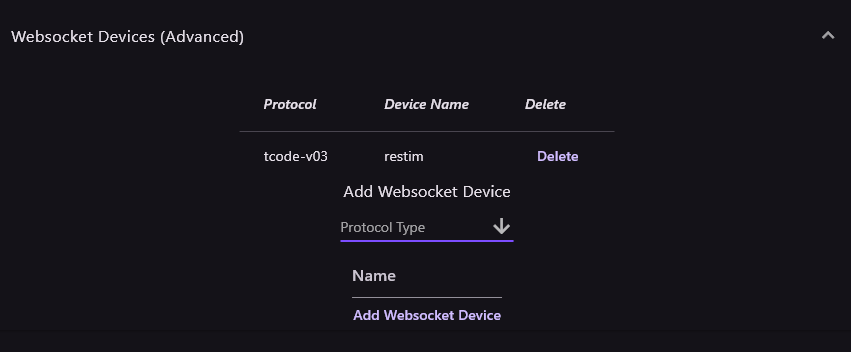
Websocket Devices (advanced):
I recommend deleting any devices you have listed here pertaining to restim
Under
Add Websocket Device, scroll and select "
tcode-v03" and in name type "
restim" then click "
Add Websocket Device"
This should place your device in the list. Make sure "
tcode-v3" is listed under
protocol column. If it is not, delete and repeat steps above. Sometimes for some reason, it will not add the protocol correctly and leave it blank.
- Spoiler: show
- Screenshot 2024-11-21 091951.png (13.31 KiB) Viewed 2298 times
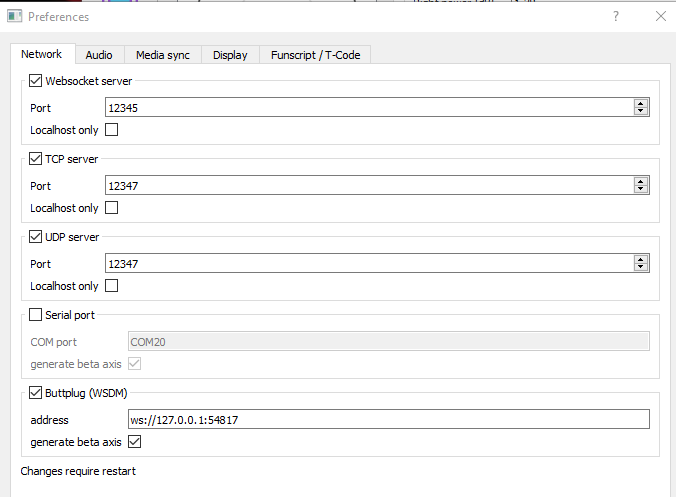
Now in restim, here are my settings:
- Spoiler: show
-
- Screenshot 2024-11-21 092354.png (19.63 KiB) Viewed 2298 times
Restart restim if you made any changes.
Back in Intiface Central, start the Engine by clicking the big purple play button in the upper left corner. If everything went good, you should see "connected to buttplug" in the cmd looking window for restim as well as a TCode v0.3 (Single Linear Axis) device shown under the connected devices section in the Devices menu. If you do, test it by selecting "Toggle Oscillation". The green dot should start to move in restim. I really hope this helps.





 Thanks but