File Renamer
Posted: Thu Dec 13, 2012 9:59 pm
Update 8/15/14: Version 1.2 fixes a bug which may changed the order of files.
Hi guys,
while writing (flash) teases you may came across the problem of renaming your pictures. A while ago I wrote a little java program which renames files. Finally I thought "Hey I'm certainly not the only one with this matter".
So here it is for you to use
I'm using it on Windows 7 64-bit. Because it is a java program it should run on any operating system.
How to use:
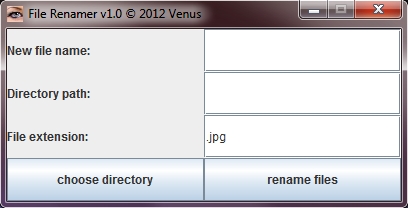
New file name: Type in the name which the files should get.
Directory path: Type in or Copy/Paste the path of the folder which contains the pictures.
File extension: Type in the file extension. (You can use the FileRenamer for any kind of files)
choose directory: Opens a file browser where you can choose the directory which contains the files.
rename files: Renames the files.
The FileRenamer renames all files in the directory you've chosen. It adds to your entered file name automatically a number.
Example:
Let's say we have a folder C:\pictures which contains 3 pictures: abc.jpg, bbb.jpg, xyz.jpg.
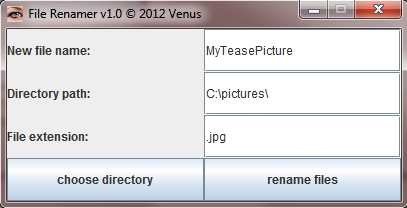
We can use the file browser or fill out the directory path manually so that it contains: C:\pictures\. Be sure that the last back slash is there.
The new file name should be MyTeasePicture.
When we hit the button "rename files" the file abc.jpg is renamed to MyTeasePicture00.jpg, the file bbb.jpg is renamed to MyTeasePicture01.jpg and the file xyz.jpg is renamed to MyTeasePicture02.jpg.
The filled out text fields look like this:
If you have any feedback or suggestions let me know.
Download Link:
click here to download FileRenamer v1.2
Hi guys,
while writing (flash) teases you may came across the problem of renaming your pictures. A while ago I wrote a little java program which renames files. Finally I thought "Hey I'm certainly not the only one with this matter".
So here it is for you to use
I'm using it on Windows 7 64-bit. Because it is a java program it should run on any operating system.
How to use:
New file name: Type in the name which the files should get.
Directory path: Type in or Copy/Paste the path of the folder which contains the pictures.
File extension: Type in the file extension. (You can use the FileRenamer for any kind of files)
choose directory: Opens a file browser where you can choose the directory which contains the files.
rename files: Renames the files.
The FileRenamer renames all files in the directory you've chosen. It adds to your entered file name automatically a number.
Example:
Let's say we have a folder C:\pictures which contains 3 pictures: abc.jpg, bbb.jpg, xyz.jpg.
We can use the file browser or fill out the directory path manually so that it contains: C:\pictures\. Be sure that the last back slash is there.
The new file name should be MyTeasePicture.
When we hit the button "rename files" the file abc.jpg is renamed to MyTeasePicture00.jpg, the file bbb.jpg is renamed to MyTeasePicture01.jpg and the file xyz.jpg is renamed to MyTeasePicture02.jpg.
The filled out text fields look like this:
If you have any feedback or suggestions let me know.
Download Link:
click here to download FileRenamer v1.2