Page 1 of 1
[EOS] Size of Pictureframe
Posted: Sat Oct 21, 2023 7:45 pm
by MrDigital
Hello,
Is it possible to change the Size of pictures in teases?
When i Play a teases, the picture is only half of Screen. The Text on the bottom is far too much. I only need a few lines. Is it possible to adjust this?
Re: [EOS] Size of Pictureframe
Posted: Sat Oct 21, 2023 8:20 pm
by verynicekojak
If you are using Firefox (or Chrome probably too) you can right click on the frame, click Inspect, and change CSS to get some effects. I do it with text and I add max-width:30em rule, which shortens and wraps text because I don't like reading long lines. Of course you must find what works for you. Changes will disappear after refreshing the page.
If you find a solution to your problem, you can then install Stylus extensions for Firefox, which allows to enter new CSS rules for specific page and they will be applied automatically you enter the page.
Re: [EOS] Size of Pictureframe
Posted: Sun Oct 22, 2023 5:28 am
by MrDigital
i use firefox, but dont know where to add the code you mean?!
can you make a screnshot or more detailed instruction where to change the code in the inspect-window?
Re: [EOS] Size of Pictureframe
Posted: Sun Oct 22, 2023 5:21 pm
by verynicekojak
For picture root, you can change height from default 70% to 85%. Going above that causes bottom buttons to disappear.
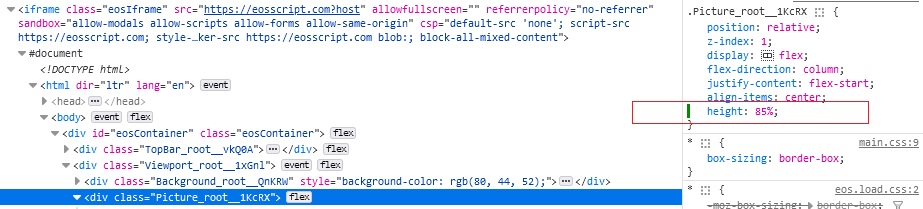
- web.jpg (83.05 KiB) Viewed 3789 times
Re: [EOS] Size of Pictureframe
Posted: Mon Oct 23, 2023 6:07 pm
by Bright_Sprinkler
Try zooming in and out (e.g. ctrl + mouse wheel).
I find that 110% fits my screen best.
Re: [EOS] Size of Pictureframe
Posted: Mon Oct 23, 2023 7:03 pm
by MrDigital
Thx kojak, that is exactly what i was looking for.