Page 1 of 1
lookin for up to date Eos tutorial
Posted: Mon Jun 19, 2023 6:45 pm
by MrNadra
As im not sure where to put this, ill just leave it here.
Is there an up to date EOS tutorial?(i looked and didnt find anything)
I was starting a pretty big project and got stuck like 10 pages in, so before continuing i need to know how to do these things:
1. A timer filling up on the right side with a button underneath, for instance: edge before the time runs out.
2. A tutorial on the scripting to add up or subtract numbers and basic stuff like that.
3. How to save a state of a tease(variables and stuff) and how to use them at all.
Even some code snippets would be appreciated or even better: is there a way to look at teases others have made to "reverse engineer mechanics"?
An updatet tutorial as its own thread would be preferred of course, not sure if thats askin too much tho.
Thanks in advance, lookin forward to makin all of you edge a shitton.

Re: lookin for up to date Eos tutorial
Posted: Tue Jun 20, 2023 12:38 am
by Scilirat
Here's how you take a look at the inner workings of any EOS tease:
- Spoiler: show
-
Grab the tease id from the URL.

Then paste it in the URL of the EOS editor.

Obviously, since you're not the creator of the tease you can't change anything, not even temporarily.
I learned all of the more "advanced" tease creation methods from copying other's homework so it's pretty much essential for novice creators.
Hope this helps :)
Re: lookin for up to date Eos tutorial
Posted: Tue Jun 20, 2023 3:28 am
by indyc
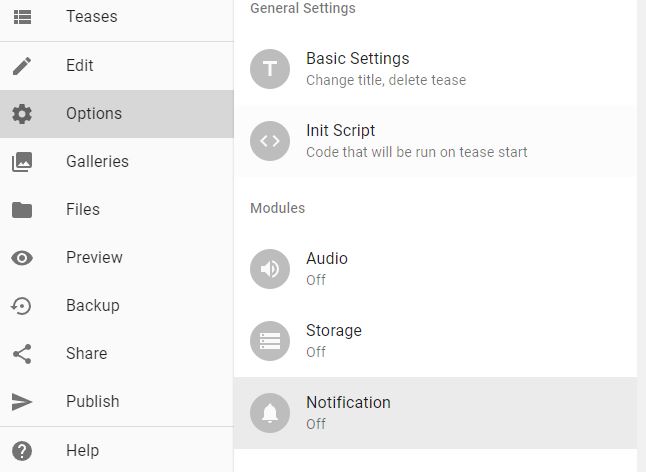
For your timer that fills up on the right side you first need to go to options and turn these on:
- Capture.JPG (30.55 KiB) Viewed 4634 times
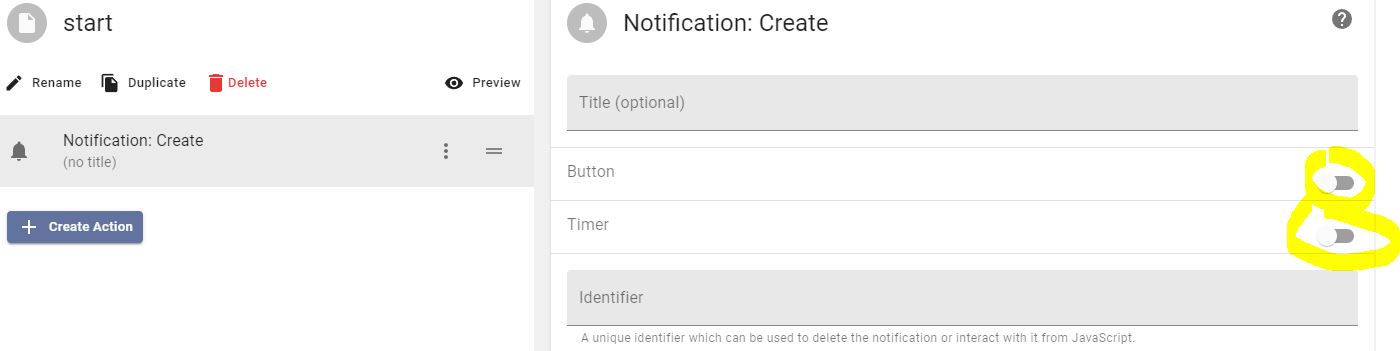
You then add it in the tease page and select both of these toggles:
- 2.JPG (39.65 KiB) Viewed 4634 times
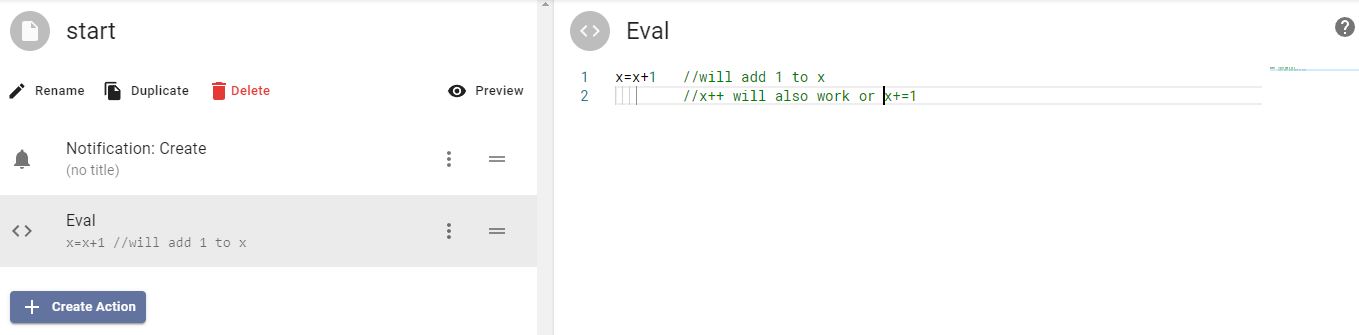
For the adding and subtracting of variables you put them in an "eval" like this:
- 3.JPG (30.24 KiB) Viewed 4634 times
For any variables, I suggest defining their starting variables in the initiation script right beside your options. For example:
x=0;
That can prevent possible freezing if you ask the game something like (if x>0 then blah blah) and x doesn't have a value yet - it will jam up.
For saving... I've worked with it for years now and I still don't understand it well enough to teach it. The tutorial should help you on this end but you need to turn tease storage on in options. The init script runs before any pages automatically.
Send me a PM if you need any help, I'm here to make your tease the best it can be!
Re: lookin for up to date Eos tutorial
Posted: Tue Jun 20, 2023 12:54 pm
by MrNadra
Scilirat wrote: Tue Jun 20, 2023 12:38 am
Here's how you take a look at the inner workings of any EOS tease:
- Spoiler: show
-
Grab the tease id from the URL.
Then paste it in the URL of the EOS editor.
Obviously, since you're not the creator of the tease you can't change anything, not even temporarily.
I learned all of the more "advanced" tease creation methods from copying other's homework so it's pretty much essential for novice creators.
Hope this helps :)
oh shit that helps a metric fuckton, thanks so much

Re: lookin for up to date Eos tutorial
Posted: Tue Jun 20, 2023 12:55 pm
by MrNadra
indyc wrote: Tue Jun 20, 2023 3:28 am
For your timer that fills up on the right side you first need to go to options and turn these on:
Capture.JPG
You then add it in the tease page and select both of these toggles:
2.JPG
For the adding and subtracting of variables you put them in an "eval" like this:
3.JPG
For any variables, I suggest defining their starting variables in the initiation script right beside your options. For example:
x=0;
That can prevent possible freezing if you ask the game something like (if x>0 then blah blah) and x doesn't have a value yet - it will jam up.
For saving... I've worked with it for years now and I still don't understand it well enough to teach it. The tutorial should help you on this end but you need to turn tease storage on in options. The init script runs before any pages automatically.
Send me a PM if you need any help, I'm here to make your tease the best it can be!
thanks for the explanaition, will try that later