Page 1 of 1
5.1 or quad channel Audio for e-stim videos
Posted: Fri Mar 18, 2022 2:52 am
by senorgif2
You people who are attaching e-stim audio to videos using the rear channels, how the fuck are you doing this? Ive spent an hour trying to find a free video editor that actually supports 5.1 audio exports.Every one I've found locks out that feature to the paid tier or just doesn't support it.
Re: 5.1 or quad channel Audio for e-stim videos
Posted: Fri Mar 18, 2022 6:29 am
by nausea21
Please take a look here:
viewtopic.php?t=23712
Re: 5.1 or quad channel Audio for e-stim videos
Posted: Fri Mar 18, 2022 10:17 am
by senorgif2
Thank you so much! I didn't think to look there, assumed it was directions for creating the stim files.
Re: 5.1 or quad channel Audio for e-stim videos
Posted: Fri Mar 18, 2022 9:34 pm
by Lamalas
As an additional option, the free version of DaVinci Resolve also supports 5.1 audio, and it is very favorable in it's restrictions in general (
https://www.blackmagicdesign.com/produc ... ciresolve/)
In my limited experience, it's not the most intuitive experience, but once you get the hang of it, a very powerful one.
As an added benefit, you can do everything in one program.
Whatever you end up using, have fun!
One more thought that comes to mind: What could be useful for some people is, on top of having quad channel audio, also having a second audio track with only the estim audio, and maybe even a third track with only the porn audio. That would cover most people's setups. I usually play the video on a big TV, and the estim from a laptop next to me. But some video's, like for example the PEP series, have the estim embedded, and a separate porn audio file. So then i would have to play everything from the laptop, and try to sync the video playing on the TV, with the sound muted, which is a hassle

Re: 5.1 or quad channel Audio for e-stim videos
Posted: Fri Mar 18, 2022 11:46 pm
by Batman314
Not sure if you know of this already, but CHPlayer is a great alternative to surround videos for syncing estim and video. With pretty much all estim releases having separate files for estim audio and video, I find that the CHPlayer is much more versatile. It also takes care of the technical aspect of separating audio to your different soundcards.
forum post here:
viewtopic.php?t=23516
Re: 5.1 or quad channel Audio for e-stim videos
Posted: Sat Mar 19, 2022 12:21 am
by edger477
Batman314 wrote: Fri Mar 18, 2022 11:46 pm
Not sure if you know of this already, but CHPlayer is a great alternative to surround videos for syncing estim and video. With pretty much all estim releases having separate files for estim audio and video, I find that the CHPlayer is much more versatile. It also takes care of the technical aspect of separating audio to your different soundcards.
forum post here:
viewtopic.php?t=23516
+1 to this... I find surround channels much more of a hassle and am exclusively using ScriptPlayer with separate files (another +1 being that you can edit files if needed)
Re: 5.1 or quad channel Audio for e-stim videos
Posted: Mon Mar 21, 2022 2:39 pm
by 47dahc
Lamalas wrote: Fri Mar 18, 2022 9:34 pm
One more thought that comes to mind: What could be useful for some people is, on top of having quad channel audio, also having a second audio track with only the estim audio, and maybe even a third track with only the porn audio. That would cover most people's setups. I usually play the video on a big TV, and the estim from a laptop next to me. But some video's, like for example the PEP series, have the estim embedded, and a separate porn audio file. So then i would have to play everything from the laptop, and try to sync the video playing on the TV, with the sound muted, which is a hassle
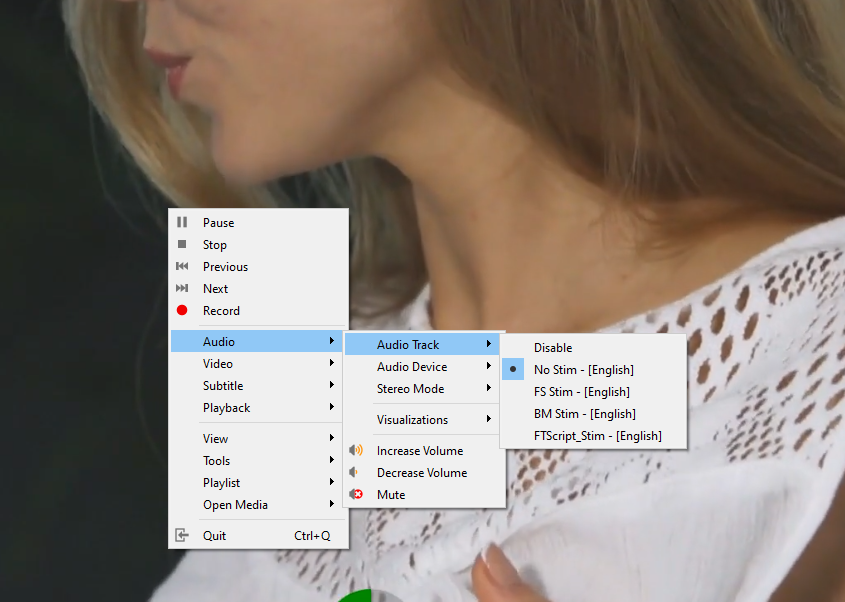
I have done this with just about all my videos. I will have an original audio (no stim) and then stim tracks. I try and name them in MKVToolNix so I have an idea of how they were created. You can mux in as many tracks as you want. If I want to watch on my big screen, I just plug the laptop into the HDMI. Start Voicemeeter Banana, select the correct audio devices, start the video and select the track. Hardest part really is making sure VB is setup correctly but once you get the hang of it, it becomes second nature.
- Spoiler: show
- Screenshot 2022-03-21 102639.png (422.36 KiB) Viewed 1576 times