Page 1 of 1
EOS, how to display variables inside text.
Posted: Wed Jul 03, 2019 1:48 pm
by xman911
Before the tease starts... I initialize variables, such as...
After I initialize them... how to display them inside a block of text?!
For example user types his name in the variable "name"... how to display that variable again inside a block of text.
Re: EOS, how to display variables inside text.
Posted: Wed Jul 03, 2019 2:07 pm
by Drool
By clicking the "<>" button and entering the name of the variable.
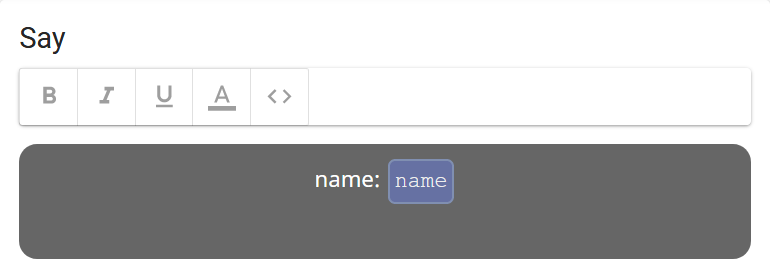
- Screenshot_2019-07-03 Eos Editor.png (8.11 KiB) Viewed 982 times
Re: EOS, how to display variables inside text.
Posted: Wed Jul 03, 2019 3:44 pm
by xman911
Drool wrote: Wed Jul 03, 2019 2:07 pm
By clicking the "<>" button and entering the name of the variable.
Screenshot_2019-07-03 Eos Editor.png
Now I have another question... how to change a variable without user input.
For example user goes to some pages and there is some task... if the user completes the task he gets 1 or 5... or x amount of points. Basically to add a points counter... but for different tasks the user gets different amount of points. Or if he makes certain choice to increase his points.
I mean something like that:
Re: EOS, how to display variables inside text.
Posted: Wed Jul 03, 2019 4:00 pm
by Drool
xman911 wrote: Wed Jul 03, 2019 3:44 pm
Exactly like this. You just have to put that line into an 'Eval' action.
Have fun with Eos

Re: EOS, how to display variables inside text.
Posted: Wed Jul 03, 2019 4:16 pm
by xman911
Drool wrote: Wed Jul 03, 2019 4:00 pm
xman911 wrote: Wed Jul 03, 2019 3:44 pm
Exactly like this. You just have to put that line into an 'Eval' action.
Have fun with Eos
Thanks... now I understand how this works.
Eval is the way to put information in the variables.