Page 1 of 1
Re: My beat meter template AE project file
Posted: Wed Feb 12, 2014 2:22 am
by Venus
Thanks for the project file. I'm really interested in your way of doing beat bars, they look really good!
Unfortunately the project file is for AE CC 12.2, I only have AE CS6. Could you please share a CS6 version?
Regarding Adobe that should be possible:
Adobe wrote:After Effects CC (12.0, 12.1, 12.2) has the command Save > Save As > Save A Copy As CS6.
Thanks in advance!
Re: My beat meter template AE project file
Posted: Tue Feb 18, 2014 11:57 pm
by Venus
Thank you for the CS6 project file! And thank you for the great tutorial videos. Very well explained.
Because of you I got in touch with expressions and realized how much more is now possible for me

Although I'm sticking to a waveform beatbar for my actual project, because I would have to put too much time into adjusting it, so that it fits my needs. But I already could adapt my current beatbar to finally implement a feature I wasn't able to implement in the way I wanted to before.
Additionally after understanding how expressions work, I felt really stupid, because I did a whole post production process manually, which is just insane. Now I was able to automatize a hell lot of the manual work, thanks to expressions. This will save me many hours of work! (If I just knew this 3 months ago

)
For the thing I want to do, I need a pretty precise transformation from audio to key frames. The drum kick sound I use works already pretty well, but not reliable through the whole track. So I have to go through and check the transformed beats and adjust them if they aren't good enough. Can you suggest a beat sound which transforms really well into key frames?
Re: My beat meter template AE project file
Posted: Wed Feb 19, 2014 2:01 pm
by Venus
sbew wrote:
As far as samples go, it'd help to now what "precise information" you want from your keyframes - consistent levels, duration, decay, attack, etc. - I've you can do so without spoiling the surprise, the most helpful thing would be to know what you want the audio to achieve or drive animation wise.
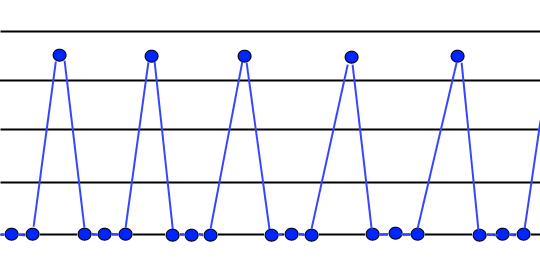
For the thing I want to do I'd need key frames that when a beat occurs I can detect it. The optimum here would be just one single amplitude.
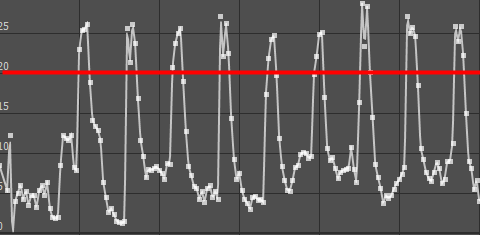
Here is an example of the current state. If the amount of beats is not too high everything is just fine. I use a threshold (red horizontal line) to detect a beat.
- key2.PNG (15.95 KiB) Viewed 1470 times
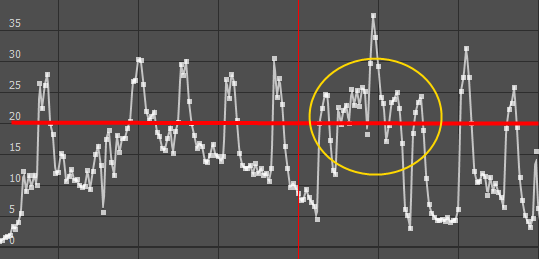
But if the beats are getting too fast I get these key frames which are problematic. Again the red horizontal line is the threshold but in the yellow circle the line is passed several times, so I would detect more beats than existing. I can't put the threshold much higher because some beats don't go much higher than the threshold.
- key1.PNG (29.53 KiB) Viewed 1470 times
Here's an example picture what would be ideal for my needs:
- key3.png (8.64 KiB) Viewed 1470 times
sbew wrote:
(Has anyone else ever noticed that there a quite a few mythological handles floating around on here - I like to imagine Venus and Jupiter chilling on Mount Olympus editing videos with Titan looking over their shoulders. Or maybe its astronomical...sorry, sidetripping - too much time looking at screens)

That would be great. Lying on a sunny mountain, editing videos and being fed with fruits by a servant.
Re: My beat meter template AE project file
Posted: Sun Mar 02, 2014 11:30 pm
by Venus
Since sbew's suggestions unfortunately didn't work for me and I was not able to achieve results which satisfied my needs, I searched for a solution and I made a find.
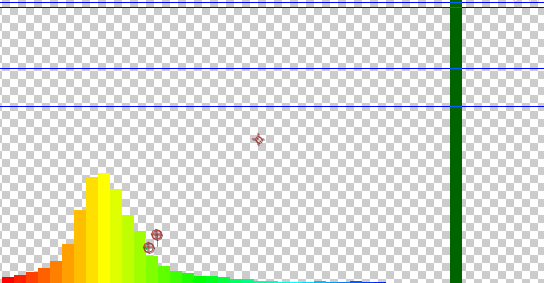
There's a plugin for AE called Trapcode Sound Keys, which allows you to work on the audio spectrum of a sound file. You can mark an area which will be tracked an can turned into key frames. See this example picture:
- spectrum.PNG (26.58 KiB) Viewed 1245 times
This makes it a lot easier to detect beats. You can even do it with normal music and successfully detect the beats. When turned into key frames it may look like this:
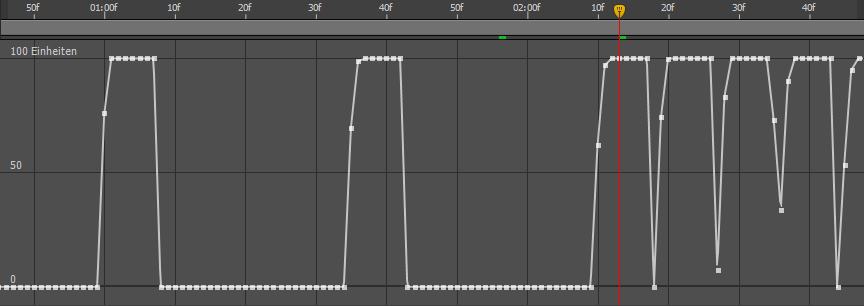
- soundKeys.PNG (27.46 KiB) Viewed 1245 times
It's possible to be very precise, and the picture above shows my first attempt of selecting an appropriate area in the spectrum and this already led to a satisfying result.