Page 6 of 14
Re: [Announcement] Beatmeter Generator 0.3.0
Posted: Thu Jul 23, 2020 4:59 pm
by kerkersklave
Assloverman wrote: Thu Jul 23, 2020 4:27 pm
Btw. It would be very nice if this program could auto generate scripts for The launch and The handy. You already have the beat so I would think that this could be added with not much effort. Or am I wrong?
I've added an export to a very simple JSON format for a similar request. Adding other formats would be easy enough, but for now, it should also be very easy to convert this JSON-format to something else. Probably one can do that even with just a text editor.
Re: [Announcement] Beatmeter Generator 0.3.0
Posted: Wed Dec 16, 2020 10:34 pm
by bobhill
I've read through this thread and appreciate you producing this tool!

Can this be used to generate a beat meter for a video without music? I have a GuideMe tease that uses some video clips (without music) and I would like to have the beat meter layered on the video. I have software (Cyberlink Power Director) to add the layer.
In case it's not clear, I want to use the beat meter to direct the user's stroking while the video plays. So, if I could generate a set of beat pattern outputs (1-1, 1-123, etc.) with the program, I should be able to add pretty easily to my video.

Re: [Announcement] Beatmeter Generator 0.3.0
Posted: Wed Dec 16, 2020 10:42 pm
by kharon
bobhill wrote: Wed Dec 16, 2020 10:34 pm
Can this be used to generate a beat meter for a video without music? I have a GuideMe tease that uses some video clips (without music) and I would like to have the beat meter layered on the video. I have software (Cyberlink Power Director) to add the layer.
You can easily use the beatmeter generator for generating beats without a song, though from my expirience it can act a little buggy if you do not load a wave file.
I recommend you export the audio track from your video as .wav and then use that as a basis for your beatmeter.
Re: [Announcement] Beatmeter Generator 0.3.0
Posted: Wed Dec 16, 2020 11:19 pm
by bobhill
kharon wrote: Wed Dec 16, 2020 10:42 pm
You can easily use the beatmeter generator for generating beats without a song, though from my expirience it can act a little buggy if you do not load a wave file.
I recommend you export the audio track from your video as .wav and then use that as a basis for your beatmeter.
Ok - thanks very much! I will give it a try.
Re: [Announcement] Beatmeter Generator 0.3.0
Posted: Thu Dec 17, 2020 12:55 am
by masperturbator
digitalparkinglot wrote: Mon Jul 20, 2020 8:20 pm
Hey Assloverman,
The .wav file has to be the 16 bit version, it won't work with a 32 bit .wav
Assloverman wrote: Tue Jul 21, 2020 4:40 pm
Unfortunately I still can't get this to work.
Also must be 44.1khz, not 48, etc.
Re: [Announcement] Beatmeter Generator 0.3.0
Posted: Fri Dec 18, 2020 7:06 pm
by zerooo
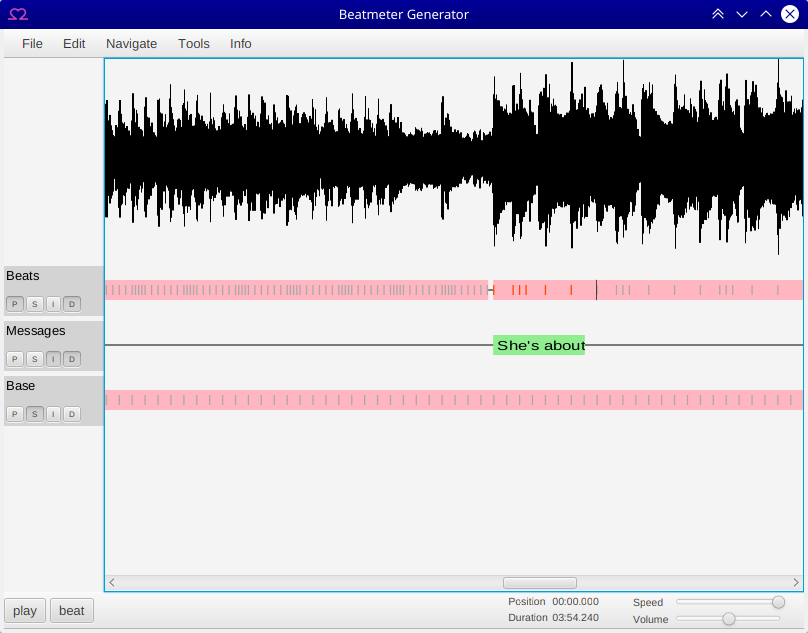
What is exactly the benefit of the base track?
Re: [Announcement] Beatmeter Generator 0.3.0
Posted: Fri Dec 18, 2020 7:35 pm
by 3xTripleXXX
zerooo wrote: Fri Dec 18, 2020 7:06 pm
What is exactly the benefit of the base track?
I'm assuming that's the track with the BPM track, so you can snap the beats to it so you don't have to carefully align everything.
Re: [Announcement] Beatmeter Generator 0.3.0
Posted: Fri Dec 18, 2020 9:08 pm
by bobhill
I was able to generate the .png files with the beat meter, but I'm having trouble finding a program to import/convert to video. I've tried several and they all convert the beatmeter video to full size height. So then I can't overlay it on my primary video.

Re: [Announcement] Beatmeter Generator 0.3.0
Posted: Fri Dec 18, 2020 9:39 pm
by zerooo
bobhill wrote: Fri Dec 18, 2020 9:08 pm
I was able to generate the .png files with the beat meter, but I'm having trouble finding a program to import/convert to video. I've tried several and they all convert the beatmeter video to full size height. So then I can't overlay it on my primary video.
Not sure, but I think the idea is, to directly import the images into your video program.
All programs (I use final cut) are able to import image sequences. Then just set the duration for every image to 1 (ONE) frame.
https://www.youtube.com/watch?v=W5kT7RmbkoI
Re: [Announcement] Beatmeter Generator 0.3.0
Posted: Fri Dec 18, 2020 9:40 pm
by zerooo
3xTripleXXX wrote: Fri Dec 18, 2020 7:35 pm
zerooo wrote: Fri Dec 18, 2020 7:06 pm
What is exactly the benefit of the base track?
I'm assuming that's the track with the BPM track, so you can snap the beats to it so you don't have to carefully align everything.
Got the idea, thanks! So that's also what the small S Button is for. Thanks for the hint

Will try tomorrow!
Re: [Announcement] Beatmeter Generator 0.3.0
Posted: Fri Dec 18, 2020 10:30 pm
by bobhill
zerooo wrote: Fri Dec 18, 2020 9:39 pm
Not sure, but I think the idea is, to directly import the images into your video program.
All programs (I use final cut) are able to import image sequences. Then just set the duration for every image to 1 (ONE) frame.
Yes, thanks, I did see the instructions on the GitLab page, which said to import at 1:1.
But I was using PowerDirector, which cant do this.

So, I was trying some open source programs to just process the beat meter output images into a video, which I then would import into PowerDirector. I had success doing this with Shotcut, Avidemux, Openshot - but all the video output files from these are full screen, with the beat meter in the center vertically, and black everywhere else. So I couldn't overlay the beatmeter on my video.
Re: [Announcement] Beatmeter Generator 0.3.0
Posted: Fri Dec 18, 2020 10:42 pm
by 3xTripleXXX
bobhill wrote: Fri Dec 18, 2020 10:30 pm
zerooo wrote: Fri Dec 18, 2020 9:39 pm
Not sure, but I think the idea is, to directly import the images into your video program.
All programs (I use final cut) are able to import image sequences. Then just set the duration for every image to 1 (ONE) frame.
Yes, thanks, I did see the instructions on the GitLab page, which said to import at 1:1.
But I was using PowerDirector, which cant do this.
So, I was trying some open source programs to just process the beat meter output images into a video, which I then would import into PowerDirector. I had success doing this with Shotcut, Avidemux, Openshot - but all the video output files from these are full screen, with the beat meter in the center vertically, and black everywhere else. So I couldn't overlay the beatmeter on my video.
In Premiere Pro, it also places the beatmeter in the middle of the screen, but then I can just select it and place it where I want it to be. So that's normal behavior. However, the background should be transparent, so if it's all black for you, whichever program converts isn't keeping the transparency.
Re: [Announcement] Beatmeter Generator 0.3.0
Posted: Sat Dec 19, 2020 3:22 am
by bobhill
3xTripleXXX wrote: Fri Dec 18, 2020 10:42 pm
In Premiere Pro, it also places the beatmeter in the middle of the screen, but then I can just select it and place it where I want it to be. So that's normal behavior. However, the background should be transparent, so if it's all black for you, whichever program converts isn't keeping the transparency.
Thanks - that's interesting, must be something I'm doing wrong. I don't use video editing software much, so that's probably the case. Holy cow, Premier Pro is $20/month!

Re: [Announcement] Beatmeter Generator 0.3.0
Posted: Sat Dec 19, 2020 10:41 am
by zerooo
Found something!
 https://lgcommunity.us.com/discussion/4 ... -artifacts
TruMotion is causing a lot of artifacts on my TV when using this beatmeter. First I thought it's a beatmeter issue, but after I saw, that there aren't any artifact visible on my mac, I started google.com.
Just turn of Trumotion and all is fine
Re: [Announcement] Beatmeter Generator 0.3.0
Posted: Sat Dec 19, 2020 11:16 am
by 3xTripleXXX
bobhill wrote: Sat Dec 19, 2020 3:22 am
3xTripleXXX wrote: Fri Dec 18, 2020 10:42 pm
In Premiere Pro, it also places the beatmeter in the middle of the screen, but then I can just select it and place it where I want it to be. So that's normal behavior. However, the background should be transparent, so if it's all black for you, whichever program converts isn't keeping the transparency.
Thanks - that's interesting, must be something I'm doing wrong. I don't use video editing software much, so that's probably the case. Holy cow, Premier Pro is $20/month!
I use the Adobe Suite for my business, so I can write it off on my taxes. :)