Page 166 of 175
Re: Tease AI General Discussion
Posted: Fri Mar 01, 2019 10:38 am
by Zamak
Hello
I have developed some script but I am struggling to understand some command.
Is there a documentation?
What does @NullResponse do?
Re: Tease AI General Discussion
Posted: Fri Mar 01, 2019 12:40 pm
by tigrotto
Zamak wrote: Fri Mar 01, 2019 10:38 am
What does @NullResponse do?
It allows you to execute commands without outputting anything in chat and proceed to the next line of the script. Here's an example from one of my scripts:
Code: Select all
The number of edges you owe me goes from @ShowVar[tgr8_edging_game_min] to @ShowVar[tgr8_edging_game_max]
Which is the right amount of edges you think you owe #Me? @InputVar[Sub_amount_of_edges]
(Check amount)
@NullResponse @RapidCodeOn
@NullResponse @DeleteVar[tgr8_edging_game_min,tgr8_edging_game_max]
@NullResponse @If[Sub_amount_of_edges]=[Domme_amount_of_edges]Then(Guessed)
@NullResponse @If[Sub_amount_of_edges]>[Domme_amount_of_edges]Then(The_more_the_better)
@NullResponse @RapidCodeOff
(Correct_amount_is)
@NullResponse @If[Sub_amount_of_edges]<=[Domme_amount_of_edges_2]Then(Way_too_low)
@ShowVar[Sub_amount_of_edges] edges is not an adequate @RT(amount, number)!
I won't tell you which is the right amount of edges
I want to see the desperation in your eyes...
I mean... how many times will I ask you to edge that #Cock? @RTOn
Zamak wrote: Fri Mar 01, 2019 10:38 am
Is there a documentation?
Yes. There is a useful command guide in Tease AI:
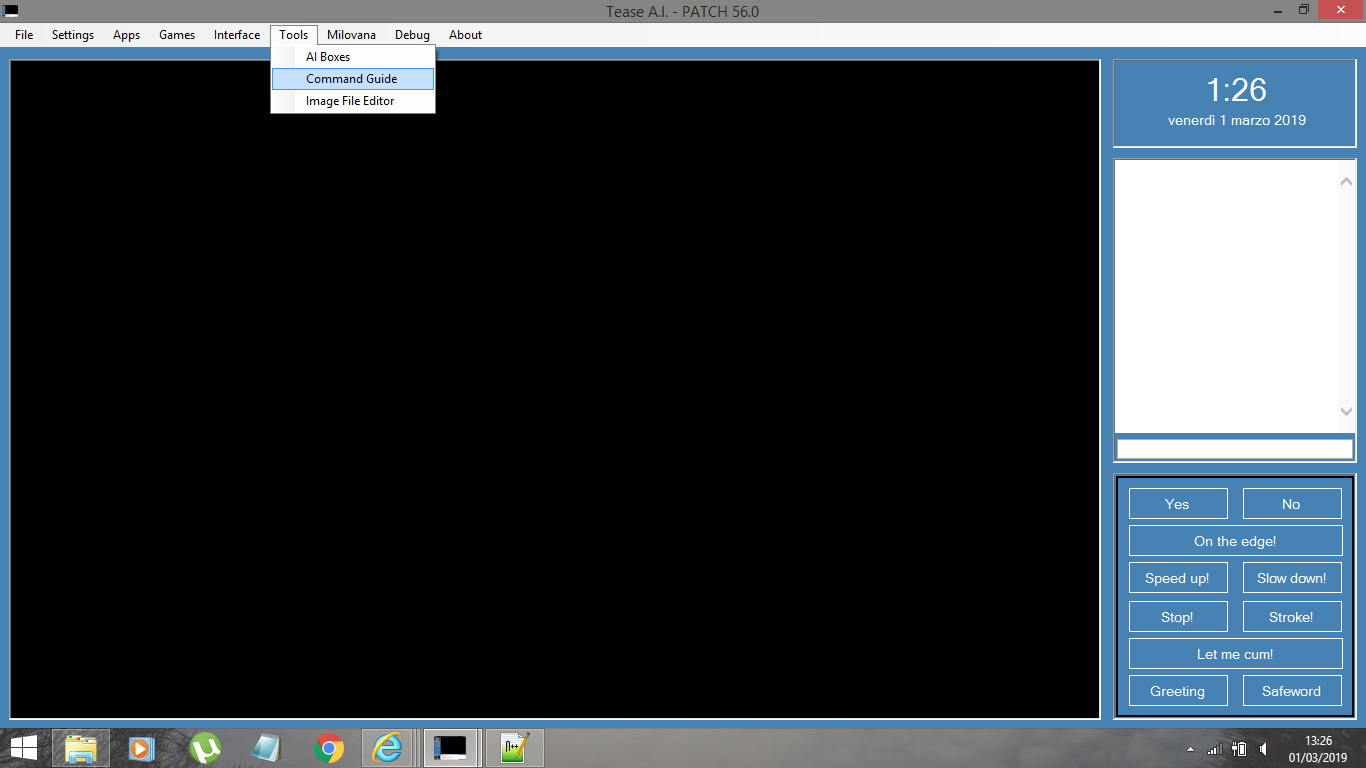
- Cattura di schermata (288).png (92.09 KiB) Viewed 3107 times
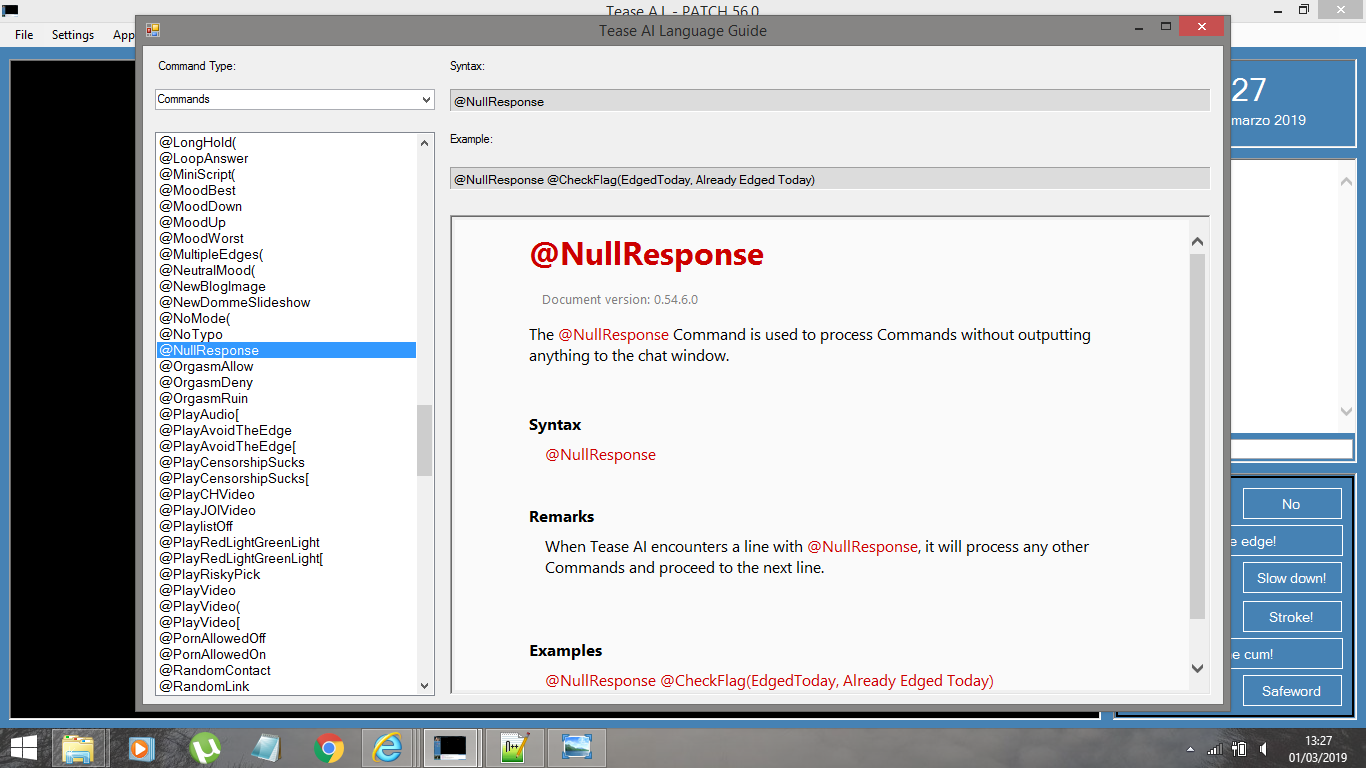
- Cattura di schermata (289).png (150.99 KiB) Viewed 3107 times
and more detailed and up to date info can be found here:
https://github.com/TeaseAI/Tease-AI/blo ... /README.md
avatarbr collected more info and resources here:
viewtopic.php?f=26&t=19692
Re: Tease AI General Discussion
Posted: Fri Mar 01, 2019 1:07 pm
by Zamak
Thx a lot.
And an other questions!
How did you managed to have pre-type words in your interface?
Re: Tease AI General Discussion
Posted: Fri Mar 01, 2019 1:10 pm
by tigrotto
Zamak wrote: Fri Mar 01, 2019 1:07 pm
How did you managed to have pre-type words in your interface?
You're welcome. I'm not sure what you mean by "
pre-type" words. What are you referring to?
Re: Tease AI General Discussion
Posted: Fri Mar 01, 2019 2:06 pm
by Zamak
On the bottom right of your gui, I can see some buttons with yes, no, on the edge, ect
Re: Tease AI General Discussion
Posted: Fri Mar 01, 2019 2:27 pm
by tigrotto
Zamak wrote: Fri Mar 01, 2019 2:06 pm
On the bottom right of your gui, I can see some buttons with yes, no, on the edge, ect
Ok. Open the interface menu and select "
Lazy Sub AV".
Re: Tease AI General Discussion
Posted: Fri Mar 01, 2019 2:31 pm
by Zamak
Thanks

Re: Tease AI General Discussion
Posted: Fri Mar 01, 2019 2:36 pm
by tigrotto
Zamak wrote: Fri Mar 01, 2019 2:31 pmThanks
You're welcome!
Re: Tease AI General Discussion
Posted: Fri Mar 01, 2019 5:50 pm
by Zamak
I can't find the command to test that the chastity cage is on?
I know this command:
@OrgasmRestricted OrgasmRestricted set
To check that the orgasm is restricted?
Is there a
@ChastityIsOn ??
@ChastityIsNotOn??
Re: Tease AI General Discussion
Posted: Fri Mar 01, 2019 6:18 pm
by tigrotto
Zamak wrote: Fri Mar 01, 2019 5:50 pm
Is there a
@ChastityIsOn ??
@ChastityIsNotOn??
Yes. Open the command guide and select "
Command filters" in the "
Command type" menu. (top left of the pictures)
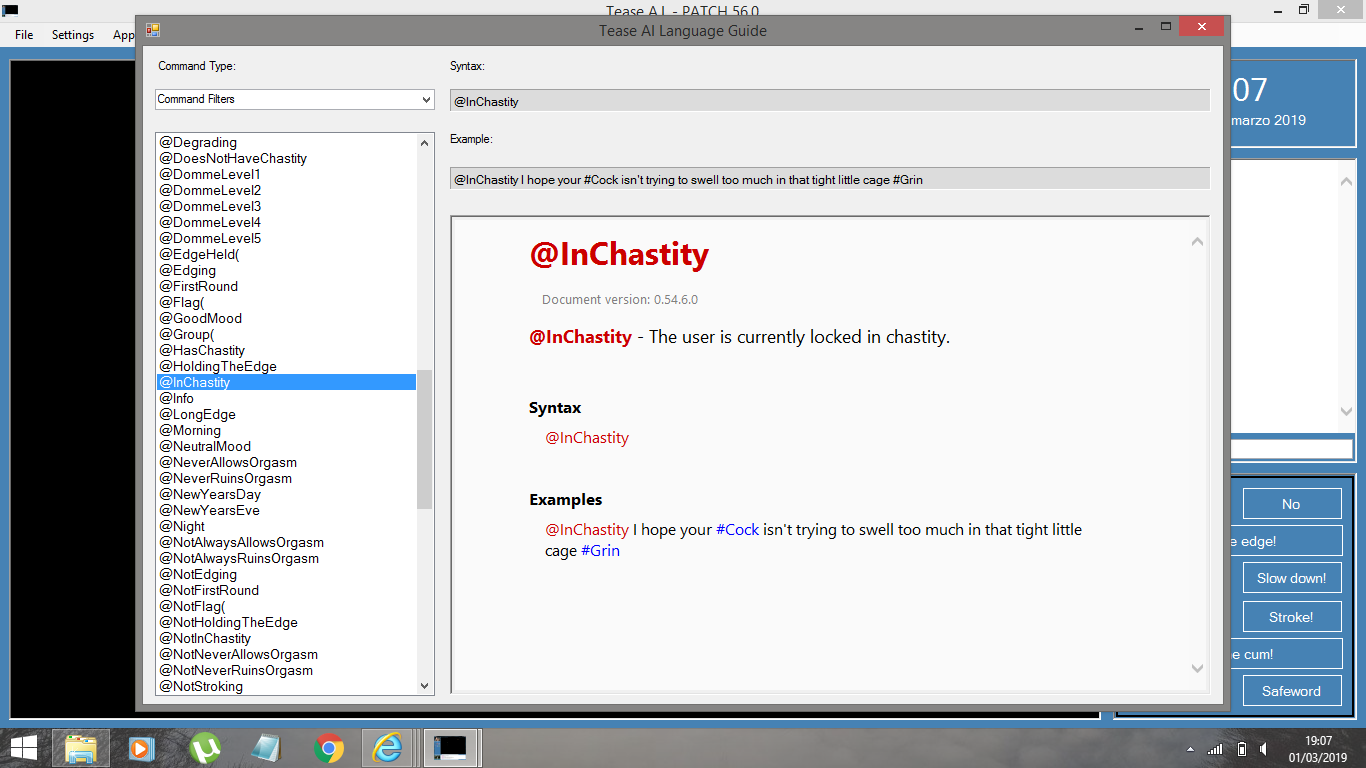
- Cattura di schermata (291).png (141.37 KiB) Viewed 5615 times
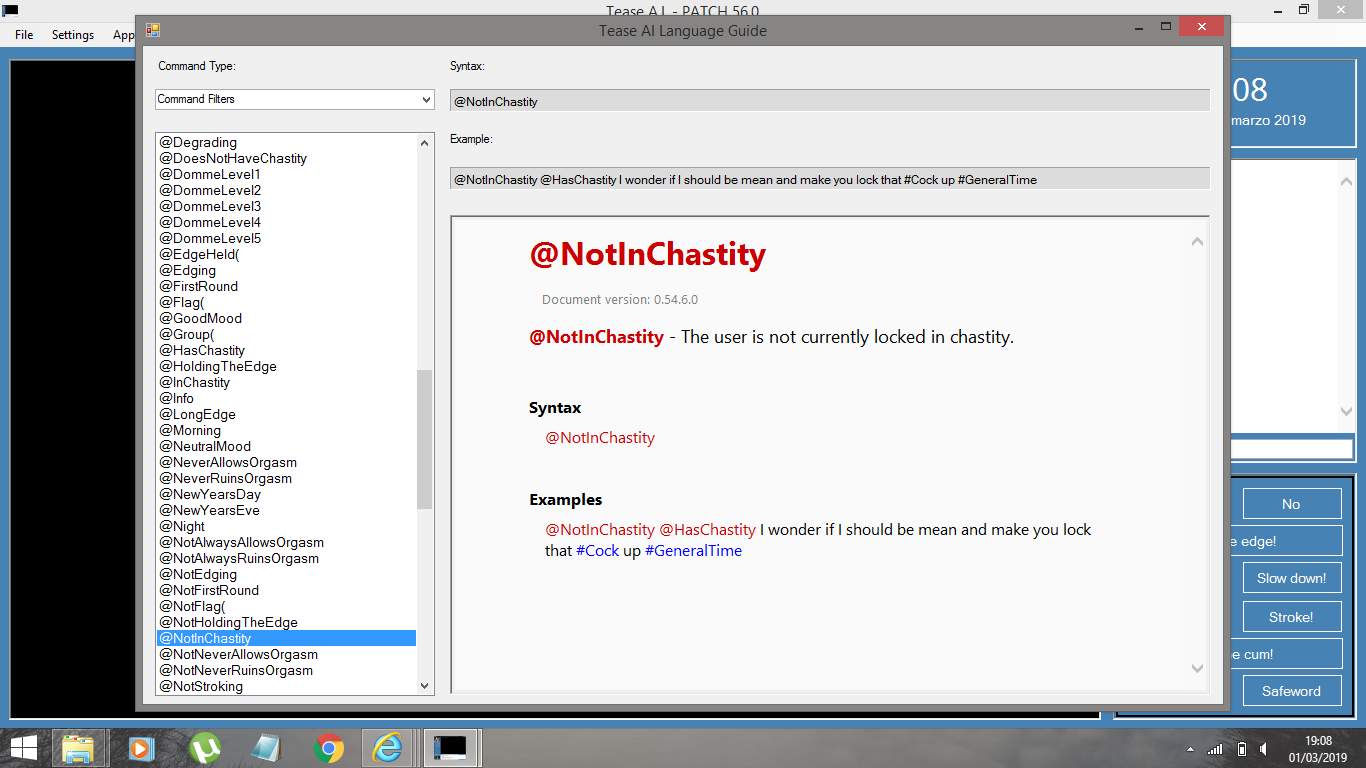
- Cattura di schermata (292).png (142.8 KiB) Viewed 5615 times
Filters work this way. You put them at the beginning of a line and TAI will process that line only if the conditions set by the filter are met, otherwise it will move to the next.
Re: Tease AI General Discussion
Posted: Fri Mar 01, 2019 8:00 pm
by Zamak
Thx, I shall have had a better look in the language guide menue.
Re: Tease AI General Discussion
Posted: Fri Mar 01, 2019 8:59 pm
by tigrotto
Zamak wrote: Fri Mar 01, 2019 8:00 pm
Thx, I shall have had a better look in the language guide menue.
You're welcome!
Re: Tease AI General Discussion
Posted: Mon Mar 18, 2019 1:33 pm
by forbiddendesire
I'm having a weird issue where Tease AI crashes whenever it's supposed to play a video. I have windows media player installed, and I downloaded and installed K-Lite codecs. Any idea what the issue could be?
Re: Tease AI General Discussion
Posted: Mon Mar 18, 2019 4:50 pm
by Zamak
Last week, I tried to install a new windows 7 virtual machine for teaseAI and I had following issue.
I have installed k-little codec too.
Sometimes, when a video or an animated images is played, the is an error, then some elements of the GUI are replaced bye white square whit a red cross untill teaseAI is crashing for good.
Is it your issue?
I assume that it shall be a memory overflow but I am not able to analyse thurther the bug.
Re: Tease AI General Discussion
Posted: Mon Mar 18, 2019 5:12 pm
by forbiddendesire
No, my error is just that when a video is given to play, the program just closes after 1 or 2 seconds. I have no idea what the issue could be