Page 17 of 31
Re: Tease Ai scripting: The HELP CORNER
Posted: Wed Aug 30, 2017 12:18 am
by Shattered
avatarbr wrote: Wed Aug 30, 2017 12:00 am
Shattered wrote: Tue Aug 29, 2017 11:01 pm
Got two short and hopefully simple questions -
1. Can you end a session in a start section? I'm looking to have a very short section and this seems like the best way to go about it.
2. Can you play a video while still having the text continue? I'd like you to interact with a certain point of the video while it is happening.
For both, this is the start in question.
- Spoiler: show
- You are going to do a JOI today.
But if she tells you to cum, you ask me permission.
And I'll randomly decide your fate :)
Ready to stroke?
[yes] Good.
@DifferentAnswer You mean yes.
Here you go. @PlayJOIVideo @wait(5) @Goto(Continue)
(Continue)
Say 'Please' when you are ready to cum.If she even lets you...
[please] @Rd(Denied,stop stroking, let go, ruin yourself, ruin your orgasm, cum)
See you tommorrow.
@EndTease
@End
Thanks!
1- Yes, it's correct.
2- You can have lines while playing a video, not sure about interacting (would stop the video?)
You just need a .txt file inside the folder Personality\Video\Scripts with the same name of the video. And you need to use this:
[00:00:00] Blah Blah
To make the line appears at that time of the video
Thanks. The code I linked didn't end the tease when it reached endtease, so I'm not sure if I've missed something. And also I want it to play a random video from 200+ so that would be an issue, I just want you to ask the AI for permission to cum when they cum in the video
Re: Tease Ai scripting: The HELP CORNER
Posted: Thu Aug 31, 2017 4:15 am
by avatarbr
Shattered wrote: Wed Aug 30, 2017 12:18 am
Thanks. The code I linked didn't end the tease when it reached endtease, so I'm not sure if I've missed something. And also I want it to play a random video from 200+ so that would be an issue, I just want you to ask the AI for permission to cum when they cum in the video
Oh, I just checked the code. He used a @Call() to anoter script. You can try that.
About the video, I just checked too

There is a @LockVideo command
This is useful for times when you want to play multiple videos in a row for whatever reason without the domme slideshow popping up in between.
Re: Tease Ai scripting: The HELP CORNER
Posted: Fri Sep 01, 2017 6:26 am
by tigrotto
Hi!
Would it be possible to have another person except for the player, the Domme and the three Glitter using the chat?
Something like this:
The Domme and the three Glitter are talking about a problem, but they can't find a solution about it.
So Contact1 calls one of her friends.
Domme: ...
Contact1: ...
Contact2: ...
Contact3: ...
Contac1: Let me call one of my friends. She will solve this problem
(
Contact1's friend joins the chatroom)
Contact1's friend: ...
I don't think it's possible but could you confirm that please?
Thanks!
Bye!

Re: Tease Ai scripting: The HELP CORNER
Posted: Fri Sep 01, 2017 9:20 pm
by avatarbr
tigrotto wrote: Fri Sep 01, 2017 6:26 am
Hi!
Would it be possible to have another person except for the player, the Domme and the three Glitter using the chat?
Something like this:
The Domme and the three Glitter are talking about a problem, but they can't find a solution about it.
So Contact1 calls one of her friends.
Domme: ...
Contact1: ...
Contact2: ...
Contact3: ...
Contac1: Let me call one of my friends. She will solve this problem
(
Contact1's friend joins the chatroom)
Contact1's friend: ...
I don't think it's possible but could you confirm that please?
Thanks!
Bye!
Yeah, it's not possible.
I made some similar, but with a "boring" workaround. Look for a file called "AV_Disconnect" (or similar) on HoT to see.
Basicaly, you need to combine @SystemMessage and <Font color> to emulate another person in the chat, and put a @Showimage on every line.
Re: Tease Ai scripting: The HELP CORNER
Posted: Sat Sep 02, 2017 6:26 am
by tigrotto
avatarbr wrote: Fri Sep 01, 2017 9:20 pm
Yeah, it's not possible.
I made some similar, but with a "boring" workaround. Look for a file called "AV_Disconnect" (or similar) on HoT to see.
Basicaly, you need to combine @SystemMessage and <Font color> to emulate another person in the chat, and put a @Showimage on every line.
Thanks avatarbr! I'll take a look at your file.
Bye!
Re: Tease Ai scripting: The HELP CORNER
Posted: Mon Oct 02, 2017 3:41 am
by SoClose68
Hello!
I'm just starting out trying to write custom stuff for TeaseAI, and I was looking for any general advice you guys might have regarding starting out, in addition to some specific questions.
1. How does TeaseAI (or the personality its using) decide what module to start with? Is it randomly from any folder within TeaseAI/System/SystemFiles/Stroke/Start? Or is it within TeaseAI/Scripts/Personality/System/SystemFiles/Stroke/Start?
2. I had a question specifically about Spicy and how that works. genome231 did a fantastic job with it and I want to try and learn how to modify it for my own purposes (and hopefully, if I can get it working and genome 231 is okay with it, to share with the community). The things I'm wondering are:
What does the new "CR" folder do?
How does the personality save all of the information it collects in the intro session?
How does the personality choose between the BaseStart and BaseStart_CHASTITY files?
Any help you all can offer would be greatly appreciated. I'm trying to work on modules geared towards slightly more niche fetishes and I'm also going to spellcheck currently existing teases. Not that they're not well written, but when you write as many documents as these hardworking creators do, you're bound to make spelling errors.
Thanks!
EDIT: I'm also wondering where the vocabulary file #petname is... cause it's referenced in all of the basic scripts and is selectable from the main menu. Unless that's just a variable file. Thanks again!
Re: Tease Ai scripting: The HELP CORNER
Posted: Mon Oct 02, 2017 5:14 am
by pepsifreak
SoClose68 wrote: Mon Oct 02, 2017 3:41 am
Hello!
I'm just starting out trying to write custom stuff for TeaseAI, and I was looking for any general advice you guys might have regarding starting out, in addition to some specific questions.
1. How does TeaseAI (or the personality its using) decide what module to start with? Is it randomly from any folder within TeaseAI/System/SystemFiles/Stroke/Start? Or is it within TeaseAI/Scripts/Personality/System/SystemFiles/Stroke/Start?
2. I had a question specifically about Spicy and how that works. genome231 did a fantastic job with it and I want to try and learn how to modify it for my own purposes (and hopefully, if I can get it working and genome 231 is okay with it, to share with the community). The things I'm wondering are:
What does the new "CR" folder do?
How does the personality save all of the information it collects in the intro session?
How does the personality choose between the BaseStart and BaseStart_CHASTITY files?
Any help you all can offer would be greatly appreciated. I'm trying to work on modules geared towards slightly more niche fetishes and I'm also going to spellcheck currently existing teases. Not that they're not well written, but when you write as many documents as these hardworking creators do, you're bound to make spelling errors.
Thanks!
EDIT: I'm also wondering where the vocabulary file #petname is... cause it's referenced in all of the basic scripts and is selectable from the main menu. Unless that's just a variable file. Thanks again!
Can't say much for #2/spicy but the scripts in \system are fallbacks for when no scripts exist.
Personalities can save information through flags (true/false kinda things), and variables (text based, also used for dates and things).
The main "flow" of the program picks scripts randomly from \stroke\start, \modules, \stroke\link, and \stroke\end.
_CHASTITY scripts from any of those folders are chosen instead when chastity is set in the program, and _EDGING modules will be run if the previous stroking period ended with an edge that wasn't asked for.
#PetName is an "internal" vocabulary that will pick from the pet names you entered in settings.
Comment in Tease AI
Posted: Thu Oct 12, 2017 9:58 pm
by Spielers
How can I make a comment in the script code (.txt) for tease ai?
Re: Comment in Tease AI
Posted: Fri Oct 13, 2017 7:23 am
by tigrotto
Spielers wrote: Thu Oct 12, 2017 9:58 pm
How can I make a comment in the script code (.txt) for tease ai?
There isn't a command to make comments in TeaseAI(as far as I know...).
There's the @Info command (see the TeaseAI Language Guide in TeaseAI to know more) but it was designed to make a small description of the script(see at the end of 1885' scripts) and it won't appear in the chat.
GodDragon and avatarbr discussed about that
here.
If you want to make comments to explain some section of your scripts for someone who wants to read them, then the @Info command should do the trick. BUT I've never used it that way so I don't know if it could create other problems.
Bye!
what does @flag?
Posted: Fri Oct 13, 2017 3:01 pm
by Spielers
Hey thanks for the fast help
I see in some scripts the command @flag(..) what does this command?
I can't find it in the command guid
https://milovana.com/forum/download/file.php?id=8025
Re: what does @flag?
Posted: Fri Oct 13, 2017 4:03 pm
by tigrotto
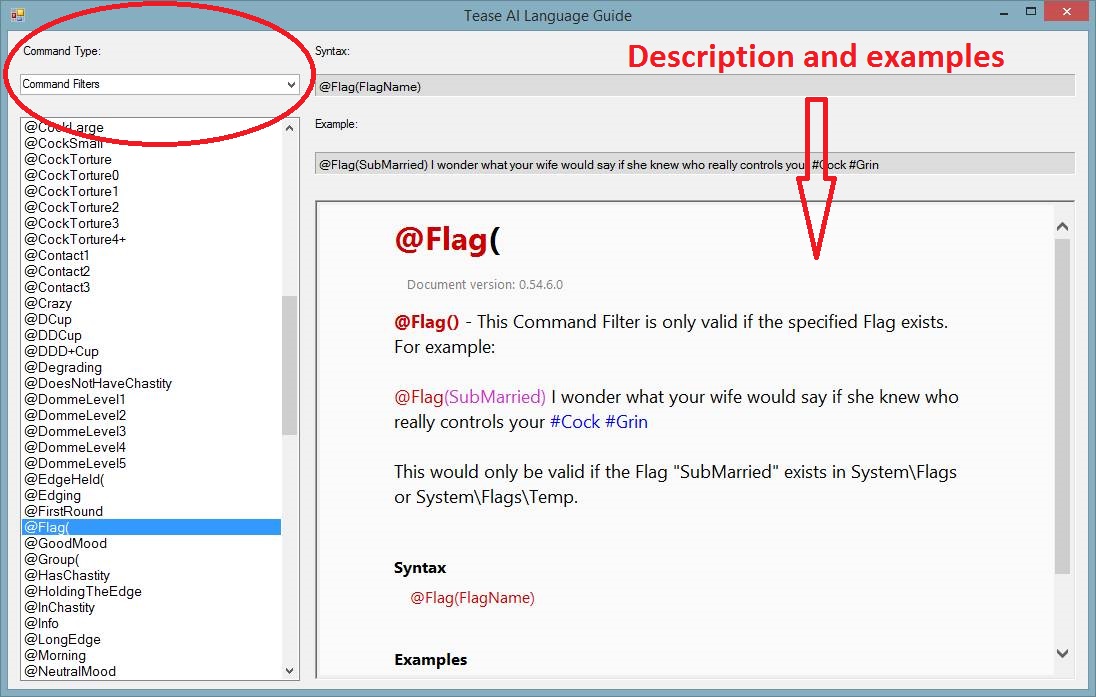
Flag acts as a filter. If the flag inside the @Flag(...) command has been created then TeaseAI will do what's after the @Flag(...) command. For example:
@Flag(punishment) I'm gonna punish you now
@Flag(punishment) @CBTBalls
This could be a part of a script. If flag
punishment has been created, your Domme will type
I'm gonna punish you now and then she will start a round of ball torture.
If flag
punishment has not been created she will simply skip that part.
There is also @NotFlag(...). It works in the same way as @Flag(...) command but only if the flag inside @NotFlag(...) has NOT been created. Another example:
@NotFlag(Domme happy) I'm not happy today
If flag
Domme happy has not been created then your Domme will type
I'm not happy today
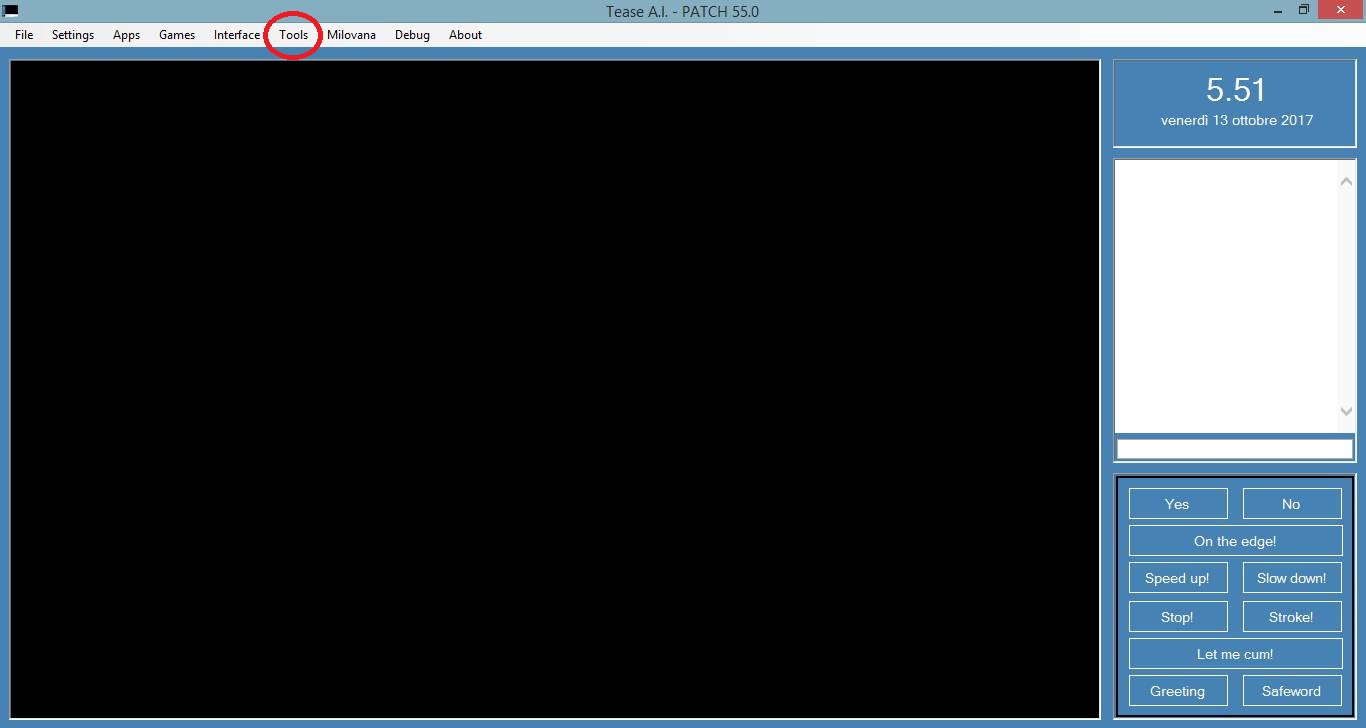
The TeaseAI Language Guide I was referring to is inside TeaseAI. Open TeaseAI; on top of the window click on
Tools and then on
Command Guide.
Select Command Filters in Command type and you will find @Flag and @NotFlag.
- Spoiler: show
- Immagine1.jpg (95.03 KiB) Viewed 2720 times
- Immagine3.jpg (177.33 KiB) Viewed 2720 times
If you are a newbie in script writing I recommend reading this guide first so you can use TeaseAI to its full potential.
Enjoy the reading!
Bye!
Tease AI Commands Guide
Posted: Fri Oct 13, 2017 6:00 pm
by Spielers
tigrotto wrote: Fri Oct 13, 2017 4:03 pm
The TeaseAI Language Guide I was referring to is inside TeaseAI. Open TeaseAI; on top of the window click on
Tools and then on
Command Guide.
Select Command Filters in Command type and you will find @Flag and @NotFlag.


If you are a newbie in script writing I recommend reading this guide first so you can use TeaseAI to its full potential.
Enjoy the reading!
Bye!
Thanks for this guide I was searching
Re: Tease Ai scripting: The HELP CORNER
Posted: Fri Oct 13, 2017 6:32 pm
by Daragorn
tigrotto wrote: Sat Sep 02, 2017 6:26 am
avatarbr wrote: Fri Sep 01, 2017 9:20 pm
Yeah, it's not possible.
I made some similar, but with a "boring" workaround. Look for a file called "AV_Disconnect" (or similar) on HoT to see.
Basicaly, you need to combine @SystemMessage and <Font color> to emulate another person in the chat, and put a @Showimage on every line.
Thanks avatarbr! I'll take a look at your file.
Bye!
if you want to do something like that i suggest you to create some vocab (#VAN-#VANC-#VANP) files as genome231 did for the assistant in spicy through which you do the "simulation" (for example one will contain the @ShowImage() for the pics to call, one the @SystemMessage [Name] (and eventual colors) and possibily another one with just the name of that person so that you can use it to make the domme/glitter talk about her).
Something like:
I will now call my friend #Name to join us
#Vocab1 #Vocab2 here i am <---the 2 vocabs in each line the friend is talking would do all the background stuff to call her pics and simulate her presence in the chat
Re: Tease Ai scripting: The HELP CORNER
Posted: Sat Oct 14, 2017 12:36 am
by GodDragon
Daragorn wrote: Fri Oct 13, 2017 6:32 pm
tigrotto wrote: Sat Sep 02, 2017 6:26 am
avatarbr wrote: Fri Sep 01, 2017 9:20 pm
Yeah, it's not possible.
I made some similar, but with a "boring" workaround. Look for a file called "AV_Disconnect" (or similar) on HoT to see.
Basicaly, you need to combine @SystemMessage and <Font color> to emulate another person in the chat, and put a @Showimage on every line.
Thanks avatarbr! I'll take a look at your file.
Bye!
if you want to do something like that i suggest you to create some vocab (#VAN-#VANC-#VANP) files as genome231 did for the assistant in spicy through which you do the "simulation" (for example one will contain the @ShowImage() for the pics to call, one the @SystemMessage [Name] (and eventual colors) and possibily another one with just the name of that person so that you can use it to make the domme/glitter talk about her).
Something like:
I will now call my friend #Name to join us
#Vocab1 #Vocab2 here i am <---the 2 vocabs in each line the friend is talking would do all the background stuff to call her pics and simulate her presence in the chat
Yes. That is probably the best way to do it.
Re: Tease Ai scripting: The HELP CORNER
Posted: Sat Oct 14, 2017 8:56 am
by tigrotto
GodDragon wrote: Sat Oct 14, 2017 12:36 am
Daragorn wrote: Fri Oct 13, 2017 6:32 pm
tigrotto wrote: Sat Sep 02, 2017 6:26 am
Thanks avatarbr! I'll take a look at your file.
Bye!
if you want to do something like that i suggest you to create some vocab (#VAN-#VANC-#VANP) files as genome231 did for the assistant in spicy through which you do the "simulation" (for example one will contain the @ShowImage() for the pics to call, one the @SystemMessage [Name] (and eventual colors) and possibily another one with just the name of that person so that you can use it to make the domme/glitter talk about her).
Something like:
I will now call my friend #Name to join us
#Vocab1 #Vocab2 here i am <---the 2 vocabs in each line the friend is talking would do all the background stuff to call her pics and simulate her presence in the chat
Yes. That is probably the best way to do it.
Thanks for the suggestions! Didn't know I did the same as genome.
However, I'm using this solution since BlackJerk 5.2. The code was difficult to read because of all those @SystemMessage and @ShowImage and it was impossible to make changes; I replaced them with vocabulary files
#bjtp1on and
#bjtp1off and it worked.