Page 14 of 25
Re: Restim: e-stim audio generation software
Posted: Wed Nov 20, 2024 11:05 pm
by Corndogville
jtcrave69 wrote: Tue Nov 19, 2024 1:24 am
Corndogville wrote: Tue Nov 19, 2024 12:14 am
I don't see websocket device manager, I see Device Websocket Server, and that's enabled in green. Under WSDM in Restim it says ws://127.0.0.1:54817 I checked Windows Firewall too and they're both allowed.
What does Intiface show for Server Address? Make sure it matches in restim.
ws://localhost:12345
Restim says: ws://127.0.0.1:54817 for WSDM
and 12345 for websocket server.
You could also try enabling "Listen on all network interfaces" in Intiface App Modes.
Well, it found my Xbox controller!

Not what we were
going for but...
Alas, still says Connection Refused.
Re: Restim: e-stim audio generation software
Posted: Thu Nov 21, 2024 1:14 am
by Electro
On the left, if you go into app modes and then scroll down, it sounds like you already have show advanced/experimental settings enabled, scroll down and enable device websocket server you said was enabled.
Then left side, click devices and scroll down, add websocket device and add tcode-v3, name the device restim Was that step done?
My server address shows ws://localhost:12345 just like yours.
My buttplug(WSDM) in Restim also shows ws://127.0.0.1:54817
Where are you seeing the connection refused message?
Re: Restim: e-stim audio generation software
Posted: Thu Nov 21, 2024 2:08 am
by Corndogville
Electro wrote: Thu Nov 21, 2024 1:14 am
On the left, if you go into app modes and then scroll down, it sounds like you already have show advanced/experimental settings enabled, scroll down and enable device websocket server you said was enabled.
Then left side, click devices and scroll down, add websocket device and add tcode-v3, name the device restim Was that step done?
My server address shows ws://localhost:12345 just like yours.
My buttplug(WSDM) in Restim also shows ws://127.0.0.1:54817
Where are you seeing the connection refused message?
I do have restim added down there, and I'm seeing the message in the secondary window that pops up with Restim, the one that looks like a command prompt.
Re: Restim: e-stim audio generation software
Posted: Thu Nov 21, 2024 2:32 pm
by 47dahc
Here are my settings in Intiface Central
Under the App Modes menu:
Server settings section:
- Sever Name: Intiface Server
Server Port: 12345
Device Managers section:
- Everything turned off since I don't have anything compatible
Advanced/experimental Settings section:
- Show Advanced/Experimental Settings: Enabled (slide right and green)
Advanced Device Managers: (displayed when previous setting is enabled)
- Device Websocket Server: Enabled (if I disable this one, Restim will not connect)
Lovesense: Disabled
Serial Port: Enabled (enabled for my OSR2)
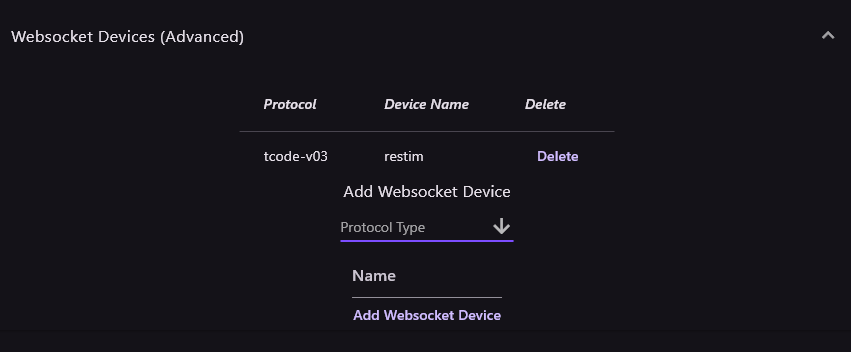
In Devices menu:
Websocket Devices (advanced):
I recommend deleting any devices you have listed here pertaining to restim
Under
Add Websocket Device, scroll and select "
tcode-v03" and in name type "
restim" then click "
Add Websocket Device"
This should place your device in the list. Make sure "
tcode-v3" is listed under
protocol column. If it is not, delete and repeat steps above. Sometimes for some reason, it will not add the protocol correctly and leave it blank.
- Spoiler: show
- Screenshot 2024-11-21 091951.png (13.31 KiB) Viewed 2305 times
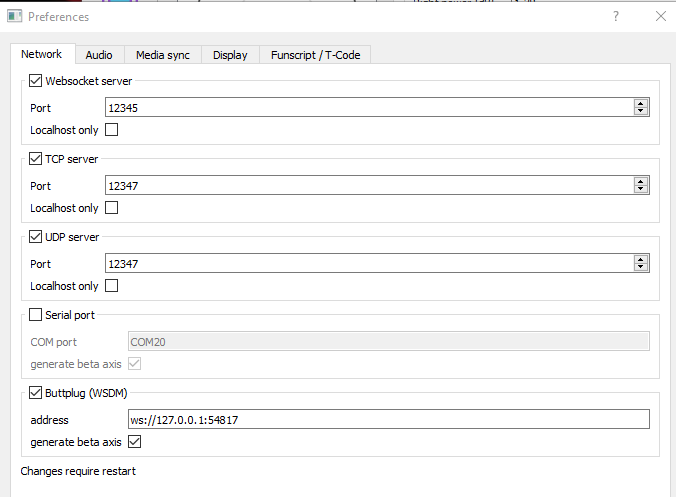
Now in restim, here are my settings:
- Spoiler: show
-
- Screenshot 2024-11-21 092354.png (19.63 KiB) Viewed 2305 times
Restart restim if you made any changes.
Back in Intiface Central, start the Engine by clicking the big purple play button in the upper left corner. If everything went good, you should see "connected to buttplug" in the cmd looking window for restim as well as a TCode v0.3 (Single Linear Axis) device shown under the connected devices section in the Devices menu. If you do, test it by selecting "Toggle Oscillation". The green dot should start to move in restim. I really hope this helps.
Re: Restim: e-stim audio generation software
Posted: Fri Nov 22, 2024 2:18 am
by Corndogville
47dahc wrote: Thu Nov 21, 2024 2:32 pm
Here are my settings in Intiface Central
Under the App Modes menu:
Server settings section:
- Sever Name: Intiface Server
Server Port: 12345
Device Managers section:
- Everything turned off since I don't have anything compatible
Advanced/experimental Settings section:
- Show Advanced/Experimental Settings: Enabled (slide right and green)
Advanced Device Managers: (displayed when previous setting is enabled)
- Device Websocket Server: Enabled (if I disable this one, Restim will not connect)
Lovesense: Disabled
Serial Port: Enabled (enabled for my OSR2)
In Devices menu:
Websocket Devices (advanced):
I recommend deleting any devices you have listed here pertaining to restim
Under
Add Websocket Device, scroll and select "
tcode-v03" and in name type "
restim" then click "
Add Websocket Device"
This should place your device in the list. Make sure "
tcode-v3" is listed under
protocol column. If it is not, delete and repeat steps above. Sometimes for some reason, it will not add the protocol correctly and leave it blank.
- Spoiler: show
- Screenshot 2024-11-21 091951.png
Now in restim, here are my settings:
- Spoiler: show
-
Screenshot 2024-11-21 092354.png
Restart restim if you made any changes.
Back in Intiface Central, start the Engine by clicking the big purple play button in the upper left corner. If everything went good, you should see "connected to buttplug" in the cmd looking window for restim as well as a TCode v0.3 (Single Linear Axis) device shown under the connected devices section in the Devices menu. If you do, test it by selecting "Toggle Oscillation". The green dot should start to move in restim. I really hope this helps.

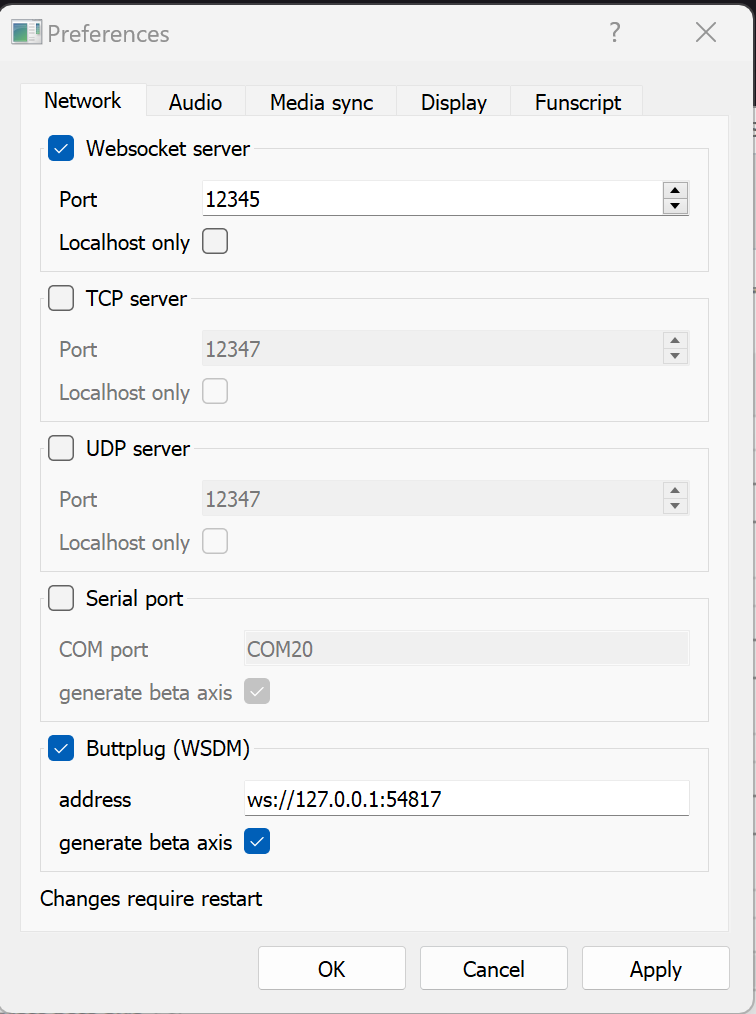
Thanks but
restim:
- Spoiler: show
- Screenshot 2024-11-21 211345.png (49.39 KiB) Viewed 2257 times
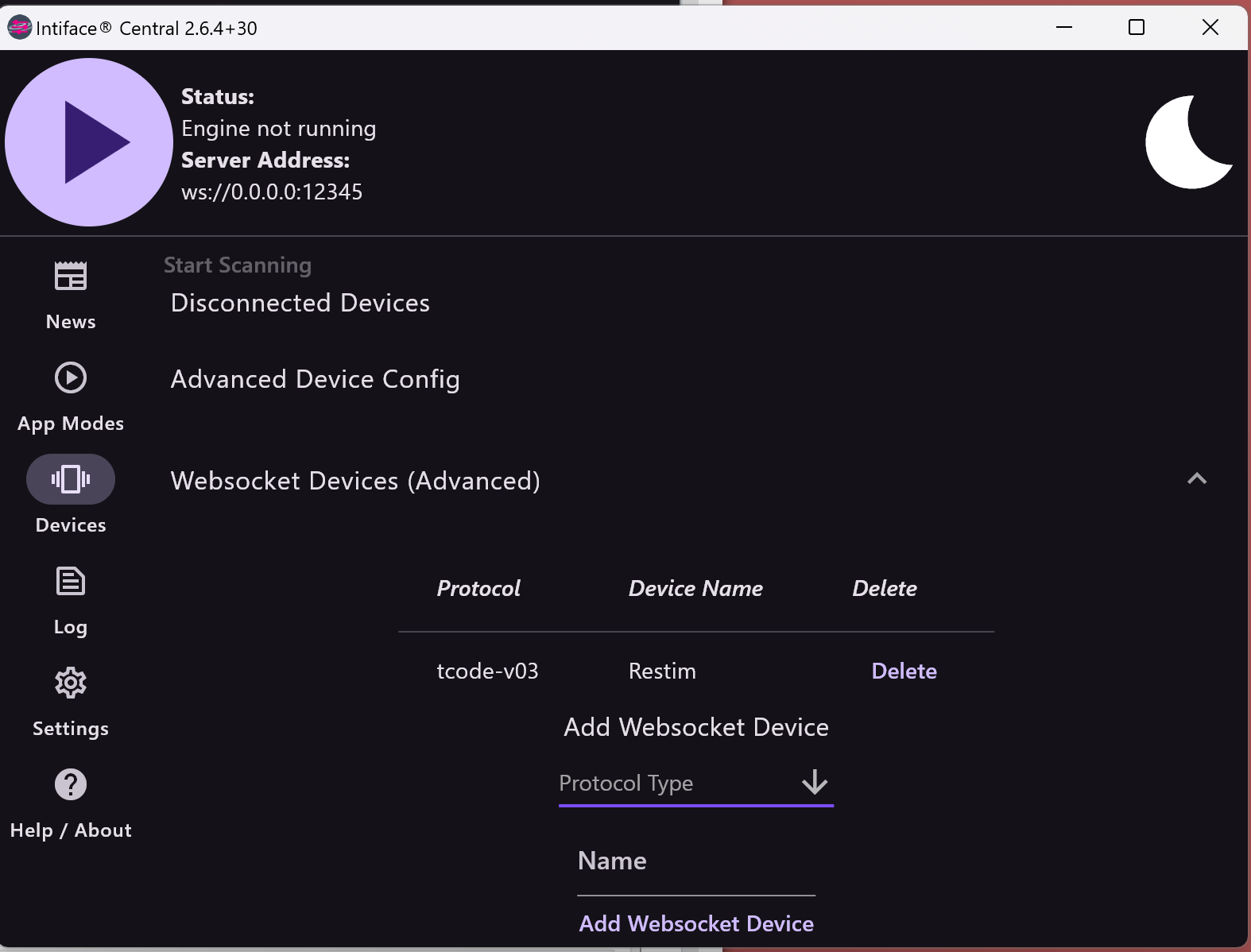
Intiface:
- Spoiler: show
-
- Screenshot 2024-11-21 211504.png (99.15 KiB) Viewed 2257 times
The error:
- Spoiler: show
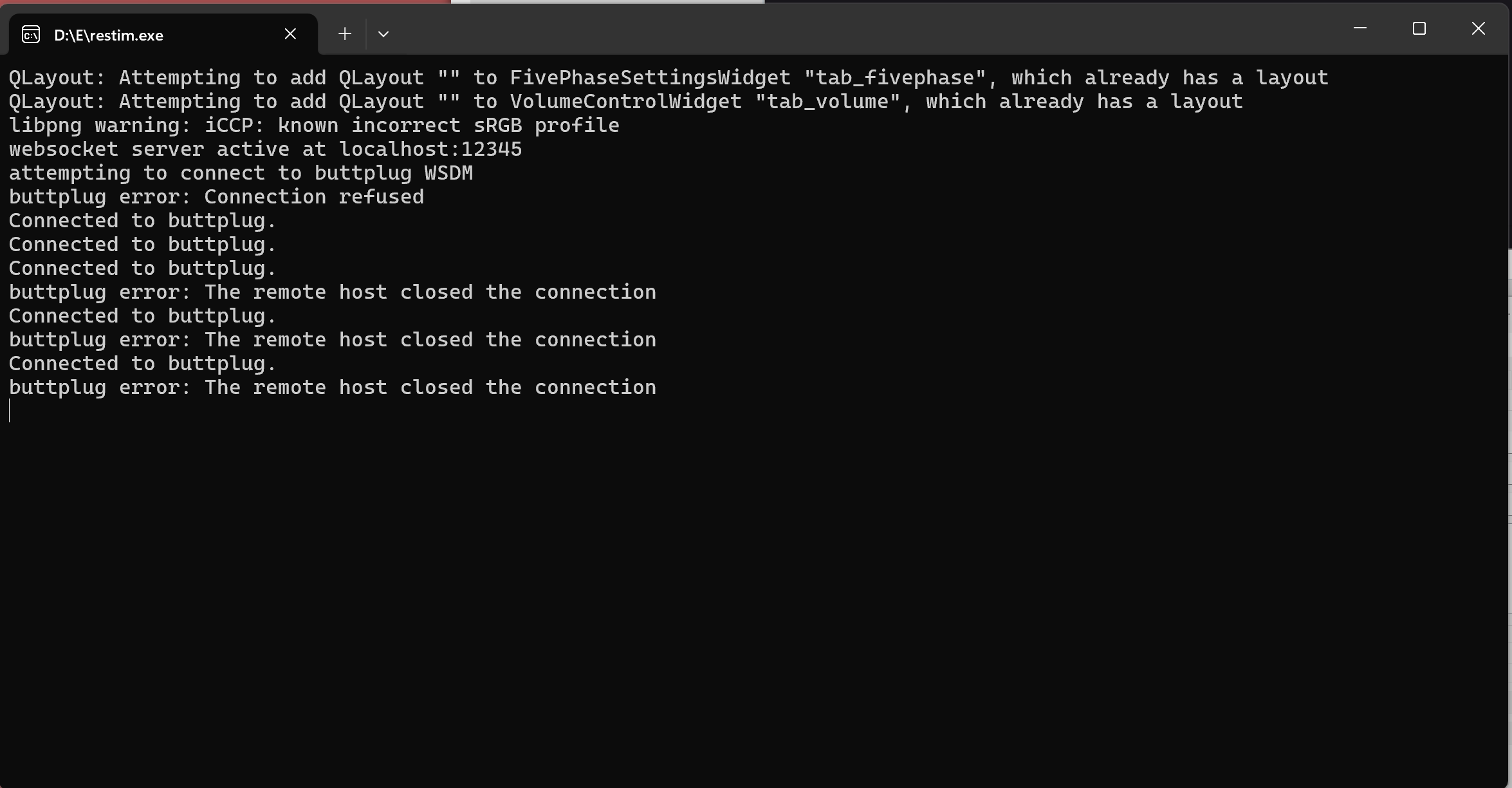
- Screenshot 2024-11-21 211617.png (67.74 KiB) Viewed 2257 times
I dunno...
Re: Restim: e-stim audio generation software
Posted: Fri Nov 22, 2024 8:08 am
by diglet
On your second screenshot, it says 'engine not running'?
Do the intiface logs say anything?
Re: Restim: e-stim audio generation software
Posted: Fri Nov 22, 2024 9:59 am
by edger477
Need to click big play button in top left of intiface to start the engine....
Re: Restim: e-stim audio generation software
Posted: Fri Nov 22, 2024 2:45 pm
by LNS
froog wrote: Fri Jul 19, 2024 8:36 pm
Hi diglet. I've been successfully using restim on a Mac (v1.16), I tried building v1.18 recently and got this "division by zero" error when I ran it (in spoiler)
Hope this feedback is useful - ( I'm fine running 1.16 for now - that works just great, and builds without problems on the same machine)
Hello Froog,
I am very interested in running Restim on a Mac, can you give me an idea how you are doing it? Thanks in advance.
LNS
Re: Restim: e-stim audio generation software
Posted: Fri Nov 22, 2024 3:42 pm
by diglet
LNS wrote: Fri Nov 22, 2024 2:45 pm
froog wrote: Fri Jul 19, 2024 8:36 pm
Hi diglet. I've been successfully using restim on a Mac (v1.16), I tried building v1.18 recently and got this "division by zero" error when I ran it (in spoiler)
Hope this feedback is useful - ( I'm fine running 1.16 for now - that works just great, and builds without problems on the same machine)
Hello Froog,
I am very interested in running Restim on a Mac, can you give me an idea how you are doing it? Thanks in advance.
LNS
If you have an M1 mac, you can try this artifact:
https://github.com/diglet48/restim/acti ... 1262958854
Otherwise, the installation instructions on github should work.
Re: Restim: e-stim audio generation software
Posted: Fri Nov 22, 2024 4:14 pm
by LNS
diglet wrote: Fri Nov 22, 2024 3:42 pm
LNS wrote: Fri Nov 22, 2024 2:45 pm
froog wrote: Fri Jul 19, 2024 8:36 pm
Hi diglet. I've been successfully using restim on a Mac (v1.16), I tried building v1.18 recently and got this "division by zero" error when I ran it (in spoiler)
Hope this feedback is useful - ( I'm fine running 1.16 for now - that works just great, and builds without problems on the same machine)
Hello Froog,
I am very interested in running Restim on a Mac, can you give me an idea how you are doing it? Thanks in advance.
LNS
If you have an M1 mac, you can try this artifact:
https://github.com/diglet48/restim/acti ... 1262958854
Otherwise, the installation instructions on github should work.
Thank you! I do have an M1 Ultra, any resource to help me understand how to get it up and running? While a bit technically inclined, I don't code, nor know python.
Re: Restim: e-stim audio generation software
Posted: Sat Nov 23, 2024 5:14 am
by Corndogville
edger477 wrote: Fri Nov 22, 2024 9:59 am
Need to click big play button in top left of intiface to start the engine....
diglet wrote: Fri Nov 22, 2024 8:08 am
On your second screenshot, it says 'engine not running'?
Yeah, because I stopped it, so the errors would stop piling up while I was trying to get a screenshot of it, before they pushed the top part off.
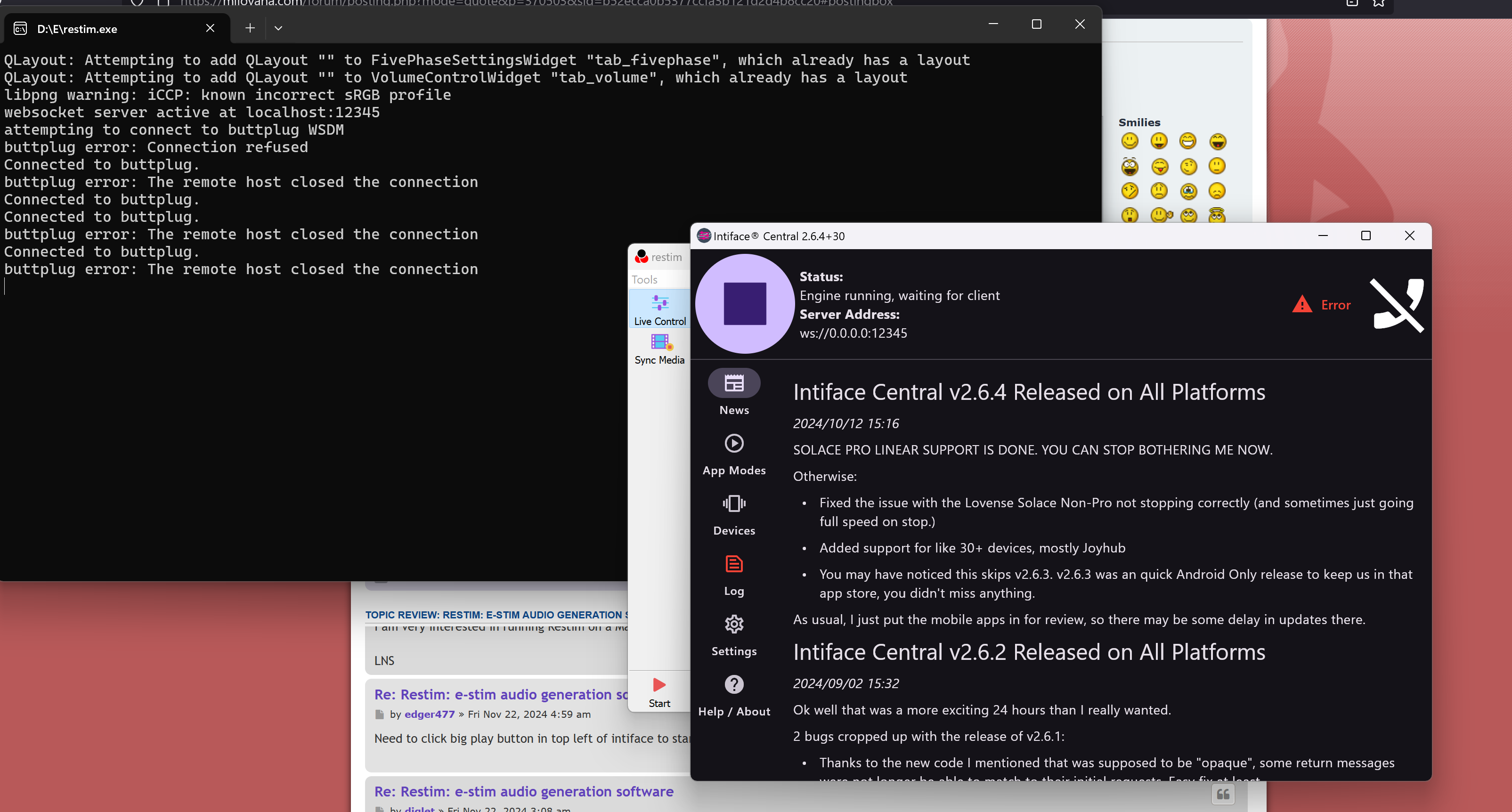
- Screenshot 2024-11-23 001106.png (480.15 KiB) Viewed 2073 times
Do the intiface logs say anything?
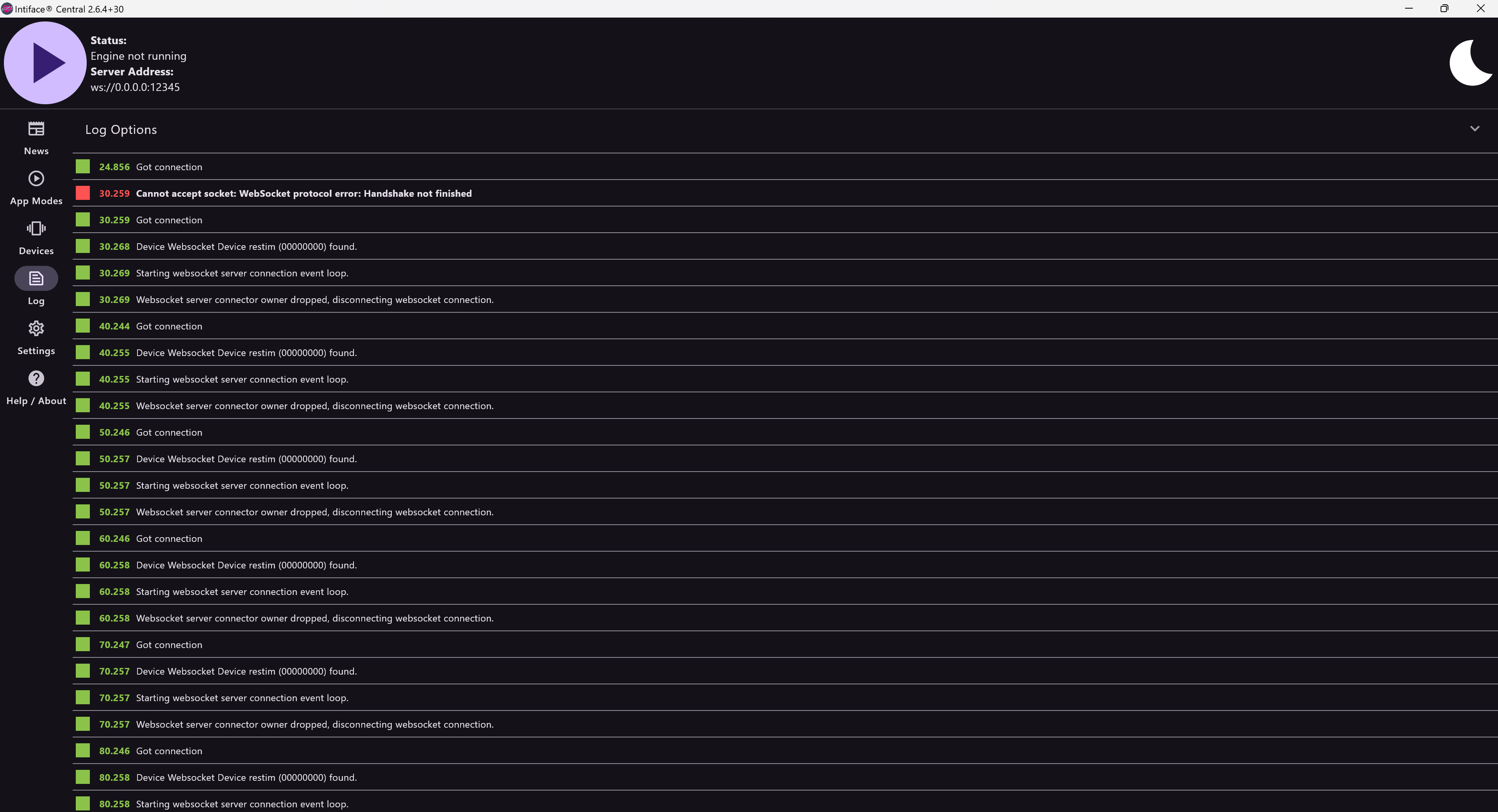
- Screenshot 2024-11-23 001614.png (247.12 KiB) Viewed 2072 times
Again, I stopped it, because what I thought might be the useful part kept scrolling out of view.
Re: Restim: e-stim audio generation software
Posted: Sat Nov 23, 2024 11:13 am
by diglet
I tried running intiface and restim on my machine and it just worked. After adding and removing the device a few times in intiface, I was able to reproduce the behavior you are seeing.
In the intiface interface, click forget device and delete device, then re-add the device under websocket devices. Then maybe it goes back to working...

LNS wrote: Fri Nov 22, 2024 4:14 pm
diglet wrote: Fri Nov 22, 2024 3:42 pm
LNS wrote: Fri Nov 22, 2024 2:45 pm
Hello Froog,
I am very interested in running Restim on a Mac, can you give me an idea how you are doing it? Thanks in advance.
LNS
If you have an M1 mac, you can try this artifact:
https://github.com/diglet48/restim/acti ... 1262958854
Otherwise, the installation instructions on github should work.
Thank you! I do have an M1 Ultra, any resource to help me understand how to get it up and running? While a bit technically inclined, I don't code, nor know python.
I have been told you can just double-click the executable, add a security exception and it'll just work. But I don't have a mac to test.
If that doesn't work you can try running it from source. First download the zip of the source code from github and unzip. install python (
https://www.python.org/downloads/release/python-3130/). Then run from the command line at the location you unzipped the source code:
Code: Select all
python3 -m pip install -r requirements.txt
python3 restim.py
Re: Restim: e-stim audio generation software
Posted: Sat Nov 23, 2024 11:56 am
by LNS
Thanks, will give it a try, have been struggling to find what to download. I got Python 3 installed. Will continue to work with it.
Re: Restim: e-stim audio generation software
Posted: Sun Nov 24, 2024 3:54 pm
by LNS
Finally moved from my M1 mac to my M2 air and got it to run. Now I need to figure out how to connect a Bluetooth device (Coyote 3).
Re: Restim: e-stim audio generation software
Posted: Mon Nov 25, 2024 6:59 am
by Corndogville
diglet wrote: Sat Nov 23, 2024 11:13 am
I tried running intiface and restim on my machine and it just worked. After adding and removing the device a few times in intiface, I was able to reproduce the behavior you are seeing.
In the intiface interface, click forget device and delete device, then re-add the device under websocket devices. Then maybe it goes back to working...
LNS wrote: Fri Nov 22, 2024 4:14 pm
Thank you! I do have an M1 Ultra, any resource to help me understand how to get it up and running? While a bit technically inclined, I don't code, nor know python.
I have been told you can just double-click the executable, add a security exception and it'll just work. But I don't have a mac to test.
If that doesn't work you can try running it from source. First download the zip of the source code from github and unzip. install python (
https://www.python.org/downloads/release/python-3130/). Then run from the command line at the location you unzipped the source code:
Code: Select all
python3 -m pip install -r requirements.txt
python3 restim.py
Yeah, I can't get it to see the device long enough to forget it!

But delete it and readd it, I did, and unfortunately my efforts were fruitless.

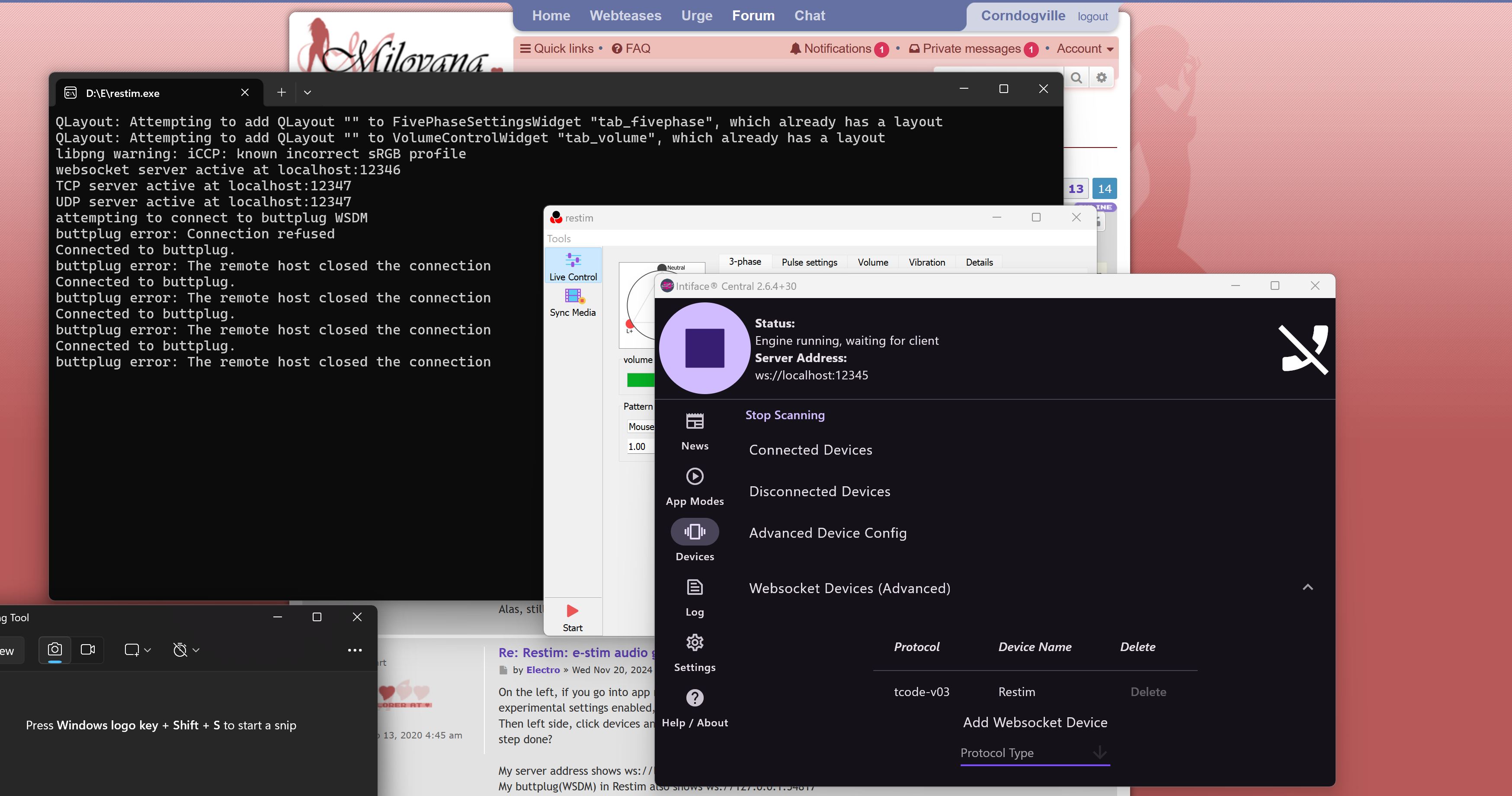
- Screenshot 2024-11-25 015653.png (579 KiB) Viewed 1862 times