Page 11 of 25
Re: Restim: e-stim audio generation software
Posted: Mon May 27, 2024 12:35 am
by UFungus
For some reason, dunno if it's the latest intiface update, I can't connect restim to intiface anymore. I get a "Connected to buttplug. buttplug error: The remote host closed the connection" from restim and this is what I get from intiface.
"Device Websocket Device restim (00000000) found.
[D] Global Loggy: Device 00000000 allowed via configuration file, continuing.
Global Loggy: Starting websocket server connection event loop.
[D] Global Loggy: Looking for protocol that matches specifier: Websocket(WebsocketSpecifier { names: {"restim"} })
[D] Global Loggy: No viable protocols for hardware Websocket(WebsocketSpecifier { names: {"restim"} }), ignoring.
Global Loggy: Websocket server connector owner dropped, disconnecting websocket connection.
[D] Global Loggy: Exiting Websocket Server Device control loop."
I tried reinstalling intiface, going back to an older version, an older version of restim etc. Nothing works. Wondering if anyone could please give me a hand.
Re: Restim: e-stim audio generation software
Posted: Mon May 27, 2024 5:15 am
by Electro
I feel like this might be a big ask, but I'm wondering if it's possible to save configuration profiles for the funscript/t-code section of preferences?
The reason I ask is when I go from one video to another, some videos work better with a specific pulse width range, are designed for a specific pulse frequency range, or some settings I've occasionally configured for certain types of funscripts and electrode configurations that are way different than what Restim is designed for, etc.
If I could save different settings and restore them before loading a video, it would save me from typing them all into a notepad and manually swapping the values each time.
Re: Restim: e-stim audio generation software
Posted: Mon May 27, 2024 8:11 am
by diglet
UFungus wrote: Mon May 27, 2024 12:35 am
For some reason, dunno if it's the latest intiface update, I can't connect restim to intiface anymore. I get a "Connected to buttplug. buttplug error: The remote host closed the connection" from restim and this is what I get from intiface.
"Device Websocket Device restim (00000000) found.
[D] Global Loggy: Device 00000000 allowed via configuration file, continuing.
[I\] Global Loggy: Starting websocket server connection event loop.
[D] Global Loggy: Looking for protocol that matches specifier: Websocket(WebsocketSpecifier { names: {"restim"} })
[D] Global Loggy: No viable protocols for hardware Websocket(WebsocketSpecifier { names: {"restim"} }), ignoring.
[I\] Global Loggy: Websocket server connector owner dropped, disconnecting websocket connection.
[D] Global Loggy: Exiting Websocket Server Device control loop."
I tried reinstalling intiface, going back to an older version, an older version of restim etc. Nothing works. Wondering if anyone could please give me a hand.
There was an update of intiface last week that changed some things. It is not no longer supported to manually edit the config file. I need to update the documentation. I was able to get it to work with these steps:
- make sure websocket device manager is enabled in Intiface Central.
- In Intiface Central, devices tab, add a new device with name "restim" and protocol "tcode-v03".
- Connect Restim to Intiface Central as normal.
Electro wrote: Mon May 27, 2024 5:15 am
I feel like this might be a big ask, but I'm wondering if it's possible to save configuration profiles for the funscript/t-code section of preferences?
The reason I ask is when I go from one video to another, some videos work better with a specific pulse width range, are designed for a specific pulse frequency range, or some settings I've occasionally configured for certain types of funscripts and electrode configurations that are way different than what Restim is designed for, etc.
If I could save different settings and restore them before loading a video, it would save me from typing them all into a notepad and manually swapping the values each time.
This is a planned feature, the idea is to store another file along with the funscripts that stores the configuration on a per-video basis. Not sure when it will be implemented.
Re: Restim: e-stim audio generation software
Posted: Tue May 28, 2024 12:03 am
by UFungus
diglet wrote: Mon May 27, 2024 8:11 am
There was an update of intiface last week that changed some things. It is not no longer supported to manually edit the config file. I need to update the documentation. I was able to get it to work with these steps:
- make sure websocket device manager is enabled in Intiface Central.
- In Intiface Central, devices tab, add a new device with name "restim" and protocol "tcode-v03".
- Connect Restim to Intiface Central as normal.
I must've tried for about 3 hours without trying the simplest thing. Thanks a bunch. It worked right away.
Re: Restim: e-stim audio generation software
Posted: Sun Jun 30, 2024 10:38 am
by KofFinland
First thanks a lot for this fantastic software Restim.
I've been trying to figure out if it is possible for Restim to sync with some VR video player, like Whirligig? If I have the funscript (converted to alpha and beta) at restim, how to get it to sync to VR video played with Whirligig?
I can use Scriptplayer to sync with Whirligig for Launch, using funscripts, and I can get Restim to sync with VLC for estim fun, but can I somehow get estim fun also with VR videos?
Re: Restim: e-stim audio generation software
Posted: Sun Jun 30, 2024 11:54 am
by diglet
KofFinland wrote: Sun Jun 30, 2024 10:38 am
First thanks a lot for this fantastic software Restim.
I've been trying to figure out if it is possible for Restim to sync with some VR video player, like Whirligig? If I have the funscript (converted to alpha and beta) at restim, how to get it to sync to VR video played with Whirligig?
I can use Scriptplayer to sync with Whirligig for Launch, using funscripts, and I can get Restim to sync with VLC for estim fun, but can I somehow get estim fun also with VR videos?
You can connect Restim to heresphere VR player. Whirlygig is not supported directly.
If you really want to use whirlygig, you can also use multifunplayer or scriptplayer+intiface as an intermediary.
Re: Restim: e-stim audio generation software
Posted: Mon Jul 08, 2024 11:05 am
by diglet
New release
https://github.com/diglet48/restim/releases
Changes in v1.17:
- Add kodi video sync
- Add funscript axis for pulse rise time
- Fix some VLC issues.
Changes in v1.18:
- Add A/B testing capabilities.
- Fix an issue where signal would be generated with incorrect carrier frequency after switching device.
To use the A/B test, select the A/B test waveform instead of the pulse waveform in the device setup. This functionality is very useful for comparing signals and performing experiments.

Re: Restim: e-stim audio generation software
Posted: Sat Jul 13, 2024 8:21 am
by ZeeWWW
Hi - I hope this is the right place to post a question about multifunplayer and Restim.
I have the following message appear when trying to connect to the WebSocket:
Error when connecting to websocket:
System.TimeoutException: The operation has timed out.
at MultiFunPlayer.Common.TaskExtensions.<WithCancellation>g__DoWaitAsync|2_0(Task task, Int32 millisecondsDelay)
at MultiFunPlayer.Common.TaskExtensions.<WithCancellation>g__DoWaitAsync|2_0(Task task, Int32 millisecondsDelay)
at MultiFunPlayer.OutputTarget.ViewModels.WebSocketOutputTarget.RunAsync(CancellationToken token)
Any idea on how I correct this?
Thanks.
Re: Restim: e-stim audio generation software
Posted: Sat Jul 13, 2024 11:26 am
by diglet
ZeeWWW wrote: Sat Jul 13, 2024 8:21 am
Hi - I hope this is the right place to post a question about multifunplayer and Restim.
I have the following message appear when trying to connect to the WebSocket:
Error when connecting to websocket:
System.TimeoutException: The operation has timed out.
at MultiFunPlayer.Common.TaskExtensions.<WithCancellation>g__DoWaitAsync|2_0(Task task, Int32 millisecondsDelay)
at MultiFunPlayer.Common.TaskExtensions.<WithCancellation>g__DoWaitAsync|2_0(Task task, Int32 millisecondsDelay)
at MultiFunPlayer.OutputTarget.ViewModels.WebSocketOutputTarget.RunAsync(CancellationToken token)
Any idea on how I correct this?
Thanks.
The error suggest that either Restim isn't listening for websocket connections or multifunplayer is connecting to the wrong address.
In Restim settings, I have websocket port set to 12346 and localhost only disabled.
In multifunplayer, I connect to ws://127.0.0.1:12346/ws
It works on my machine with these settings.
Re: Restim: e-stim audio generation software
Posted: Sat Jul 13, 2024 11:37 am
by ZeeWWW
In multifunplayer, I connect to ws://127.0.0.1:12346/ws
This worked; many thanks for our help

Re: Restim: e-stim audio generation software
Posted: Wed Jul 17, 2024 8:45 am
by kinkyhorizons
I just had some questions around the additional width and pulse files that are appearing on more recent uploads. I've done some searches through this topic and checked the wiki, but it still just gives the following advice for setup.
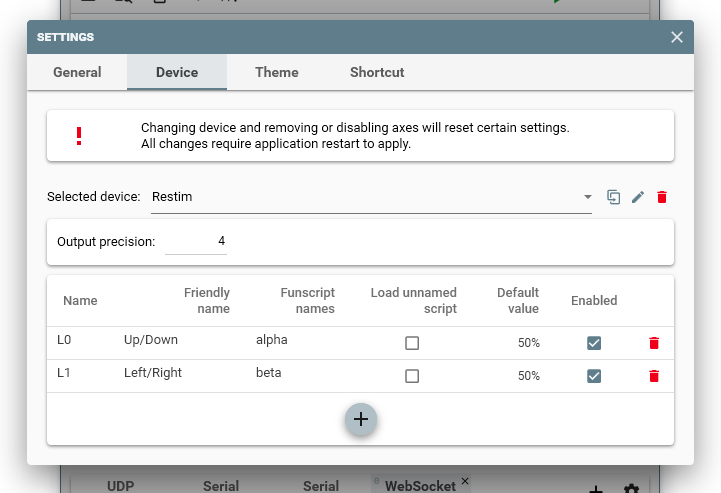
Should Pulse Rise Time, Width etc just be configured on additional device lines, does the name matter at all as long as the funscript names match, and is there anything specific that should be put in for the default values?
Sorry if these seem obvious questions, I just want to make sure I get it correctly configured.
Re: Restim: e-stim audio generation software
Posted: Wed Jul 17, 2024 8:58 am
by edger477
kinkyhorizons wrote: Wed Jul 17, 2024 8:45 am
I just had some questions around the additional width and pulse files that are appearing on more recent uploads. I've done some searches through this topic and checked the wiki, but it still just gives the following advice for setup.
Should Pulse Rise Time, Width etc just be configured on additional device lines, does the name matter at all as long as the funscript names match, and is there anything specific that should be put in for the default values?
Sorry if these seem obvious questions, I just want to make sure I get it correctly configured.
You configure MultiFunPlayers according to axis names (L0, L1 etc), you have to give your own names in both restim settings and MFP (matching names of course) if you want to pass these through multifun player. The files are loaded automatically if you sync from restim and skip usage of MFP.
Re: Restim: e-stim audio generation software
Posted: Wed Jul 17, 2024 9:00 am
by kinkyhorizons
edger477 wrote: Wed Jul 17, 2024 8:58 am
You configure MultiFunPlayers according to axis names (L0, L1 etc), you have to give your own names in both restim settings and MFP (matching names of course) if you want to pass these through multifun player. The files are loaded automatically if you sync from restim and skip usage of MFP.
I was just trying to understand if the names link to anything specific, for example can you just set pulse as L4 as long as you've got the funscript name as .pulse_width. As as long as you've got the funscript name linking to the correct file is that all you really need?
Re: Restim: e-stim audio generation software
Posted: Wed Jul 17, 2024 9:03 am
by edger477
kinkyhorizons wrote: Wed Jul 17, 2024 9:00 am
edger477 wrote: Wed Jul 17, 2024 8:58 am
You configure MultiFunPlayers according to axis names (L0, L1 etc), you have to give your own names in both restim settings and MFP (matching names of course) if you want to pass these through multifun player. The files are loaded automatically if you sync from restim and skip usage of MFP.
I was just trying to understand if the names link to specific, for example can you just set pulse as L4 as long as you've got the funscript name as .pulse_width. As as long as you've got the funscript name linking to the correct file is that all you really need.
When you use MFP, the MFP loads files and restim does not know what are file names, it just receives tcodes with the axis names (like L0/L1/L2 etc). So you can map anything to anything :)
Re: Restim: e-stim audio generation software
Posted: Wed Jul 17, 2024 9:10 am
by kinkyhorizons
edger477 wrote: Wed Jul 17, 2024 9:03 am
When you use MFP, the MFP loads files and restim does not know what are file names, it just receives tcodes with the axis names (like L0/L1/L2 etc). So you can map anything to anything :)
Just what I needed to know, cheers for helping clear that up for me!