Page 11 of 12
Re: Your first webtease? Let us help you out!
Posted: Tue Mar 26, 2024 4:09 pm
by Hermes.Eros
okay so i may be stupid
I made an account to make a webtease, but I want to do the kind with multiple choices and different paths to go down- I cannot figure out how the hell to do this. The only options I can seem to find are to add pages that dont have any options. can someone please help me figure this out?
Is the only way to do that to be like.... really good at coding? Cause i definitely dont have coding capabilities ;-; is there not like a tool or system where i can just like... make and expand choices?
aaaaaa
Re: Your first webtease? Let us help you out!
Posted: Tue Mar 26, 2024 4:15 pm
by PlayfulGuy
Hermes.Eros wrote: Tue Mar 26, 2024 4:09 pm
okay so i may be stupid
I made an account to make a webtease, but I want to do the kind with multiple choices and different paths to go down- I cannot figure out how the hell to do this. The only options I can seem to find are to add pages that dont have any options. can someone please help me figure this out?
Is the only way to do that to be like.... really good at coding? Cause i definitely dont have coding capabilities ;-; is there not like a tool or system where i can just like... make and expand choices?
aaaaaa
For some reason there is no official link on the site to the tease editor you're looking for.
You can find it here:
https://milovana.com/eos/editor/teases
There's also a tutorial thread (of sorts) here:
EOS Tutorials
If/when you run into trouble getting things to work just ask. There are plenty of helpful members around to help you out.
PG
Re: Your first webtease? Let us help you out!
Posted: Tue Mar 26, 2024 5:58 pm
by Hermes.Eros
PlayfulGuy wrote: Tue Mar 26, 2024 4:15 pm
Hermes.Eros wrote: Tue Mar 26, 2024 4:09 pm
okay so i may be stupid
I made an account to make a webtease, but I want to do the kind with multiple choices and different paths to go down- I cannot figure out how the hell to do this. The only options I can seem to find are to add pages that dont have any options. can someone please help me figure this out?
Is the only way to do that to be like.... really good at coding? Cause i definitely dont have coding capabilities ;-; is there not like a tool or system where i can just like... make and expand choices?
aaaaaa
For some reason there is no official link on the site to the tease editor you're looking for.
You can find it here:
https://milovana.com/eos/editor/teases
There's also a tutorial thread (of sorts) here:
EOS Tutorials
If/when you run into trouble getting things to work just ask. There are plenty of helpful members around to help you out.
PG
Aaaaa thank you so much!! i was so confused ;o;
Re: Your first webtease? Let us help you out!
Posted: Sun Mar 09, 2025 1:34 am
by cliasworld
Hi! I'm working on my first webtease. It's got a randomized looping structure that adjusts slightly for difficulty as the player earns more hidden points. I'm trying to preview it, but it keeps getting stuck at "loading modules." I have only extremely basic coding knowledge and am not really sure how I went wrong. Is there something I can do to fix this?
Re: Your first webtease? Let us help you out!
Posted: Mon Mar 10, 2025 1:00 pm
by schefflera0101
cliasworld wrote: Sun Mar 09, 2025 1:34 am
Hi! I'm working on my first webtease. It's got a randomized looping structure that adjusts slightly for difficulty as the player earns more hidden points. I'm trying to preview it, but it keeps getting stuck at "loading modules." I have only extremely basic coding knowledge and am not really sure how I went wrong. Is there something I can do to fix this?
Can you post your init script? Maybe there's just a missing "," or something like that.
Re: Your first webtease? Let us help you out!
Posted: Sat Apr 05, 2025 9:25 pm
by PrincessBrooke
I'm currently making an EOS and have a question I'm not sure if it's in the tutorial or not: How do we had, "conditions" for lack of a better word? For example, I want the tease to remember they're currently wearing. Like how in indyc's Keystrokes it remembers you lost your virginity earlier in the tease.
Also, anytime I have a say command where it includes the player's name it's not showing up when trying to test individual pages, but works when previewing the whole tease. Is that just a bug/feature of the EOS maker?
Re: Your first webtease? Let us help you out!
Posted: Sun Apr 06, 2025 4:17 pm
by indyc
PrincessBrooke wrote: Sat Apr 05, 2025 9:25 pm
I'm currently making an EOS and have a question I'm not sure if it's in the tutorial or not: How do we had, "conditions" for lack of a better word? For example, I want the tease to remember they're currently wearing. Like how in indyc's Keystrokes it remembers you lost your virginity earlier in the tease.
Those conditions are variables that you need to make in the initiation script which can be found right here:
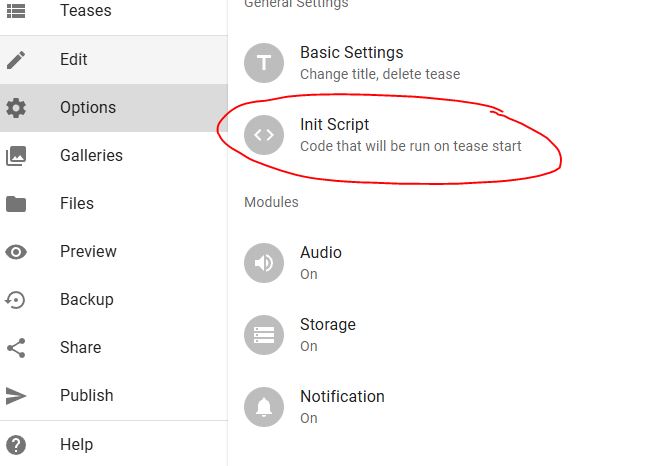
- init.JPG (29.65 KiB) Viewed 9657 times
You then add whatever variables you want to it like this (My example straight from Keystroke like you asked):

- init2.JPG (5.28 KiB) Viewed 9657 times
Then you can use it in your page like this:
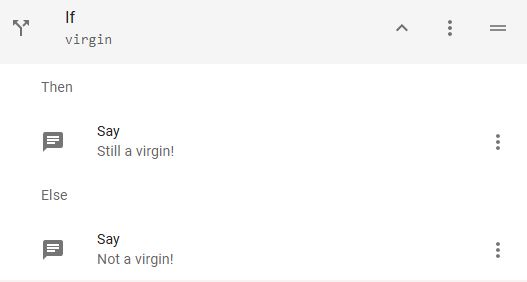
- init3.JPG (8.11 KiB) Viewed 9657 times
I'm happy to go into as much detail as you want because I'm excited for more teases that use more variables!
PrincessBrooke wrote: Sat Apr 05, 2025 9:25 pm
Also, anytime I have a say command where it includes the player's name it's not showing up when trying to test individual pages, but works when previewing the whole tease. Is that just a bug/feature of the EOS maker?
This one is tough to nail down. Normally variables shouldn't be different when previewing a page compared to the entire thing.
What I'm guessing is happening is you probably have one of your first pages that asks what the player name is that you are skipping when you preview a later page.
You can preset the name as something in the init script like this:
name="PrincessBrooke";
Feel free to send me a PM or your tease or anything because I'm here to help!
Re: Your first webtease? Let us help you out!
Posted: Sun Apr 06, 2025 8:56 pm
by PrincessBrooke
indyc wrote: Sun Apr 06, 2025 4:17 pm
Those conditions are variables that you need to make in the initiation script which can be found right here:
init.JPG
You then add whatever variables you want to it like this (My example straight from Keystroke like you asked):
init2.JPG
Then you can use it in your page like this:
init3.JPG
I'm happy to go into as much detail as you want because I'm excited for more teases that use more variables!
Yeah, I didn't set the original script.
indyc wrote: Sun Apr 06, 2025 4:17 pm
What I'm guessing is happening is you probably have one of your first pages that asks what the player name is that you are skipping when you preview a later page.
You can preset the name as something in the init script like this:
name="PrincessBrooke";
I have a feeling that's probably what it is because if I start the tease from the beginning it works perfectly fine.
indyc wrote: Sun Apr 06, 2025 4:17 pm
Feel free to send me a PM or your tease or anything because I'm here to help!
Thank you!
Re: Your first webtease? Let us help you out!
Posted: Tue Apr 08, 2025 2:44 am
by Turbo
After I add a variable for "Name" how do I link back to the Name the player selected? Sorry I'm very new to this.
Re: Your first webtease? Let us help you out!
Posted: Tue Apr 08, 2025 1:08 pm
by phönix
Turbo wrote: Tue Apr 08, 2025 2:44 am
After I add a variable for "Name" how do I link back to the Name the player selected? Sorry I'm very new to this.
Maybe you find the answer in the tutorial, especially chapter IV:
viewtopic.php?t=22570
Re: Your first webtease? Let us help you out!
Posted: Tue Apr 22, 2025 9:58 am
by HitThemHarder
Help creating EOS tease
I'm currently attempting my first ever tease. I have zero coding experience and, although the EOS Editor is easy to use, some things are beyond a simpleton like myself. I have a good idea of how most of the tease will work, my only problem is with keeping score.
First, I need to know how to add a random number generator to create a target score.
Then I need to know how to add +1 to a score tally every time a certain event happens.
Finally, I need to know how to use the final score to decide how the game ends.
EDIT:
From the tutorial, I have a basic understanding of what I need. I just don't know what commands to input and where.
On my "Game Start" page, I want the user to pass through a RNG that will give a number from 1 to 52. I do not want to show the user their number - I just want it stored in the background and labelled "Target Score". At the same time, I want to activate the "Player Score" which will increase as the game goes on.
As the game is played, the player will go through a deck of cards. Each card will have a "WIN" or "LOSE" option. If the player clicks "WIN", I want to add 1 to "Player Score"
At the game ending, the player will pass through a gate where if "Player Score">"Target Score" they win but if "PS"<"TS" they lose.
How do I do all this? The rest of the tease is going great - I just need these details to tie it all together.
Thanks in advance!
Re: Your first webtease? Let us help you out!
Posted: Tue Apr 22, 2025 12:01 pm
by phönix
Hello and welcome to milovana.
On my "Game Start" page, I want the user to pass through a RNG that will give a number from 1 to 52. I do not want to show the user their number - I just want it stored in the background and labelled "Target Score". At the same time, I want to activate the "Player Score" which will increase as the game goes on.
You need an 'Eval' action that contains this:
Code: Select all
target_score = Math.floor(Math.random() * 52) + 1;
player_score = 0;
As the game is played, the player will go through a deck of cards. Each card will have a "WIN" or "LOSE" option. If the player clicks "WIN", I want to add 1 to "Player Score"
After WIN you need this 'eval' action:
At the game ending, the player will pass through a gate where if "Player Score">"Target Score" they win but if "PS"<"TS" they lose.
Now you need an 'if' action.
In the line 'condition' you put
... and under 'Then' what happens when winning.
... and under 'else' what happens when loosing.
I hope this helps.

Re: Your first webtease? Let us help you out!
Posted: Tue Apr 22, 2025 12:38 pm
by HitThemHarder
That sounds simple enough. Thank you so much!
I'll let you know how I get on
Re: Your first webtease? Let us help you out!
Posted: Wed Apr 23, 2025 1:21 am
by HitThemHarder
My game has 4 endings which are disabled when the game starts. Each ending has it's own button; once an ending is enabled, clicking it's button will take you there. If an ending is still disabled, however, I want the button to return the user to the home page.
So, how do i input this command?:
If "page name" is disabled, go to "page name"
Re: Your first webtease? Let us help you out!
Posted: Wed Apr 23, 2025 7:22 am
by phönix
HitThemHarder wrote: Wed Apr 23, 2025 1:21 am
My game has 4 endings which are disabled when the game starts. Each ending has it's own button; once an ending is enabled, clicking it's button will take you there. If an ending is still disabled, however, I want the button to return the user to the home page.
So, how do i input this command?:
If "page name" is disabled, go to "page name"
You can use something like this in the init section of the script (cogwheel symbol -> init script)
Code: Select all
ending1_enabled = false;
ending2_enabled = false;
...
Enable the ending in an EVAL action with
Then in an IF action, you put 'ending1_enabled' in the line 'condition'.
If 'ending1_enabled' is true, the THEN part if the IF action will be executed, otherwise the ELSE part.
Alternative hint:
You can make buttons visible or invisible.
In the CHOICE action (for buttons) there is an option 'visible'.
When activated you can put the variable 'ending1_enabled' in the eval line. If false, the button won't be shown.