Page 2 of 2
Re: EOS Audio Tutorial for beginners
Posted: Sun May 10, 2020 5:20 am
by Andrus
Excellent tutorial. Might take me a month or three, but started a new estim tease tonight.
The EOS editor is a very impressive piece of work. Nicely done.
Re: EOS Audio Tutorial for beginners
Posted: Sun May 10, 2020 8:52 am
by lolol2
Can't wait to see what you are coming up with!

I guess EOS should be no problem for you after I have seen how you create script based audio files.

Re: EOS Audio Tutorial for beginners
Posted: Mon May 18, 2020 12:39 am
by samsan21
I need help im making an E-Stim Tease and want to increase the volume but its just not working. When I write this Sound.get('vol').setVolume(volume/100) into the Init Script the tease doesnt even start. Any common mistakes I can look out for?
Re: EOS Audio Tutorial for beginners
Posted: Mon May 18, 2020 1:17 am
by fapnip
samsan21 wrote: Mon May 18, 2020 12:39 am
I need help im making an E-Stim Tease and want to increase the volume but its just not working. When I write this Sound.get('vol').setVolume(volume/100) into the Init Script the tease doesnt even start. Any common mistakes I can look out for?
1. Do you have an Audio Action with an identifier of "vol" that was loaded before the "Sound.get('vol').setVolume(volume/100)" eval?
2. Are you sure that (volume / 100) is between 0 and 1?
I'd start by opening up your browser's
javascript console and look for any error messages while previewing your tease.
Re: EOS Audio Tutorial for beginners
Posted: Mon May 18, 2020 2:54 pm
by samsan21
fapnip wrote: Mon May 18, 2020 1:17 am
samsan21 wrote: Mon May 18, 2020 12:39 am
I need help im making an E-Stim Tease and want to increase the volume but its just not working. When I write this Sound.get('vol').setVolume(volume/100) into the Init Script the tease doesnt even start. Any common mistakes I can look out for?
1. Do you have an Audio Action with an identifier of "vol" that was loaded before the "Sound.get('vol').setVolume(volume/100)" eval?
2. Are you sure that (volume / 100) is between 0 and 1?
I'd start by opening up your browser's
javascript console and look for any error messages while previewing your tease.
I found out what the problem was.
You need to put the audio play thing before you change the volume.
This is pretty embarrasing because im a programmer myself haha.
Thanks.
Re: EOS Audio Tutorial for beginners
Posted: Mon May 18, 2020 4:01 pm
by lolol2
samsan21 wrote: Mon May 18, 2020 2:54 pm
This is pretty embarrasing because im a programmer myself haha.
Thanks.
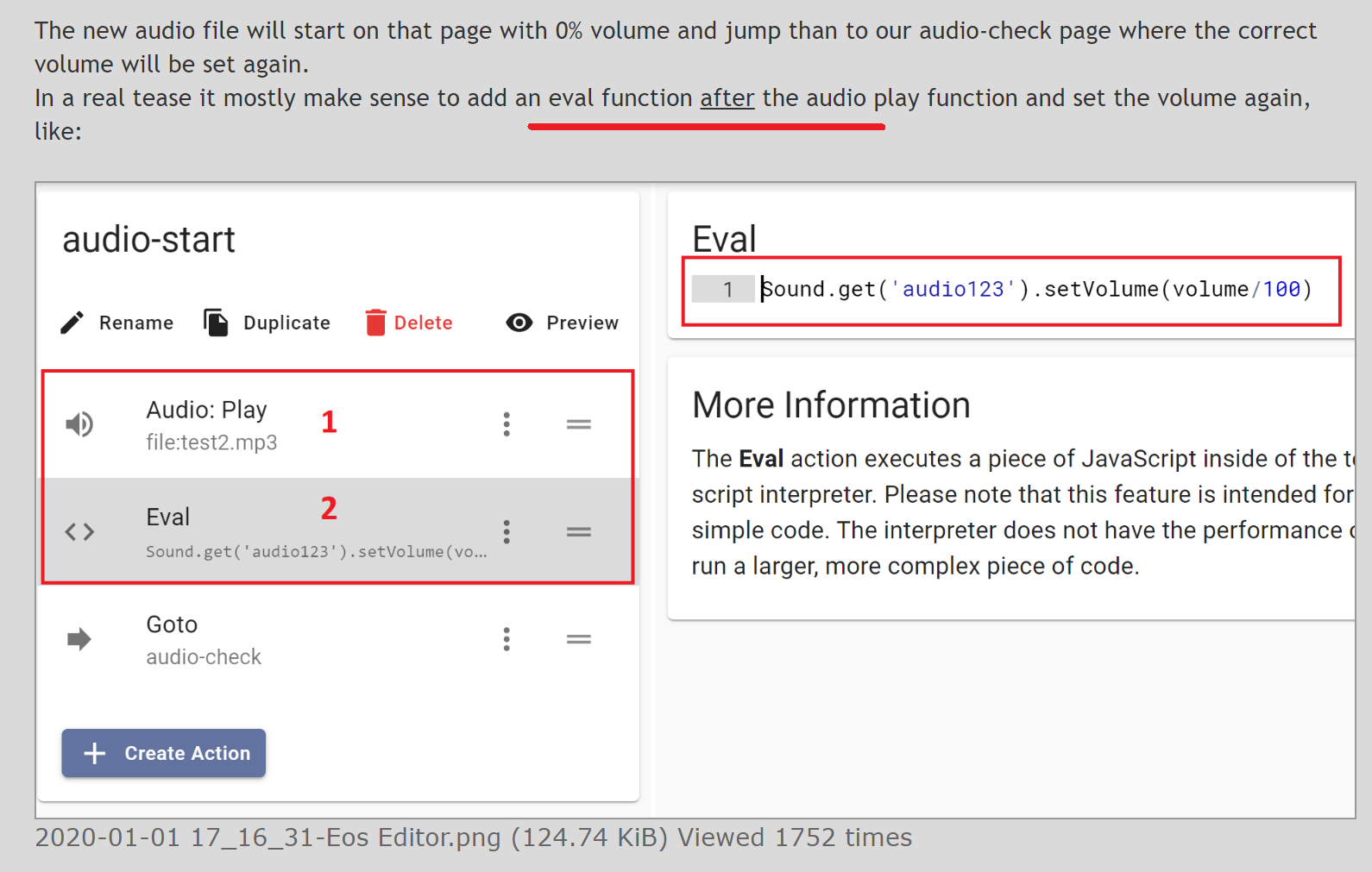
Maybe I need to add this second red underline in my tutorial...

But glad to hear it's working now and hopefully we will see some tease from you.
If there are more questions just ask.
- 1.png (214.2 KiB) Viewed 1481 times
Re: EOS Audio Tutorial for beginners
Posted: Wed May 20, 2020 1:32 am
by samsan21
lolol2 wrote: Mon May 18, 2020 4:01 pm
samsan21 wrote: Mon May 18, 2020 2:54 pm
This is pretty embarrasing because im a programmer myself haha.
Thanks.
Maybe I need to add this second red underline in my tutorial...
But glad to hear it's working now and hopefully we will see some tease from you.
If there are more questions just ask.
1.png
Yea that would definitely be helpfull haha.
I just finished my first tease actually it is inspired by your E-Stim Challenge Tease
Thanks for the help.
Re: EOS Audio Tutorial for beginners
Posted: Fri Oct 08, 2021 5:43 am
by officialreal
I recently followed the instructions on this tutorial, made my own audio metronome files and uploaded them, activating the sound module but the sounds aren’t playing on phones regardless if I try playing the tease on firefox, chrome, etc I have implemented the right code too, but it just doesn’t play. The files aren’t massive either, and are in mp3 format. Do you have any idea what is causing this issue?
Re: EOS Audio Tutorial for beginners
Posted: Fri Oct 08, 2021 12:43 pm
by lolol2
Most mobile browsers block that the website is allowed to play sounds with javascript.
You can mostly enable that in the browser settings, in chrome this should be available in the Settings -> Website Settings -> Audio
I had the same problem 1-2 years ago and was able to enable the sound, but never tried with newer Chrome versions.
But this sound like the same problem, kind of security default rules.
Re: EOS Audio Tutorial for beginners
Posted: Fri Oct 08, 2021 1:05 pm
by fapnip
lolol2 wrote: Fri Oct 08, 2021 12:43 pm
Most mobile browsers block that the website is allowed to play sounds with javascript.
Generally, you need to make sure the script that starts the audio play action was initiated from a user interaction event, like a click, keypress, etc. Once you get at least one Audio play started from a user event, future audio plays should work from just about anywhere in most browsers.
To do this in Eos, you can try:
A. Put an Put an Audio.play action immediately after a Choice or paused Say action
If that doesn't work:
B1. Put an Audio.play action before a Choice or paused Say action, and give it an identifier like 'audio-test'.
B2. In an Eval immediately after a Choice or paused Say action, do a Sound.get(''audio-test').stop(); Sound.get(''audio-test').play();